How to Prove a Theorem with Claude and Lean 4 (1/2)
Part 1/2. From Riemann to even numbers. A tribute to the Alpöge + Claude Riemann Hypothesis announcement. Claude proves a theorem and translates it into Lean 4, and we set up Lean and Mathlib inside a Windows 11 Sandbox.
TL;DR
- On Friday, November 20, 2026, Levent Alpöge, a mathematician at Anthropic, announced a proof of the Riemann Hypothesis, found while working with Claude. He also claims the generalized version. Experts are now checking it.
- Big question: how can anyone trust a proof found with an AI? One answer is a proof assistant such as Lean 4, a program that checks every step of a proof, mechanically, without ever getting tired.
- As a tribute, we replay the whole loop at high-school scale: Claude proves that the set of even natural numbers is infinite, translates the proof into Lean 4, and Lean checks it.
- Everything runs inside Windows Sandbox: nothing is installed on the main PC.
- The hard part was not the math. It was tooling and versions. Six errors, all fixed by sending them back to Claude.
- The post is in 2 parts. Part 1 (this page): the context, the proof by Claude, and the setup (Steps 1 to 6). Part 2: the build, the errors, the validation, and Claude looping on its own (Steps 7 to 10).
| Step | What we do | Tool |
|---|---|---|
| 1. Prove | Ask for a rigorous, human-readable proof | Claude |
| 2. Formalize | Ask for the same proof in Lean 4 + Mathlib | Claude |
| 3. Check | lake build | Lean, in Windows Sandbox |
| 4. Fix | Paste Lean’s errors back, repeat | Claude + Lean |
| 5. Trust | No sorry, read the statement yourself | You |

Table of Contents
- Introduction
- Prerequisites
- The Riemann Hypothesis in Five Minutes
- Why We Need a Machine to Check Proofs
- Step 1: Ask Claude for a Human-Readable Proof
- Step 2: Ask Claude to Translate It into Lean 4
- Step 3: Start a Clean Windows Sandbox with PowerShell 7
- Step 4: Install Git and elan
- Step 5: Create a Lean Project with Mathlib
- Step 6: Wire Our File into the Project
- Conclusion
- Webliography
Introduction
On Friday, November 20, 2026, Levent Alpöge, a mathematician working at Anthropic, announced that he believes he has found a proof of the Riemann Hypothesis. He did not find it alone in front of a blackboard. He found it working with Claude. Take some time to read this document.
If it is confirmed, let’s take a second to measure what this means. The Riemann Hypothesis was stated in 1859. It has resisted the best mathematicians on the planet for more than 160 years. It is on Hilbert’s famous list of 23 problems (1900) and on the Clay Institute’s list of seven Millennium Prize Problems (2000), with one million dollars for whoever solves it. Thousands of published theorems start with the words “Assume the Riemann Hypothesis…“.
As I write these lines (Sunday, November 22), the claim is not yet verified. Experts are reading it, line by line. This is how mathematics works, and this is how it should work. A proof is not true because someone important says so, and certainly not because an AI says so. It is true because it survives checking.
And this is exactly the topic of this article. Not the Riemann Hypothesis itself (I am not crazy), but the loop behind it:
- a human asks a question (here, a theorem to prove),
- an AI proposes a proof,
- a machine checks it, step by step,
- the errors go back to the AI,
- until the proof is accepted.
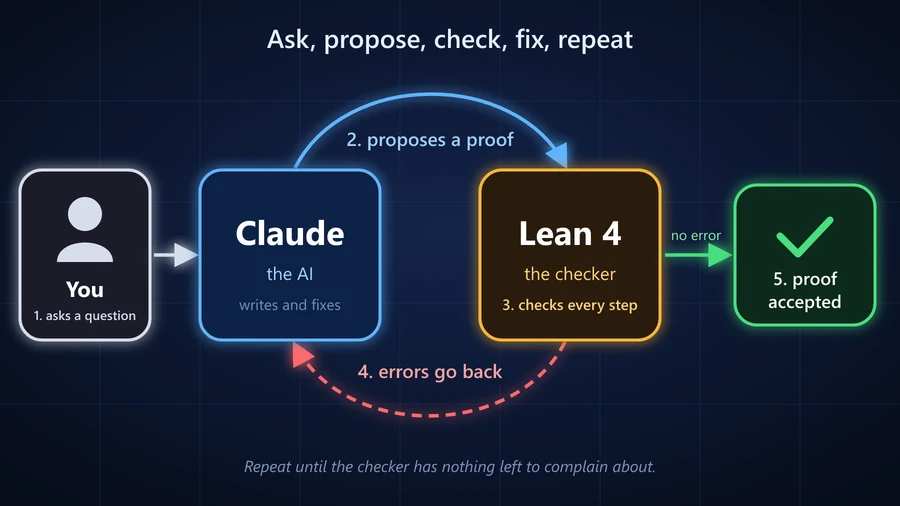
We will replay that loop on a deliberately trivial theorem: “the set of even natural numbers is infinite”. A high-school student knows it is true and even a French student should be able to prove it. The point is not the theorem. The point is to see, with our own eyes, on our own Windows 11 PC, what it takes for a machine to certify a proof.
My goal: a student in their final year of high school, running Windows 11, should be able to follow this article and redo everything. So, sometimes, I will be very explicit. That’s on purpose.
Consider this page a modest tribute. Even if not yet confirmed at the time of writing, Levent and Claude climbed Everest. Here, we climb the small hill behind the house, with the same rope and the same harness.
This post is in 2 parts:
- Part 1/2 (this page): the Riemann Hypothesis in five minutes, why we need a machine to check proofs, then Claude writes the proof and its Lean 4 version, and we install everything inside Windows Sandbox (Steps 1 to 6). At the end, Lean and Mathlib are ready, and Claude’s file is wired into the project.
- Part 2/2: we build, read the errors, send them back to Claude, and repeat until Lean accepts the proof. Then we check that we can trust the result, and finally we let Claude Code run the loop on its own (Steps 7 to 10 and the next level).
Both parts happen in the same Sandbox session, so keep it open between the two.
Prerequisites
- OS: Windows 11 Pro, Enterprise, or Education. Windows Sandbox is not available on Windows 11 Home (see the note below).
- Windows Sandbox enabled. If this is not done yet, follow my checklist: Windows Sandbox on Windows 11: A Hands-On Checklist. It takes 10 minutes, and it covers the classic traps.
- A Claude account (claude.ai). I used the Claude desktop app with Opus 5.5, but the web version works the same.
- Disk and network: Lean + Mathlib weigh several GB. A decent connection helps.
- Math level: knowing what an even number is, what “by contradiction” means, and what a proof by induction looks like. That’s it.
- Programming level: none required. We will copy and paste commands into a terminal.
Why a Sandbox? Lean, its version manager, Git, and the Mathlib library are a lot of stuff to install just to “give it a try”. Inside Windows Sandbox, everything lives in a disposable virtual machine. When we close the window, it all disappears, and the main PC stays clean. On Windows 11 Home, we can follow the same steps directly on the PC (minus the Sandbox part), it just leaves things installed.
The Riemann Hypothesis in Five Minutes
Before we get our hands dirty, let’s understand why Friday was a big day. Grab a coffee.
Prime Numbers, the Atoms of Arithmetic
A prime number is a natural number greater than 1 whose only divisors are 1 and itself: 2, 3, 5, 7, 11, 13… Every integer greater than 1 breaks down, in a unique way, into a product of primes (\(60 = 2^2 \times 3 \times 5\)). Primes are the atoms, the other integers are the molecules.
Around 300 BC, Euclid proved that there are infinitely many primes. Keep this in mind, it will come back at the end of the article.
But how are they spread? Look at them: 2, 3, 5, 7, 11, 13, 17, 19, 23, 29, 31, 37, 41, 43, 47… They look random. Sometimes two are neighbors (41 and 43), sometimes there is a big gap. And yet, on average, they obey a law. The prime number theorem (proven in 1896) says that the number of primes below \(x\), written \(\pi(x)\), is roughly:
\[\pi(x) \approx \frac{x}{\ln x}\]For example, there are 168 primes below 1,000, and \(1000 / \ln 1000 \approx 145\). Not bad, not perfect. The real question is: how big is the error?
Riemann’s Zeta Function
In 1859, Bernhard Riemann wrote an 8-page paper (yes, eight) built around this function:
\[\zeta(s) = \sum_{n=1}^{\infty} \frac{1}{n^s} = 1 + \frac{1}{2^s} + \frac{1}{3^s} + \frac{1}{4^s} + \dots\]Fun fact: Euler had already shown that \(\zeta(2) = 1 + \frac{1}{4} + \frac{1}{9} + \frac{1}{16} + \dots = \frac{\pi^2}{6}\). Yes, \(\pi\) shows up in a sum of inverse squares.
Euler also discovered the bridge between this sum over all integers and the primes:
\[\sum_{n=1}^{\infty} \frac{1}{n^s} = \prod_{p \text{ prime}} \frac{1}{1 - p^{-s}}\]On the left, all the integers. On the right, only the primes. This identity is a rewriting of “every integer breaks down uniquely into primes”. It means that \(\zeta\) knows everything about the primes.
Riemann’s stroke of genius was to let \(s\) be a complex number (\(s = a + ib\), those we meet in the final year of high school). The function then lives on the complex plane, and it has zeros: values of \(s\) where \(\zeta(s) = 0\). Some are easy to find (\(-2, -4, -6, \dots\), the “trivial zeros”). The others, the non-trivial zeros, are the interesting ones. Riemann showed that the error in the prime number theorem is controlled by where those zeros sit.
The Hypothesis
Riemann computed a few of these non-trivial zeros, noticed something, and wrote (more or less) “it is very likely that…“:
Riemann Hypothesis. All the non-trivial zeros of \(\zeta\) have a real part equal to \(\frac{1}{2}\). In other words, they all sit on a single vertical line of the complex plane, the “critical line” \(\text{Re}(s) = \frac{1}{2}\).
Computers have checked that the first trillions of zeros are on that line. But “trillions of examples” is not a proof: in mathematics, one counter-example far away is enough to ruin everything.
If the hypothesis is true, the primes are as regularly spread as they could possibly be. The error in the counting of primes below \(x\) stays of the order of \(\sqrt{x}\) (times a logarithm), which is tiny compared to \(x\). The apparent chaos of the primes hides a deep order.
The generalized Riemann Hypothesis extends the same statement to a whole family of cousins of \(\zeta\) (the Dirichlet \(L\)-functions). Levent Alpöge claims that one too.
Does this break RSA and my credit card? No. RSA security relies on the difficulty of factoring a number \(n = p \times q\) into its two big primes. The Riemann Hypothesis describes how primes are distributed on average. It gives no method to factor anything. Besides, cryptographers already assumed it was true. The real long-term threat to RSA is quantum computing, not Riemann.

Why We Need a Machine to Check Proofs
A proof of the Riemann Hypothesis will not be two pages long (Levent mentions a Claude scrap book of 250,000 pages and a formal proof of 14 blocks of Lean). I suppose it will be a dense document, building on decades of previous results. Checking it by hand takes months, sometimes years. And history shows that even the best make mistakes:
- Fermat’s Last Theorem. Andrew Wiles announced his proof in 1993. A gap was found during the review. It took him (and Richard Taylor) more than a year to fix it.
- The Kepler conjecture (the best way to stack oranges). Thomas Hales proved it in 1998. After years of work, the referees said they were “99% sure”. Hales was not satisfied with 99%, so he launched a project to have the proof checked by a machine. It was completed in 2014.
- The four color theorem. Proven in 1976 with the help of a computer, then fully machine-checked in 2005.
- Peter Scholze’s Liquid Tensor Experiment. In 2020, this Fields medalist challenged the community to check one of his hardest results with Lean. It was done in 2022.
Now, add an AI to the picture. An AI can write a proof that looks perfect: clean notation, confident tone, all the right words. And still contains a subtle error. So the question becomes: how do we trust a proof without having to trust the one who wrote it?
Lean 4, the Strictest Teacher in the World
Lean 4 is a proof assistant. Think of it as the strictest math teacher in the world:
- It accepts no “it is obvious that…”. Every step must be justified.
- It never gets tired, never skims, never trusts a famous name.
- If it accepts a proof, the proof is correct. Period.
Behind Lean, there is Mathlib, a huge community library of formalized mathematics: more than 200,000 theorems, from basic arithmetic to research-level topics. When our proof says “a finite, non-empty set of natural numbers has a maximum”, we don’t have to prove it again: Mathlib already has it, already checked.
And why can we trust Lean itself? Because the part that actually checks proofs, the kernel, is small. It is a few thousand lines of code that many experts have scrutinized. Everything else (the tactics, the automation, the AI that wrote the proof) can be as clever or as buggy as it wants: in the end of the day, every proof goes through the kernel, and the kernel says yes or no.
The trust shifts. We no longer have to trust the AI’s reasoning. We only have to trust Lean’s small kernel and our own reading of the statement. Lean guarantees that the proof proves the statement. It does not guarantee that the statement says what we meant. That part stays our job.
The Loop We Are About to Run
    +-------------------+     informal proof     +-------------------+
    |       Human       | ---------------------> |   Claude          |
    |  (asks, reads,    |                        |   proposes        |
    |   checks the      | <--------------------- |   (math + Lean)   |
    |   statement)      |     Lean 4 file        +-------------------+
    +-------------------+                               ^
             |                                          | errors
             | lake build                               |
             v                                          |
    +-------------------+                               |
    |   Lean 4 kernel   | ------------------------------+
    |   checks every    |
    |   single step     | ---> "Build completed successfully"
    +-------------------+
Claude is very good at finding proofs. Lean is uncompromising at checking them. Together, they make a team where each one covers the other’s weakness.
Step 1: Ask Claude for a Human-Readable Proof
Let’s start with the math, on paper, so to speak. I opened Claude and asked (in French, my native language, but English works just as well):
Prove that the set of even natural numbers is infinite. Give a rigorous, step-by-step proof.
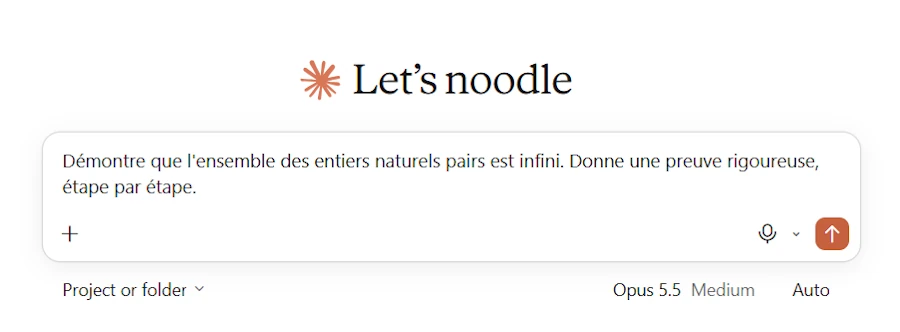
Here is the answer I got. Take the time to read it: it is a perfectly classical proof, the kind a math teacher would write on the board.
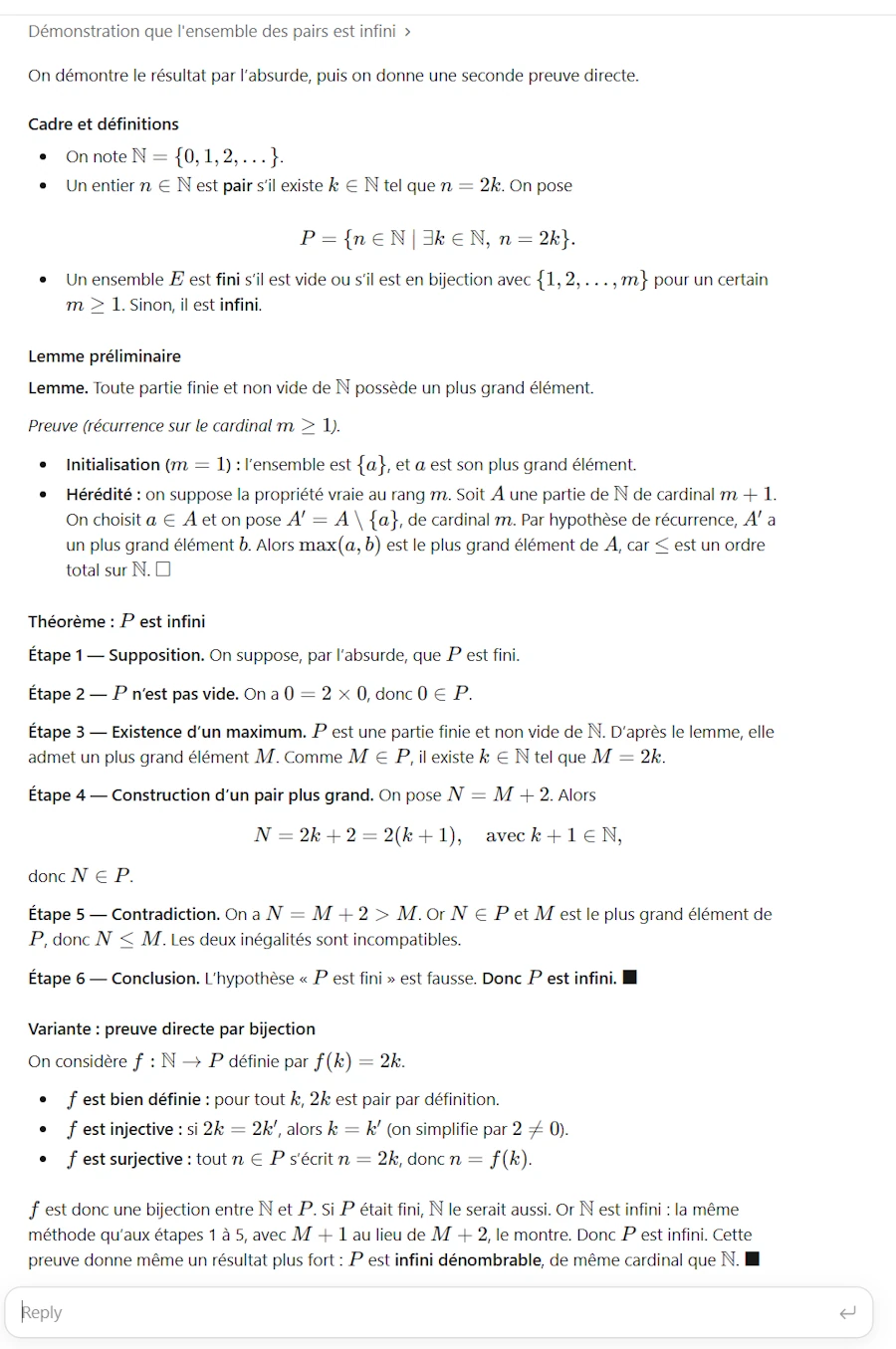
For those who don’t read French, here is the same proof in English.
Definitions. \(\mathbb{N} = \{0, 1, 2, \dots\}\). A natural number \(n\) is even if there exists \(k \in \mathbb{N}\) such that \(n = 2k\). We write \(P\) for the set of even natural numbers:
\[P = \{ n \in \mathbb{N} \mid \exists k \in \mathbb{N},\ n = 2k \}\]Lemma. Every finite, non-empty subset of \(\mathbb{N}\) has a largest element.
Proof by induction on the number of elements \(m \geq 1\). If \(m = 1\), the set is \(\{a\}\) and \(a\) is its largest element. Now assume the property is true for sets of \(m\) elements, and let \(A\) have \(m + 1\) elements. Pick \(a \in A\) and let \(A' = A \setminus \{a\}\), which has \(m\) elements. By the induction hypothesis, \(A'\) has a largest element \(b\). Then \(\max(a, b)\) is the largest element of \(A\). \(\square\)
Theorem. \(P\) is infinite.
- Assumption. Assume, by contradiction, that \(P\) is finite.
- \(P\) is not empty. \(0 = 2 \times 0\), so \(0 \in P\).
- A maximum exists. \(P\) is a finite, non-empty subset of \(\mathbb{N}\). By the lemma, it has a largest element \(M\). Since \(M \in P\), there is a \(k\) with \(M = 2k\).
- A bigger even number. Let \(N = M + 2\). Then \(N = 2k + 2 = 2(k + 1)\), so \(N \in P\).
- Contradiction. On one hand, \(N = M + 2 > M\). On the other hand, \(N \in P\) and \(M\) is the largest element of \(P\), so \(N \leq M\). Both cannot be true.
- Conclusion. The assumption “\(P\) is finite” is false. So \(P\) is infinite. \(\blacksquare\)
Bonus: a direct proof. The function \(f(k) = 2k\) sends \(\mathbb{N}\) into \(P\). It is injective: if \(2k = 2k'\) then \(k = k'\). So \(P\) contains a copy of \(\mathbb{N}\), which is infinite. Hence \(P\) is infinite.
Before going further, make sure you understand this proof. Lean will check the Lean version of it. But if we don’t understand what we are proving, we can’t judge whether the Lean statement is the right one. This is the “read the statement yourself” rule, and it starts here.
Step 2: Ask Claude to Translate It into Lean 4
In the same conversation, I asked:
Formalize this statement and proof in Lean 4 with Mathlib. Use Mathlib’s
Evendefinition.
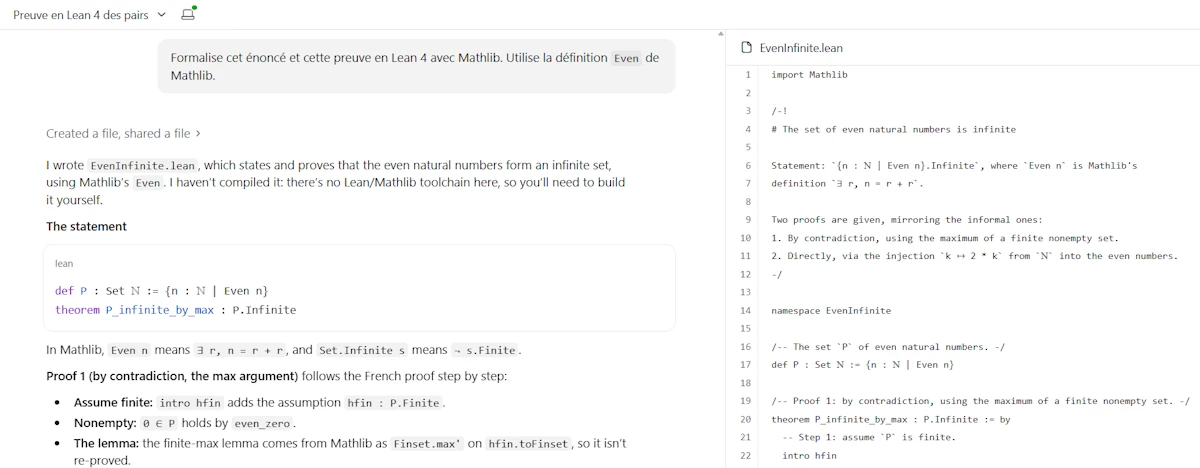
Claude produced a file named EvenInfinite.lean. Notice one sentence in its answer: “I haven’t compiled it: there’s no Lean/Mathlib toolchain here, so you’ll need to build it yourself.” I like that. Claude does not claim the proof is checked. It hands us the file and tells us to check it. Which is precisely what we are going to do.
- Download the file (button at the top right of the file panel) and keep it somewhere on the main PC, for example in
Downloads.
Tip for a smoother ride. Tell Claude your exact Lean version (we will find it in the
lean-toolchainfile of the project, in Step 5). For example: “Target Lean v4.36 and the current Mathlib, which uses the module system.” Models are often trained on older Mathlib versions, and Mathlib renames lemmas regularly. I didn’t do it the first time, and you’ll see in Step 7 (Part 2) what it cost me.
Step 3: Start a Clean Windows Sandbox with PowerShell 7
Now we need Lean. Let’s install it inside the Sandbox so that our PC stays untouched.
- Launch Windows Sandbox from the Start menu. If anything goes wrong at this point, see my Windows Sandbox checklist.
- Inside the Sandbox, right-click the Start button, then Terminal (or search for PowerShell or even faster:
Win + X, thenI). We get Windows PowerShell 5.1, the old one. Note the title bar: we are Administrator, always, inside the Sandbox.
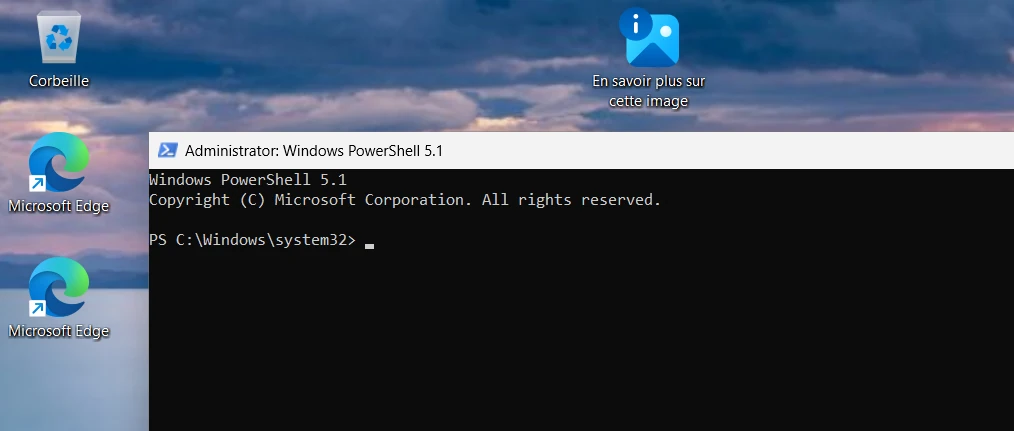
The Lean installer expects either the old Command Prompt (cmd) or PowerShell 7.4.1 or later. So let’s install PowerShell 7.
- In the PowerShell 5.1 window, copy and paste:
iex "& { $(irm https://aka.ms/install-powershell.ps1) } -AddToPath"
- Once it is done (give it some time, you must see a blue progress bar), in the same window, copy and paste the line below. It looks useless (it writes back the user
PATHunchanged), but it tells Windows that thePATHhas changed, so that every window opened from now on knows wherepwshis:
[Environment]::SetEnvironmentVariable("Path", [Environment]::GetEnvironmentVariable("Path", "User"), "User")
- Now press
Win + R, typepwsh, then pressEnter. We are now in PowerShell 7.
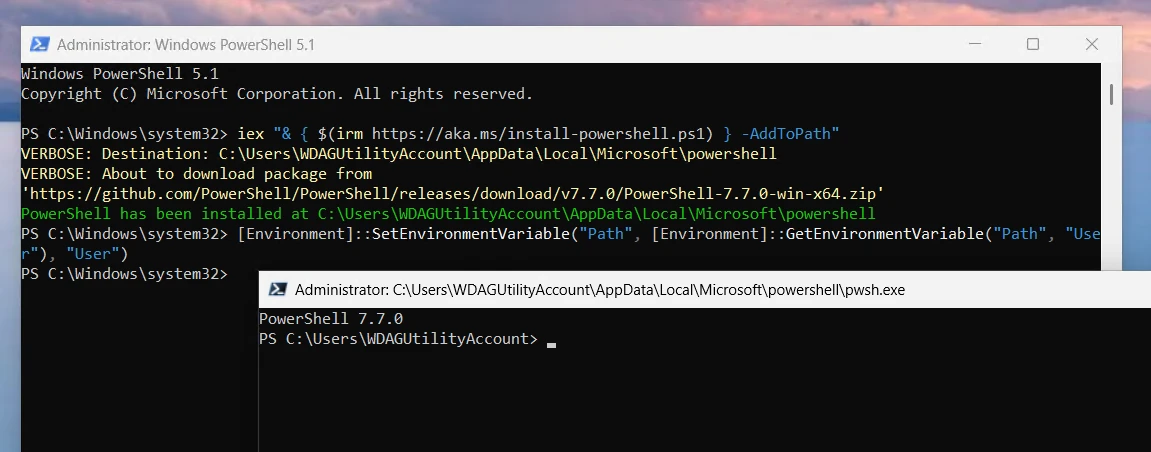
Recent PowerShell releases (7.7.0 and later) no longer ship an
.msiinstaller, so the-UseMSIflag you may see in older tutorials can fail. Use-AddToPathas above. And if you don’t want to redo this every time, my Sandbox checklist shows how to get PowerShell 7 automatically at each Sandbox start with a.wsbfile.
From now on, every command in this article is typed in the PowerShell 7 window. The prompt should look like PS C:\Users\WDAGUtilityAccount> where WDAGUtilityAccount is the name of the user account inside the Sandbox, and C:\Users\WDAGUtilityAccount is our home folder.
We can close the PowerShell 5.1 window.
Step 4: Install Git and elan
Two tools to install:
- Git, because Lean projects download their dependencies (Mathlib included) as Git repositories.
- elan, the Lean version manager. It installs
lean(the proof checker) andlake(the build tool).
Install Git (MinGit)
No need for the full Git for Windows installer. MinGit is a minimal, portable version: a zip file to extract. Perfect for a disposable Sandbox.
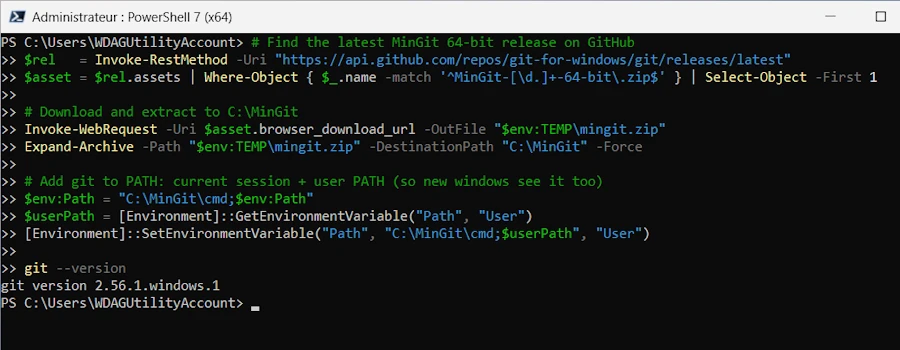
- In the PowerShell 7 window, copy and paste the whole block:
# Find the latest MinGit 64-bit release on GitHub
$rel   = Invoke-RestMethod -Uri "https://api.github.com/repos/git-for-windows/git/releases/latest"
$asset = $rel.assets | Where-Object { $_.name -match '^MinGit-[\d.]+-64-bit\.zip$' } | Select-Object -First 1

# Download and extract to C:\MinGit
Invoke-WebRequest -Uri $asset.browser_download_url -OutFile "$env:TEMP\mingit.zip"
Expand-Archive -Path "$env:TEMP\mingit.zip" -DestinationPath "C:\MinGit" -Force

# Add git to PATH: current session + user PATH (so new windows see it too)
$env:Path = "C:\MinGit\cmd;$env:Path"
$userPath = [Environment]::GetEnvironmentVariable("Path", "User")
[Environment]::SetEnvironmentVariable("Path", "C:\MinGit\cmd;$userPath", "User")

git --version
- The last line should print something like
git version 2.56.1.windows.1.
Install elan
If you know Rust: elan is a fork of rustup, and the pieces line up nicely.
Lean Rust Role elanrustupInstalls and selects toolchain versions lakecargoBuild tool and package manager leanrustcThe compiler / proof checker lean-toolchainrust-toolchain.tomlPins the Lean version per project lakefile.tomlCargo.tomlProject configuration and dependencies
- Download and run the installer. In the PowerShell 7 window, copy and paste the lines below, one at a time:
# Download the installer (curl.exe, not the old PowerShell "curl" alias)
curl.exe -O --location https://elan.lean-lang.org/elan-init.ps1

# Run it, bypassing the script execution policy for this one call
powershell -ExecutionPolicy Bypass -f elan-init.ps1
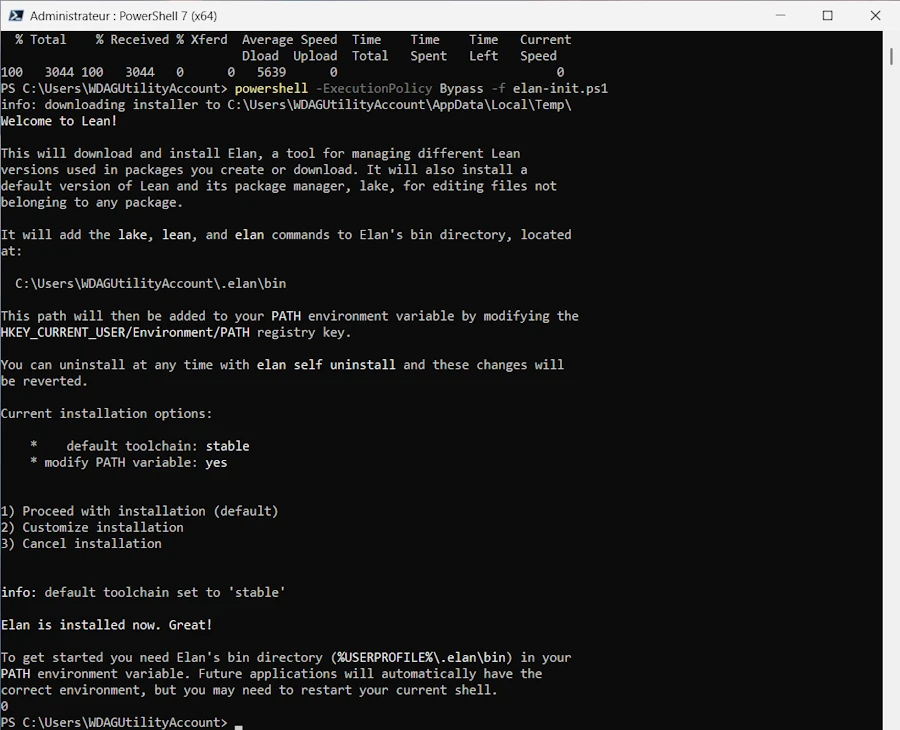
- The installer explains what it will do and offers three options. Type
1(or just pressEnter) to proceed with installation. It ends with “Elan is installed now. Great!”
- Clean up the installer script:
del elan-init.ps1
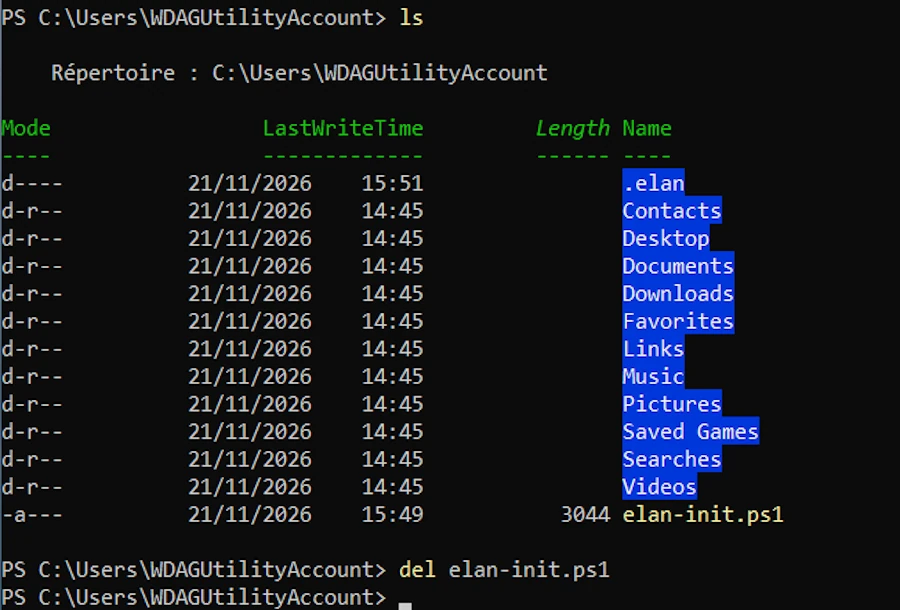
- Close the terminal and open a new PowerShell 7 window (
Win + R,pwsh,Enter). This matters: the installer updated thePATH, and only new windows see the change. - Check:
elan --version
elan show   # lists installed toolchains
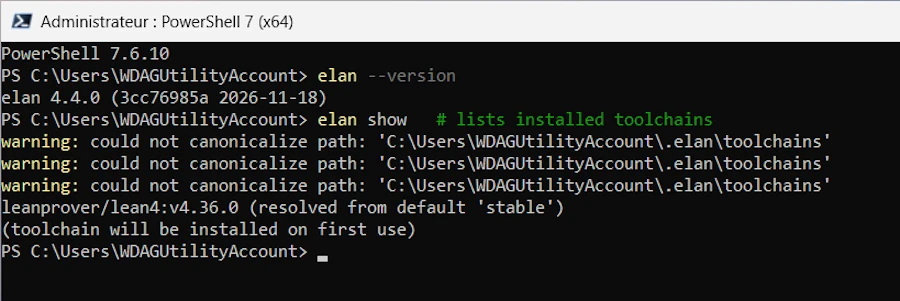
Don’t worry about the could not canonicalize path warnings. elan is looking for its toolchains folder, which does not exist yet. Lean itself (the “toolchain”) will be downloaded the first time we need it, which is… right now.
What just happened? elan put small “shim” programs (lean.exe, lake.exe) in C:\Users\WDAGUtilityAccount\.elan\bin. When we run lake inside a project, the shim reads the project’s lean-toolchain file, downloads that exact Lean version if it is missing, then runs it. This way, each project uses exactly the Lean version it was written for.
Step 5: Create a Lean Project with Mathlib
- Make sure we are in the home folder, then create the project:
cd ~
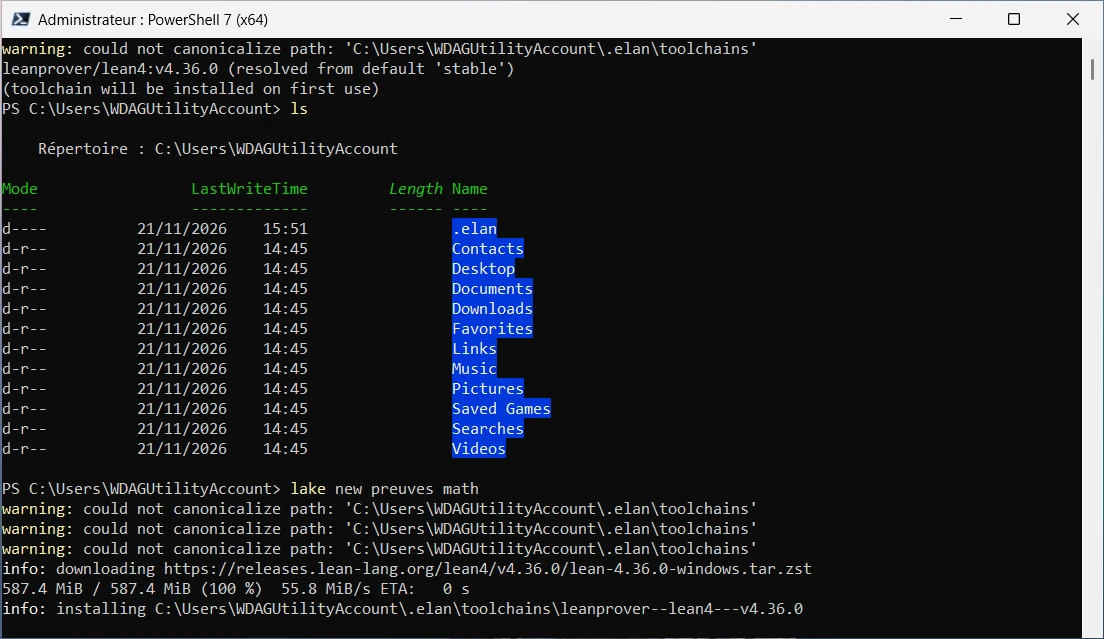
lake new preuves math
preuvesis the project name (“proofs” in French). lake creates apreuves\folder.mathis the template. It creates a project that depends on Mathlib. Without it, we would get a bare project.
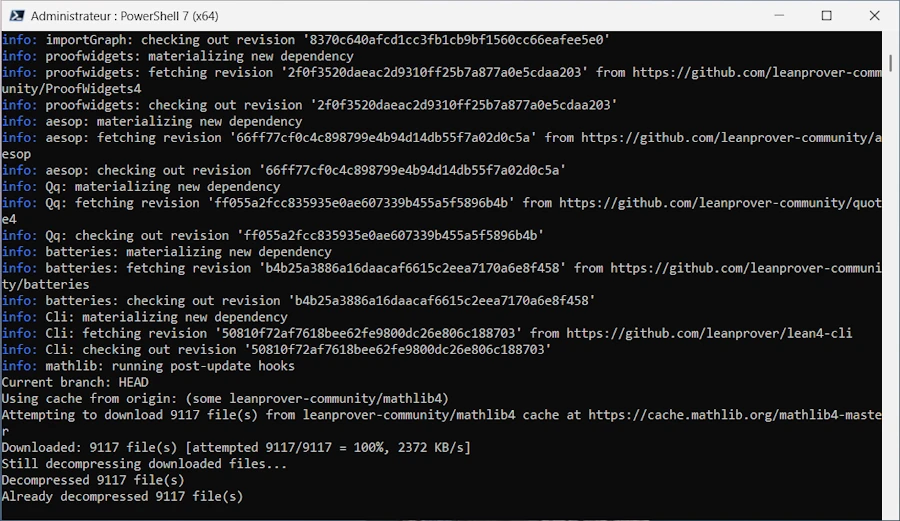
This command does a lot, so be patient:
- It downloads the Lean toolchain (about 590 MB, here Lean v4.36.0).
- It clones Mathlib and its own dependencies with Git (
batteries,aesop,Qq,proofwidgets…). - It downloads a precompiled version of Mathlib, about 9,000 files.
- To be safe, make sure the precompiled Mathlib is really there:
cd preuves
lake exe cache get
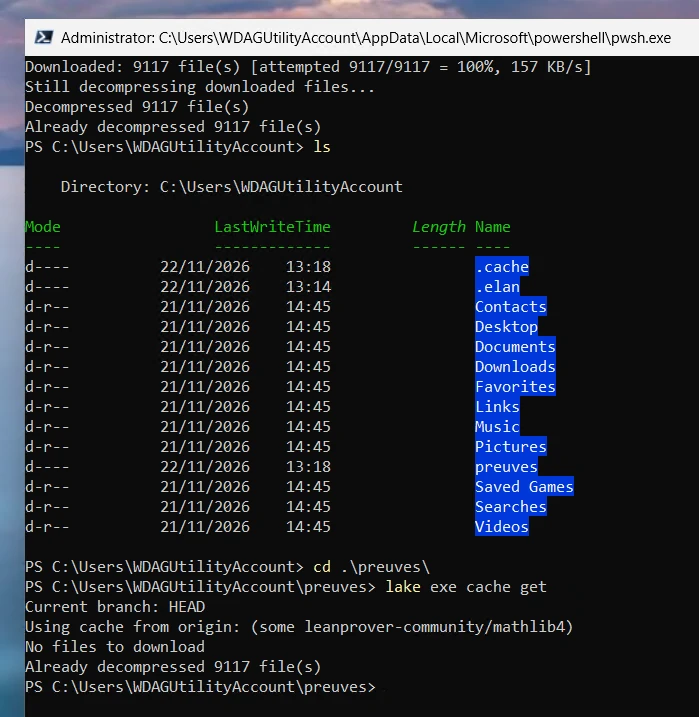
If everything was already downloaded, this command just says so and exits. If not, it downloads what’s missing. Do not skip it: without the cache, Lean would compile Mathlib from source, and that takes hours.
- Look at what was generated:
preuves\
├── lakefile.toml        # declares the "Preuves" library and requires mathlib
├── lean-toolchain       # pins the Lean version Mathlib needs (v4.36.0 here)
├── Preuves.lean         # library root: a list of imports
└── Preuves\
    └── Basic.lean       # placeholder module (def hello := "world")
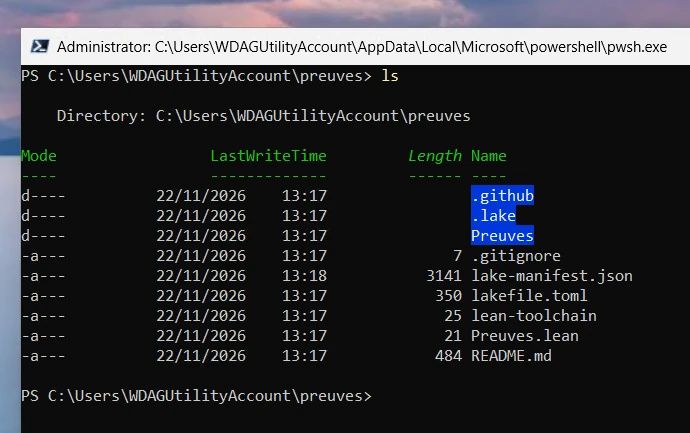
Get-Content .\lean-toolchain
# leanprover/lean4:v4.36.0 on my PC
This prints the exact Lean version of the project. This is the version worth mentioning to Claude (see the tip in Step 2).
Step 6: Wire Our File into the Project
lake does not scan the folder ./Preuves for .lean files. It builds the library root (Preuves.lean) and everything that root imports. A file that nobody imports is simply ignored. If you know Rust: a module not declared from lib.rs is never compiled either.
So two things to do: copy the file, and import it.
- Copy the file into the Sandbox. On the main PC, in File Explorer, select
EvenInfinite.lean(inDownloads) and pressCtrl + C. In the Sandbox, in the open terminal, use the following command to open the project folder:
explorer .\Preuves
- In the Explorer window that opens (inside the Sandbox), press
Ctrl + V. The Sandbox shares the clipboard with the main PC, so the copy works across the two.
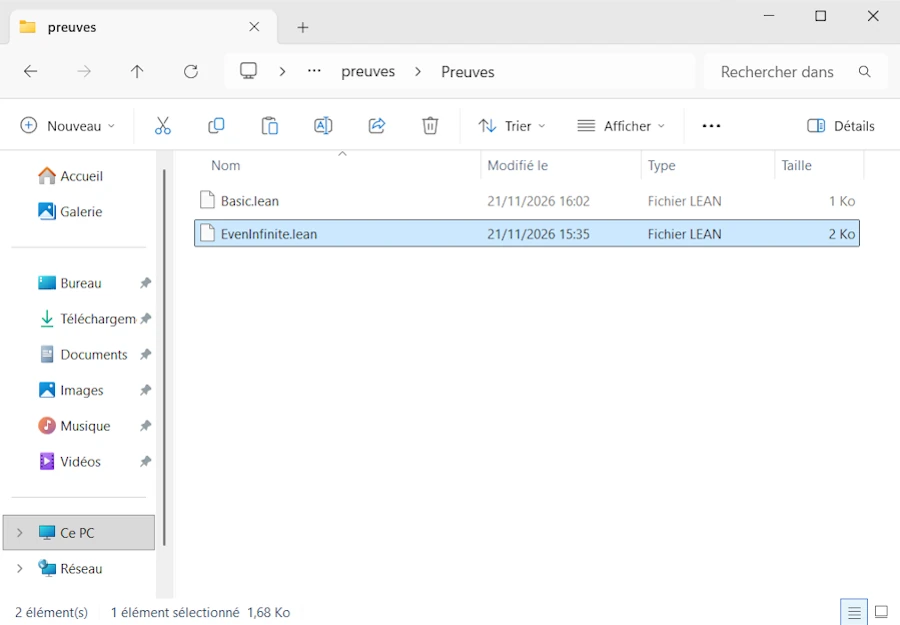
The file name uses UpperCamelCase (
EvenInfinite.lean), and the module name follows the path, with.instead of\: the filePreuves\EvenInfinite.leanis the modulePreuves.EvenInfinite.
- Import it.
- In the terminal, we are in
C:\Users\WDAGUtilityAccount\preuves - Open the file
Preuves.lean(the library root) with MS Edit (notepad is not available in the sandbox)
- In the terminal, we are in
edit .\Preuves.lean
If the command above does not work, in File Explorer, right-click on the name of the file (
Preuves.lean), selectOpen with...then point toC:\Windows\System32\edit.exe
- Add a line
import Preuves.EvenInfiniteand save.
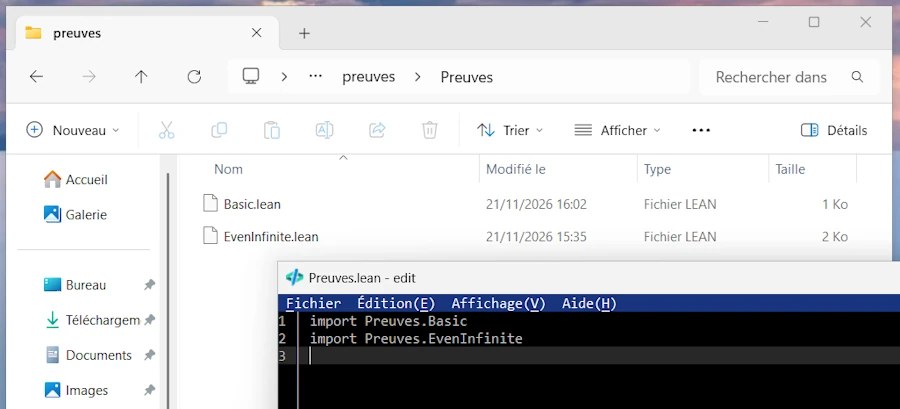
To make things simple, here is the final version of Preuves.lean that works, so you don’t have to go through all my errors:
module

import Preuves.EvenInfinite
And since we no longer import the template’s placeholder, we can delete it:
Remove-Item .\Preuves\Basic.lean
If you delete
Basic.lean, also remove theimport Preuves.Basicline. Otherwise the build fails with an “unknown module” error.
Two other ways to check a single file without touching Preuves.lean, good to know:
lake build Preuves.EvenInfinite                 # build just this module and its dependencies
lake env lean .\Preuves\EvenInfinite.lean       # check one file directly
Conclusion
Let’s take stock. Claude gave us a human-readable proof, then its Lean 4 version. We have a disposable Windows Sandbox with PowerShell 7, Git, elan, Lean, and a Mathlib project, and Claude’s file is wired into it. Everything is in place. The only thing left is to ask Lean what it thinks.
Spoiler: the first lake build will fail. And this is exactly what we want. Watching the machine reject a proof, then sending its complaints back to Claude until it accepts it, is the whole point of the exercise.
Don’t close the Sandbox! We continue in the very same session. If you close it, you will have to redo Steps 3 to 6.
See you in Part 2, where we build, read the errors, and send them back to Claude.
Webliography
- TODO: Anthropic’s post, if any.
- Levent Alpöge’s announcement and preprint
- Levent Alpöge, Wikipedia page.
- Windows Sandbox on Windows 11: A Hands-On Checklist
- Lean 4, the official website.
- Mathlib and the Lean community.
- elan, the Lean version manager.
- The Natural Number Game, learn Lean in the browser, nothing to install.
- Mathematics in Lean, the free online book, once the game is done.
- The Riemann Hypothesis, on the Clay Mathematics Institute website.
- Git for Windows releases (MinGit is there).