Rust Error Handling, Demystified
A beginner-friendly conversation on Errors, Results, Options, and beyond.
This is Episode 06

Let's have a beginner-friendly conversation on Errors, Results, Options, and beyond.
Posts
Table of Contents
- Path to Production - Step_00
- Path to Production - Step_01
- Path to Production - Step_02
- Path to Production - Step_03
- Path to Production - Step_04
- Path to Production - Step_05
- Path to Production - Step_06
- Conclusion
- Webliography
Path to Production - Step_00
Bob: You know what? We will use the last experiment code as a starting point. Again the objective is to transition to a production ready code (at least from the error management standpoint). As it is, the code is monolithic and it looks like this:
// ex303.rs
pub type Error = Box<dyn std::error::Error>;
pub type Result<T> = std::result::Result<T, Error>;

fn main() -> Result<()> {
    let files = list_files("./01_experimentation/empty")?;
    println!("{files:#?}");
    Ok(())
}

fn list_files(path: &str) -> Result<Vec<String>> {
    let files: Vec<String> = std::fs::read_dir(path)?
        .filter_map(|re| re.ok())
        .filter(|e| e.file_type().map(|ft| ft.is_file()).unwrap_or(false))
        .filter_map(|e| e.file_name().into_string().ok())
        .collect();

    if files.is_empty() {
        return Err("Cannot list empty folder.".into());
    }
    Ok(files)
}
The output is:
Error: "Cannot list empty folder."
error: process didn't exit successfully: `target\debug\examples\ex303.exe` (exit code: 1)
What would you do?
Alice: As explained in THE book, I would create a library so that main() acts as a consumer of the exposed API. This will also helps, later, when we will need to write tests… So first thing first, we should split the code according to the responsibilities.
Bob: Ok, but I would like to be very conservative here and go one step at a time. As a very first step I want you to split the code among modules (not lib) and make sure everything works again. You could create a package in a 00_project directory and since you read the Modules Cheat Sheet, use the modern way of doing meaning you’re not allowed to create any mod.rs file. And please, explain what you do as you move forward.
Side Note
From now on, in the workspace, the projects discussed below are in the
02_production/directory.
Alice: OK…
- I create a package in the
02_production/00_project/directory - Below you can see how files and directories are organized
.
│   Cargo.lock
│   Cargo.toml
│
├───empty
└───src
    │   main.rs
    │   files.rs
    │
    └───files
            listing.rs
- In the
Cargo.tomlthe package is namedstep_00because I suppose we will have more than one step on our path to the Valhalla (production code). Here isCargo.toml:
# Cargo.toml
[package]
name = "step_00"
version = "0.1.0"
edition = "2024"

[dependencies]
- I create a directory named
emptyto perform some tests - Since I can’t yet create a library, there is no
lib.rsin the directory, just amain.rs - Since there is a
main.rsthis means that the crate (the output of the build system) will be a binary crate, an application (step_00.exe) - In
main.rsI basically keep the minimum, amain()function with a call tolist_files(). See below:
// main.rs
pub type Result<T> = std::result::Result<T, Error>;
pub type Error = Box<dyn std::error::Error>;

mod files;

use crate::files::listing;

fn main() -> Result<()> {
    let files = listing::list_files("./02_production/00_project/empty")?; // see the ? here
    println!("{files:#?}");
    Ok(())
}
- The type alias declarations for
ResultandErrorremain unchanged. - The line
mod files;declares the existence and loads a module namedfilesin the binary crate. It includes the content of the module found in the external filefiles.rs. A module is a namespace. The line brings its content to the local scope (crate root). - It is important to understand that the module tree that we start building with the
mod files;declaration is the only thing that matters for the build system. At the top of the tree is the crate root (binary crate here). Then, underneath there is a tree where on each branch and each leaf we have modules (not files). Modules are namespaces which organize code inside the crate. Files do not matter and this is why we can have multiple modules in one file (check what we did inex19.rswith themath_utilsmodule). Files are just containers of modules. Here, the module tree will look like this:
crate           The crate root module is stored in main.rs
└─ files        The `files`    module is stored in files.rs
   └─ listing   The `listing`  module is stored in files/listing.rs
use crate::files::listing;is a shortcut, nothing more.- Rather than writing
files::listing::list_files(), I can writelisting::list_files(). - Alternatively I could write
use crate::files::listing::list_files;and calllist_files()directly but I prefer to writelisting::list_files(). Indeed, 6 months from now, the code will be auto documented and easier to read. I will not have to remember in which modulelist_files()is defined, instead I will “read” thatlist_filesis defined in the module namedlisting.
- Rather than writing
Side Note
If you don’t feel 100% confident with crates, modules, files… You should read this short dedicated post
- In the directory tree,
files.rsis a hub file. I mean it is a short file that declares and loads one or more modules at a given level. Here it declares and loads the modulelistingone level below in the module tree. In other words, since depub mod listing;take place in thefilesmodule then thelistingmodule is a child of thefilesmodule. Review the module tree above (not the directory tree), confirm it makes sense.
// files.rs
pub mod listing;
- And now, ladies and gentlemen, here is the content of the file
files/listing.rs
// listing.rs
use crate::Result;

pub fn list_files(path: &str) -> Result<Vec<String>> {
    let files: Vec<String> = std::fs::read_dir(path)?
        .filter_map(|re| re.ok())
        .filter(|e| e.file_type().map(|ft| ft.is_file()).unwrap_or(false))
        .filter_map(|e| e.file_name().into_string().ok())
        .collect();
    if files.is_empty() {
        return Err("Cannot list empty folder.".into());
    }
    Ok(files)
}
- At the top of the file the line
use crate::Result;is a shortcut. I can writeResult<T>rather thancrate::Result<T>.- We know that the module
listingis a grand-child of the crate root (check the module tree). - This said, if we recall that the visibility rule says that a private item is visible in the curent module and in all its children modules
- This explains why
crate::Resultis accessible in the modulelisting
- We know that the module
- I had to add the
pubaccess specifier at the beginning of the linelist_files()so that the function can be called from the grand-parent module (crate root inmain.rs) - Other than that, there is no change
Once the code is dispatched and organized as explained I can open a terminal (CTRL+ù on a FR keyboard) at the root of the workspace and run it with:
cargo run -p step_00
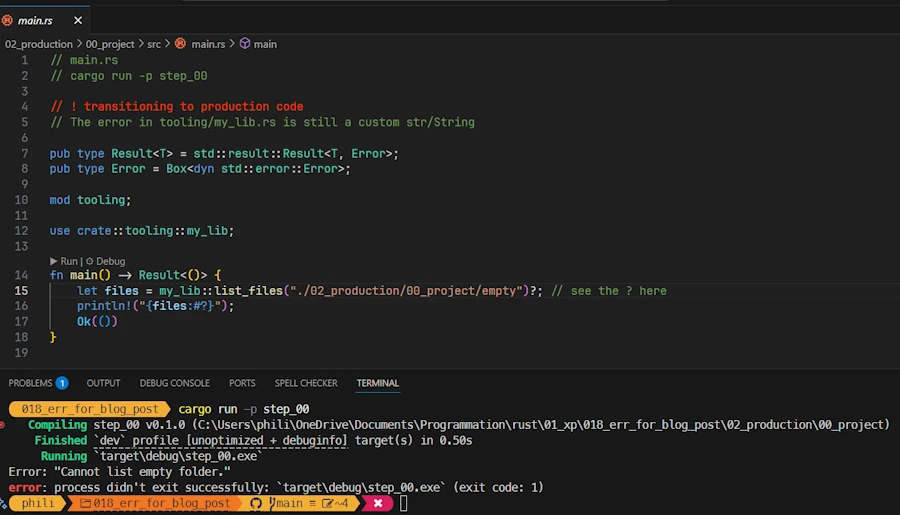
Here is what I can see in VSCode:
- In
main(),my_lib::list_files()is called with an argument which is a path to an empty directory. No surprise, we print a message and the application exit.
To confirm my understanding, I did some tests.
🦀 Test 1:
- In
listing.rsabove, I comment the lineuse crate::Result; - I modify the signature of
list_files()
pub fn list_files(path: &str) -> crate::Result<Vec<String>> {...}
- I can build the project
- This confirms that
use crate::Result;is nothing more than a shortcut - I delete the modifications
🦀 Test 2:
- In
main.rs, in front of theResultandErrortype alias declarations I remove thepubaccess specifier - I can build the project.
- Why? Because we are building a binary crate, nothing is accessed from the outside and so, in this context,
pubdoes’nt hurt but is useless. - Then I put the
pubback in place because they seem important to you.
Path to Production - Step_01
Bob: The second step should be easy. Create an error.rs file then copy/paste Result and Error definitions there. Explain what you do when you make the code runs as before.
Alice: You know what? I copy/paste/rename the previous package in a directory named 01_project.
- I update the package name in
Cargo.toml(name = "step_01") - I create an
error.rsfile with this content:
// error.rs
pub type Result<T> = std::result::Result<T, Error>;
pub type Error = Box<dyn std::error::Error>;
- I update the content of
main.rs
// main.rs
mod error;
mod files;

use crate::files::listing;
use crate::error::Result;

fn main() -> Result<()> {
    let files = listing::list_files(".")?;
    println!("{files:#?}");

    let files = listing::list_files("./02_production/01_project/empty")?;
    println!("{files:#?}");
    Ok(())
}
- The line
mod error;declares the existence and loads a module namederrorin the binary crate. It includes the content of the module found in the external fileerror.rs - Since the line
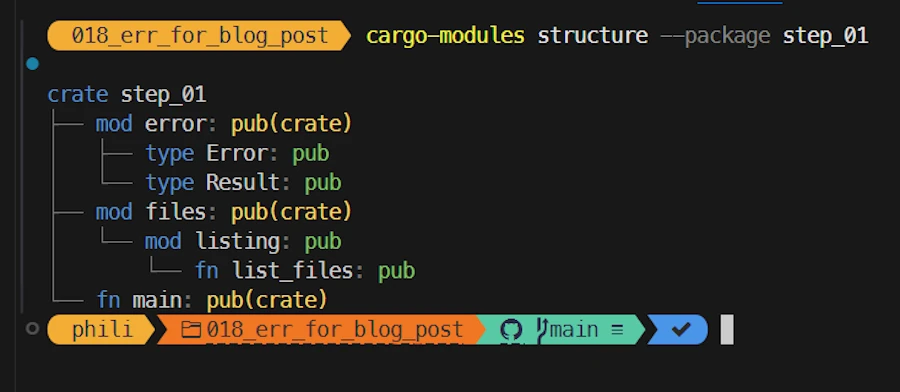
mod error;appears in the crate root, theerrormodule is a child of the latter. Now, the module tree looks like this:
crate           The crate root module is stored in main.rs
|  error        The `error`    module is stored in error.rs
└─ files        The `files`    module is stored in files.rs
   └─ listing   The `listing`  module is stored in files/listing.rs
Side Note
cargo install cargo-modulescargo-modules structure --package step_01
-
I also add
use crate::error::Result;so that I can writefn main() -> Result<()> {...}rather thanfn main() -> error::Result<()> {...} -
For the “fun”, now in
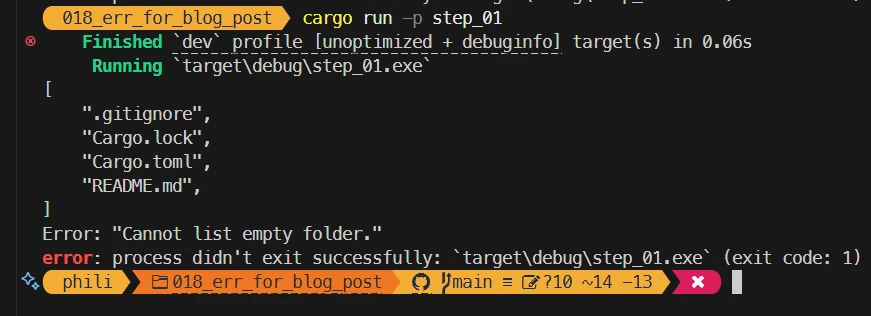
main()we inspect 2 different directories.
Here is what I can see in the terminal
Again I check my understanding about what is possible and what is not with the modules and the module tree.
🦀 Test 3:
- The module
erroris a child of the crate root (inmain.rs). - Within
errorI can “see” what is in the crate root but the crate root cannot “see” what is inerrorif I don’t make it public. - So in
error.rsI remove thepubaccess modifier in front ofResult. - Then I check I’m no longer able to build the project.
- I undo my modifications
🦀 Test 4:
- In
main.rsI comment the lineuse crate::error::Result;and I writefn main() -> crate::error::Result<()> {. - I cannot build the crate because there is a problem with
use crate::Result;inlisting.rs(unresolved import 'crate::Result'). - Obviously, if in
listing.rsI replace the lineuse crate::Result;withuse crate::error::Result;then I can build again because inerror,Resultis public.
Now, the 1 million $ question is: “why it worked in the initial version?”
The answer goes like this:
Resultis public in theerrormodule- In the crate root we have
mod errorwhich bringserror::Resultis in the current scope, the scope of the crate root. - If
Resultis in the scope of the crate root, it becomes visible from its children - So
crate::Resultis available in the scope oflistingmodule (child visibility rule) - In the
listingnamespace I can write:pub fn list_files(path: &str) -> crate::Result<Vec<String>> {...- or
use crate::Result;thenpub fn list_files(path: &str) -> Result<Vec<String>> {...

Tadaa!
It took me a while. Believe me, it’s harder to write and explain than to make the changes in the code, but honestly, it’s worth it. I realize how important it is to have the module tree in mind (or to print it as shown before) and to know the rule of visibility.
Bob: I’m genuinely impressed by your insight and your willingness to test ideas to strengthen your understanding. Keep it up!
You will be happy to learn that in the next step, you will create a library and expose an API… Welcome to the real world

Create a lib.rs file at the root of the project, put the pub mod error; and pub mod files;. Make the application run again and, as before, explain what you do.
Path to Production - Step_02
Alice: Um… Ok… I start with a copy/paste/rename of the previous directory (02_project/)
- I recall that if in the directory there is a
lib.rsand amain.rs- The build system builds the library crate then the binary crate.
- The lib is automatically linked to the binary.
- Ideally I want to keep
main()as short as possible. It should validate some stuff then call arun()function from the library. - Here I will keep
list_file()in main as before.
Once the copy of the directory is done:
- I update the package name in
Cargo.toml(name = "step_02") - I create a
lib.rsfile with this content:
// lib.rs
pub mod error;
pub mod files;

// re-export lib from crate root
pub use self::error::{Error, Result};
- Since I want to call
list_files()frommain()I “put” thefilesmodule in thelib main()returns aResult<()>so I “put” the error module in thelibas well-
So far there is no need to copy/paste the code from
files/listings.rsintolib.rs. Indeed if tomorrow the app grows, I will write more code in more modules and I will simply list the modules inlib.rs. - At this point, if I compare V2 on the left versus V1 of the file
main.rshere is what I can see:
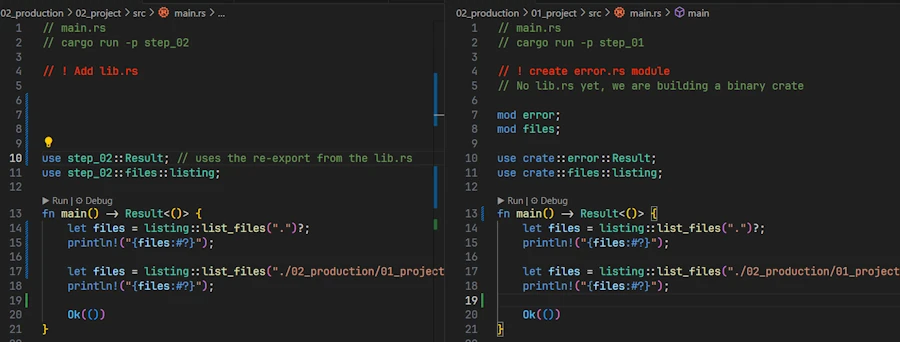
- The lines
mod error;andmode files;have been moved tolib.rs. The moduleserrorandfilesare now in the lib namespace. - One point of attention: In previous versions, the code was monolithic, all the modules were children of the same root, all symbols were accessible within the same namespace. This is why, in
main.rs, a line likeuse crate::files::listing;allowed us to calllisting::list_files().cratewas pointing to the crate being built, the binary crate. - But this is no longer the case. Indeed
list_files()is now in the library namespace. - This is why, since the library is linked to the binary I need to write
use step_02::files::listing;wherestep_02is the name of the library (which is the same as the name of the binary. I know, this does’nt help much…)
And that’s it. It builds and run like a charm…
Bob: This is cool but I have 2 questions for you. First question: are you sure when you say that in use step_02::files::listing;, step_02 is the name of the library. I believe you, but how can we remove any doubt?
Alice: We can modify Cargo.toml as shown below:
[package]
name = "step_02"
version = "0.1.0"

edition = "2024"

[dependencies]


[[bin]]
name = "my_app"      # name of the executable (my_app.exe under WIN11)
path = "src/main.rs"

[lib]
name = "my_super_lib" # name of the lib (libmy_super_lib.rlib under WIN11)
path = "src/lib.rs"
Then we can modify main.rs:
// main.rs
use my_super_lib::Result;
use my_super_lib::files::listing;

fn main() -> Result<()> {
    let files = listing::list_files(".")?;
    println!("{files:#?}");

    let files = listing::list_files("./02_production/01_project/empty")?;
    println!("{files:#?}");

    Ok(())
}
Here is the output in the console
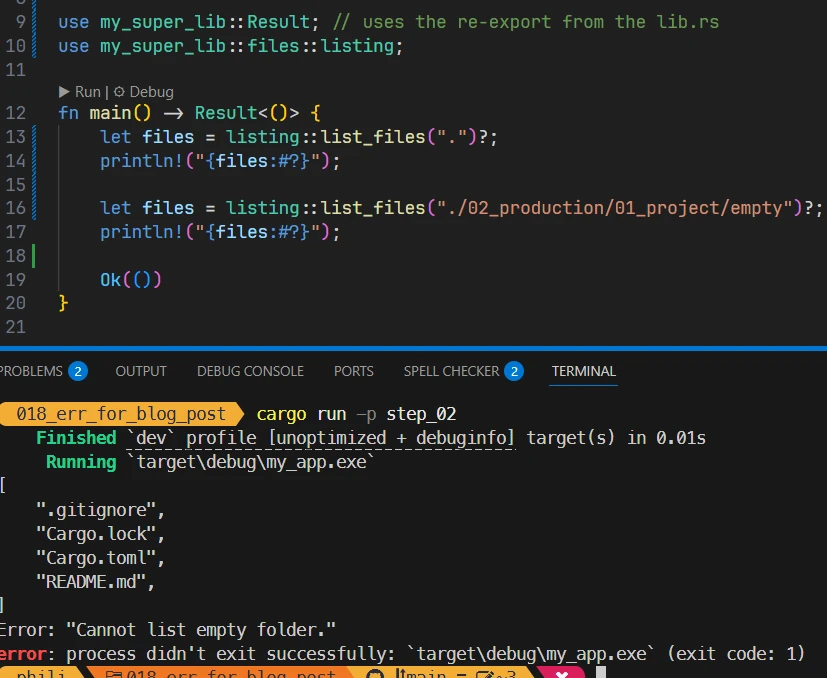
The runtime mention my_app.exe when it says something like: process didn't exit successfully: target\debug\my_app.exe while in main.rs we write use my_super_lib::files::listing;.
One last point of attention if I can… The command to build and run the application remains: cargo run -p step_02. This is because step_02 is the name of the package in Cargo.toml. Review the content of Cargo.toml if this is not crystal clear.
What is your second question?
Bob: Easy, Padawan, I think the Force is making your head a little bigger… My second question is about the last line of the lib.rs:
pub use self::error::{Error, Result};
You did’nt say a word about it while in the last screenshot above I see the following comment:
use step_02::Result; // uses the re-export from the lib.rs
Would you be so kind as to explain to an 800-year-old Jedi why you wrote these lines of code and these comments?
Alice: You’re right it took me a while so they deserve some explanations.
- In
lib.rs- I load the modules
errorandfilesin the module tree - If the line
pub use self::error::{Error, Result};is commented I can’t build the package. I get an error fromlisting.rssaying:
use crate::Result; ^^^^^^^^^^^^^ no `Result` in the root- I’m not impressed. I know the module tree of the library crate, I can fix the problem and build the library. In
listing.rsI writeuse crate::error::Result;rather thanuse crate::Result; - However, if building the library seems OK, I can’t build the binary crate. I see an error in
main.rs:
use step_02::Result; ^^^^^^^^^^^^^^^ no `Result` in the root- Again, I know the module tree of the binary crate. In
main.rsI writeuse step_02::error::Result;rather thanuse step_02::Result; - Then I can build the package (the library crate and the binary crate)
- However…
- This work here because I have few modules. What if I have hundreds?
- On the other hand, I don’t like the idea of not being able to reuse most of the source code from the previous version without modifying it.
- This is where the re-export “trick” enters the game.
- In
lib.rsI load the modules I need (errors,files) - Then I create, at the top of the module tree of the library crate, the shortcuts I need:
pub use self::error::{Error, Result}; - With this, 2 things happens
- With
use self::error::{Error, Result};all child modules of the library crate can useResultas if it was declared at the top of the module tree (I can writecrate::Resultinstead ofcrate::error::Result). This is what is done inlisting.rs - With the
pubaccess specifier,ResultandErrorare accessible from code linked with the library. The binary crate of the package for example. This is why inmain.rsI first create a shorcut to Result in the library (seeuse step_02::Result;) and then use it locally (seewrite fn main() -> Result<()> {...}).
- With
- In
- I load the modules
Bob: Not to split hairs here, but if the shortcut lives in lib.rs, why duplicate it in main.rs?
Alice: This is exactly what I did but it does’nt work. Indeed without the shortcut use step_02::Result; in main.rs, this is the Result<T,E> from the std lib which is used and the compiler is not happy. See by yourself:
fn main() -> Result<()> {
             ^^^^^^ -- supplied 1 generic argument
             |
             expected 2 generic arguments
So in main.rs the shortcut “overwrite” the default Result<T, E>
Bob: One last question. In lib.rs you write pub use self::error::{Error, Result}; while until now you have been using use crate quite a lot. Is there any specific reason.
Alice: Absolutely none.
- In a path like
self::error::Error,selfrefers to the current module. This allows to use paths relative to the current module. Since we are inlib.rs,selfrefers to the crate root. - In a path like
crate::error::Error,craterefers to the crate root. This allow to use absolute path, always starting from the root. - So here both paths are equivalent. I’ll keep the absolute version.
Path to Production - Step_03
Bob: Splendid! Did you notice we did’nt yet talk about error handling? First, let’s set the problem then we will work on one possible option.
- I let you copy/paste/rename of the previous directory (
03_project) - Think to update the package name in
Cargo.toml(name = "step_03")
Once this is done, to “feel” the problem, please modify the main() function as below then run the code and tell me what you think.
fn main() -> Result<()> {
    let files = listing::list_files(".")?;
    println!("{files:#?}");

    // let files = listing::list_files("./02_production/03_project/empty")?;
    // println!("{files:#?}");

    let files = listing::list_files("./non_existent_folder")?;
    println!("{files:#?}");

    Ok(())
}
Alice: Here is what I see
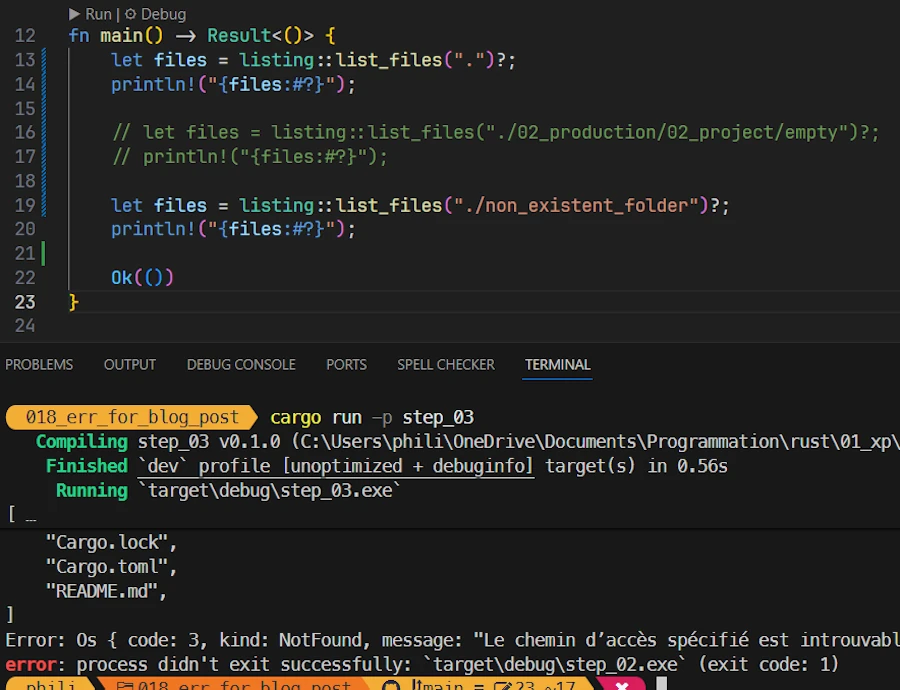
-
We use to read
Error: "Cannot list empty folder.". This message was coming fromlisting.rswhen the code detects that there is no file to list. See below:// listing.rs use crate::Result; pub fn list_files(path: &str) -> Result<Vec<String>> { let files: Vec<String> = std::fs::read_dir(path)? .filter_map(|re| re.ok()) .filter(|e| e.file_type().map(|ft| ft.is_file()).unwrap_or(false)) .filter_map(|e| e.file_name().into_string().ok()) .collect(); if files.is_empty() { return Err("Cannot list empty folder.".into()); } Ok(files) } list_files()is not ready to handle cases were the directory does not exists. In such case, whenread_dir()returns, the?operator bubbles up the error tomain()- Back in
main(), the error is returned asBox<dyn std::error::Error> - Finally, the Rust runtime prints the last 2 messages.
Bob: Any comment?
Alice: The app is not ready to handle all possible kinds of errors it may encounter. In the experimentation phase it was acceptable but, in production phase it is no longer the case. We need to put in place a scalable errors management but I have no idea how to do that…
Bob: You’re right. The app is not yet ready but don’t worry, solutions based on custom errors exist (do you remember the enum etc.?).
We will keep our methodology and make one step at a time. Based on our experience in list_files(), in a first step we will make sure the app can report all kind of I/O errors as well as custom error messages based on strings of chars (String or string literal). Let me show you how…
So far errors.rs look like this:
// error.rs
pub type Result<T> = std::result::Result<T, Error>;
pub type Error = Box<dyn std::error::Error>;
Modify it so that it looks like that:
// error.rs
use thiserror::Error;

pub type Result<T> = std::result::Result<T, Error>;

#[derive(Debug, Error)]
pub enum Error {
    #[error("custom error: {0}")]
    Custom(String),

    #[error(transparent)]
    Io(#[from] std::io::Error),
}

impl Error {
    pub fn custom(val: impl std::fmt::Display) -> Self {
        Self::Custom(val.to_string())
    }
}

impl From<&str> for Error {
    fn from(val: &str) -> Self {
        Self::Custom(val.to_string())
    }
}
Do not look at the code yet but realize that since:
- the
error.rsfile is standalone pub type Error = Box<dyn std::error::Error>;is on its own line
We can now change the implementation of Error without impacting the rest of the project thanks to the level of indirection.
Now, in the code above, only pay attention to Error.
- So far its datatype was
Box<dyn std::error::Error> - Important: Now it is an
enum. This means that the lib restrict itself to only 2 flavors:Error:CustomorError::Io - It is a totally different story
- We used to be more lax, free, and flexible (
Box<dyn std::error::Error>), but now we’re becoming stricter, more specific, and more professional in the way we handle errors (pub enum Error{...}).
If needed, open a console and add thiserror crate to Cargo.toml with the command below:
cargo add thiserror --package step_03
Cargo.toml should look like:
[package]
name = "step_03"
version = "0.1.0"
edition = "2024"

[dependencies]
thiserror = "2.0.17"
Now, run the application (cargo run -p step_03) and “tell me why” you get this output.
Alice: Good news, it works. Bad news, I don’t see big difference in the output. With step_02 I had:
[
    ".gitignore",
    "Cargo.lock",
    "Cargo.toml",
    "README.md",
]
Error: Os { code: 3, kind: NotFound, message: "Le chemin d’accès spécifié est introuvable." }
error: process didn't exit successfully: `target\debug\step_02.exe` (exit code: 1)
Now with step_03 I see:
[
    ".gitignore",
    "Cargo.lock",
    "Cargo.toml",
    "README.md",
]
Error: Io(Os { code: 3, kind: NotFound, message: "Le chemin d’accès spécifié est introuvable." })
error: process didn't exit successfully: `target\debug\step_03.exe` (exit code: 1)
The difference is… Now it prints Error: Io(Os... instead of Error: Os.... Not sure it makes the app more production ready.
Path to Production - Step_04
Bob: This is OK. It is part of our journey… Copy/paste/rename the directory as 04_project and rename the package in Cargo.toml as step_04.
Now, modify main.rs as below:
// main.rs
use step_04::Result;
use step_04::files::listing;

fn main() -> Result<()> {
    match listing::list_files(".") {
        Ok(files) => println!("Files found   : {files:#?}"),
        Err(e) => println!("Error: {e}"),
    }

    match listing::list_files("./02_production/04_project/empty") {
        Ok(files) => println!("Files found   : {files:#?}"),
        Err(e) => println!("Error detected: {e}"),
    }

    match listing::list_files("./non_existent_folder") {
        Ok(files) => println!("Files found   : {files:#?}"),
        Err(e) => println!("Error detected: {e}"),
    }

    Ok(())
}
The non_existent_folder is “back in town”
In addition, the ? operator has disappeared. We use match after each call instead. Don’t, but if you run the code at this point you should not see big changes.
Open error.rs and replace the line #[error(transparent)] with #[error("**** I/O error: {0}")]. See below the code fragment:
pub enum Error {
    #[error("Custom error - {0}")]
    Custom(String),

    // #[error(transparent)]
    #[error("**** I/O error: {0}")]
    Io(#[from] std::io::Error),
}
Now run the code (cargo run -p step_04). What do you see. What is you understanding?
Alice: Here is what I get in the terminal:
Files found   : [
    ".gitignore",
    "Cargo.lock",
    "Cargo.toml",
    "README.md",
]
Error detected: Custom error - ⛔ Cannot list empty folder.
Error detected: **** I/O error: Le chemin d’accès spécifié est introuvable. (os error 3)
And now I understand what happens!
-
First call: No problemo! Files are listed as before.

- Second call: The code reports a custom error with a message because the directory is empty. This is business as usual.
- Third call: This is an unhandled I/O error. The directory does not exists. After
read_dir(), the?operator bubbles the error as anError. The code must convert the I/O error into anError. I don’t know yet all the details but I rememberthiserrorgenerates the code for that and it seems it is using templated message"**** I/O error: {0}"because I can see the 4 stars in the console.
To make a long story short: Now, when the app encounter an unknown I/O error it reports it as an Error::Io.
Cool, it works. Now I can uncomment the line with transparent and run the application again. Here is what I see:
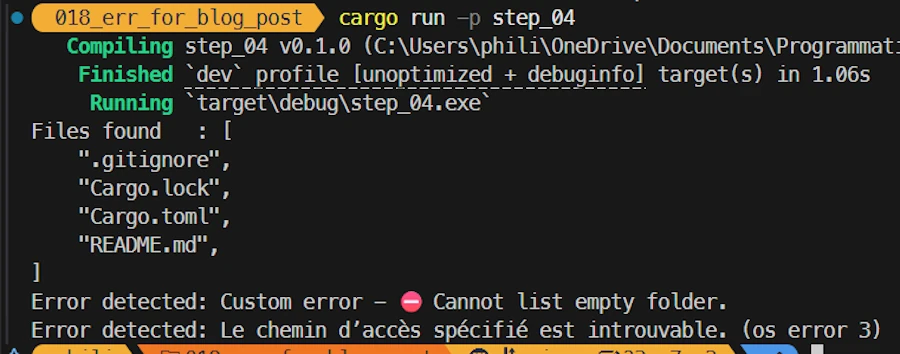
Bob: One question however. Could you read error.rs and tell me exactly what is going on here?
Alice: We already used thiserror, but, Ok, let me start from the beginning… Until Step_03 we had:
// error.rs
pub type Result<T> = std::result::Result<T, Error>;
pub type Error = Box<dyn std::error::Error>;
Now we want our Error being able to cover system-level I/O errors or send back custom error messages. We would like to write something like:
// error.rs
pub type Result<T> = std::result::Result<T, Error>;

pub enum Error {
    Custom(String),
    Io(std::io::Error),
}
This cannot work but thiserror can help. And below is equivalent to what we had within ex24.rs
// error.rs
use thiserror::Error;

pub type Result<T> = std::result::Result<T, Error>;

#[derive(Debug, Error)]
pub enum Error {
    #[error("Custom error - {0}")]
    Custom(String),

    #[error(transparent)]
    Io(#[from] std::io::Error),
}
However, here few lines of code have been added:
// error.rs
use thiserror::Error;

pub type Result<T> = std::result::Result<T, Error>;

#[derive(Debug, Error)]
pub enum Error {
    #[error("Custom error - {0}")]
    Custom(String),

    #[error(transparent)]
    Io(#[from] std::io::Error),
}

impl Error {
    pub fn custom(val: impl std::fmt::Display) -> Self {
        Self::Custom(val.to_string())
    }
}

impl From<&str> for Error {
    fn from(val: &str) -> Self {
        Self::Custom(val.to_string())
    }
}
In the implementation section of Error we define a “convenience” constructor (see custom(param)). This constructor accepts anything implementing Display (string literals, numbers…) and converts the parameter into a Error::Custom variant. This provides more flexibility because we can write Error::custom("foo") instead of manually allocating a String.
The last implementation is here to help us to write return Err("something went wrong".into()). Indeed, since we remember that in Rust if the trait From<A> for B exists, then we get the trait Into<B> for A for free, we define From<&str> for Error so that we get Into<Error> for &str.
Path to Production - Step_05
Bob: You know… We could go one step further… Indeed if we want to be more strick we should remove the Custom variant of the Error enum and only list the errors we deal with.
I let you copy/paste/rename the directory as 05_project and rename the package in Cargo.toml as step_05.
Now I propose to use this version of the error.rs file
// error.rs
use thiserror::Error;

pub type Result<T> = std::result::Result<T, Error>;

#[derive(Debug, Error)]
pub enum Error {
    #[error("⛔ Cannot list an empty folder")]
    CantListEmptyFolder,

    #[error(transparent)]
    Io(#[from] std::io::Error),
}
For comparison, find below the previous version:
// error.rs
use thiserror::Error;

pub type Result<T> = std::result::Result<T, Error>;

#[derive(Debug, Error)]
pub enum Error {
    #[error("Custom error - {0}")]
    Custom(String),

    #[error(transparent)]
    Io(#[from] std::io::Error),
}

impl Error {
    pub fn custom(val: impl std::fmt::Display) -> Self {
        Self::Custom(val.to_string())
    }
}

impl From<&str> for Error {
    fn from(val: &str) -> Self {
        Self::Custom(val.to_string())
    }
}
- The
Customvariant has been removed. This allow us to remove the constructorcustom()and theFromtrait implementation forError. - More important. We now have
CantListEmptyFolderwhich is a variant without associated data, unlike theIo(std::io::Error)variant, which contains astd::io::Errorobject. SoCantListEmptyFolderacts as a constant of typeError.
With this in place we can now modify listing.rs so that it no longer returns a custom message when the directory is empty but the Error::CantListEmptyFolder custom error code instead. See below:
// listing.rs

use crate::{Error, Result};

pub fn list_files(path: &str) -> Result<Vec<String>> {
    let files: Vec<String> = std::fs::read_dir(path)?
        .filter_map(|re| re.ok())
        .filter(|e| e.file_type().map(|ft| ft.is_file()).unwrap_or(false))
        .filter_map(|e| e.file_name().into_string().ok())
        .collect();
    if files.is_empty() {
        // return Err("⛔ Cannot list empty folder.".into());
        return Err(Error::CantListEmptyFolder);
    }
    Ok(files)
}
In the code above, if we want to return Err(Error::CantListEmptyFolder) we need to bring crate::Error into the local scope. This is why we now have use crate::{Error, Result}; (vs use crate::Result;) at the beginning of the source code.
If you run the app (cargo run -p step_05), here is what you should see:
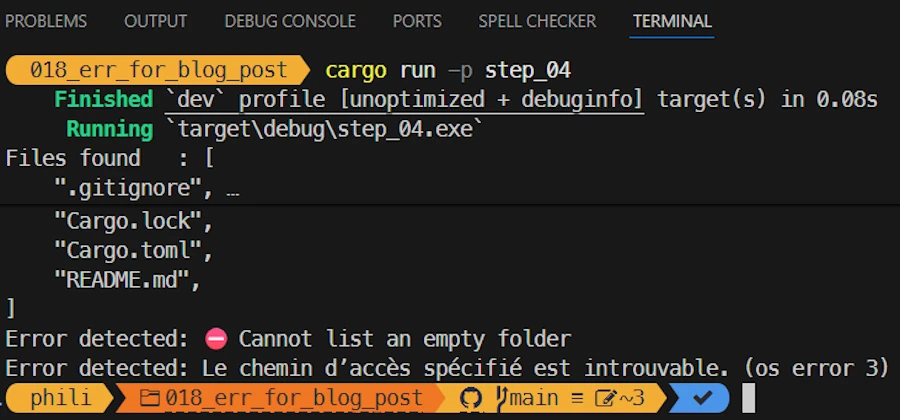
Now, if in main() you modify the match in charge of the empty folder as below :
match listing::list_files("./02_production/05_project/empty") {
    Ok(files) => println!("Files found   : {files:#?}"),
    // Err(e) => println!("Error detected: {e}"),
    Err(e) => println!("Error detected: {e:?}"),
}
You should get the following output in the console. The :? format specifier helps to see the CantListEmptyFolder error code in plain English.
Files found   : [
    ".gitignore",
    "Cargo.lock",
    "Cargo.toml",
    "README.md",
]
Error detected: CantListEmptyFolder
Error detected: Le chemin d’accès spécifié est introuvable. (os error 3)
Path to Production - Step_06
Alice: Could you show me how to add testing to my “production” code ?
Bob: Yes I can but I will only show you the code. To tell the truth I’m getting tired, testing is an subject on itself and I believe it is time to end this conversation.
The code below is in 02_production/06_project/src/files/listing.rs.
// listing.rs
use crate::{Error, Result};

pub fn list_files(path: &str) -> Result<Vec<String>> {
    let files: Vec<String> = std::fs::read_dir(path)?
        .filter_map(|re| re.ok())
        .filter(|e| e.file_type().map(|ft| ft.is_file()).unwrap_or(false))
        .filter_map(|e| e.file_name().into_string().ok())
        .collect();
    if files.is_empty() {
        return Err(Error::CantListEmptyFolder);
    }
    Ok(files)
}

#[cfg(test)]
mod test {

    use super::*;

    // ! cwd is 06_project/ NOT 018_err_for_blog_post/ (workspace)
    #[test]
    fn test_empty_folder() {
        let result = list_files("./empty");
        assert!(matches!(result, Err(Error::CantListEmptyFolder)));
    }

    #[test]
    fn test_non_existing_folder() {
        let result = list_files("./non_existent_folder");
        match result {
            Err(Error::Io(_)) => {} // ok, this is an I/O error
            other => panic!("Expected Error::Io, got {:?}", other),
        }
    }

    #[test]
    fn test_current_folder_contains_expected_files_v1() {
        let result = list_files(".").expect("Should list current directory");
        assert_eq!(result, vec!["Cargo.lock", "Cargo.toml"]);
    }

    // Cannot be sure of the order => sort
    #[test]
    fn test_current_folder_contains_expected_files_v2() {
        let mut files = list_files(".").expect("Should list current directory");
        files.sort();
        let mut expected = vec!["Cargo.lock".to_string(), "Cargo.toml".to_string()];
        expected.sort();
        assert_eq!(files, expected);
    }

    // Cannot be sure of the order
    // Cannot be sure other files are not added
    // Just checks both files are present
    #[test]
    fn test_current_folder_contains_expected_files_v3() {
        let files = list_files(".").expect("Should list current directory");
        assert!(files.contains(&"Cargo.toml".to_string()));
        assert!(files.contains(&"Cargo.lock".to_string()));
    }
}
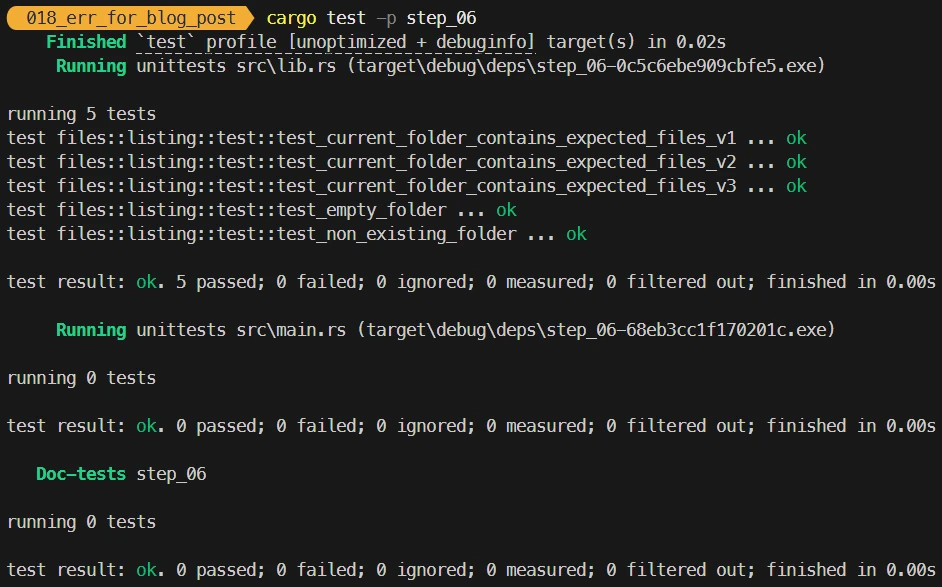
Here is what you should see after: cargo test -p step_06
Summary – Experimentation to Production
Summary – Experimentation to Production
- We now have a good code template for our experimentation
- See the summary of Experimentation
- We learn how to split monolithic experimentation code into one or more files, including a
lib.rsand amain.rs- We know much more about the module tree
- “Hub files” which help to build the module tree and avoid
mod.rsfilesmod files;: declares the existence and loads a module namedfilesin the crate under construction- Shortcuts like:
use crate::files::listing;- The visibility rule (if in parent then visible in child)
cratevsselfin theusestatements- Create an independent
error.rs- The re-export “trick” in
lib.rsto shareResultandErrorfrom the lib crate to the binary cratethiserrorand the re-write oferror.rsto provide a custom error type to the lib.- Move from custom error messages to strick custom error codes
- Testing with our library error codes
Exercises – Experimentation to Production
- You have this code
 use std::fs;

 fn main()  {
     let content = fs::read_to_string("config.txt");
     println!("{:?}", content);
 }
Apply what we discussed in the section Experimentation and use the “template” of our toolbox.
- You have this code
fn main() -> Result<(), Box<dyn std::error::Error>> { let mut input = String::new(); std::io::stdin().read_line(&mut input)?; let n: u32 = input.trim().parse()?; println!("Factorial : {}", factorial(n)); Ok(()) } fn factorial(n: u32) -> u32 { match n { 0 | 1 => 1, _ => n * factorial(n - 1), } }- Structure this package by creating:
lib.rsfile with a math module.- A
math.rsfile containing thefactorial()function. - An
error.rsfile with a customResulttype. - Ensure that
main.rsuses the library and handles errors via the customResulttype.
Conclusion
It’s 6AM. Your sister is coming back home. You are “dead” but happy because you learnt a lot even if you are not sure you will keep everything in your mind. It is also time for you to go to bed…
You know what? Don’t touch your PC for, at least, one day. And if you want to watch kitten’s videos use your phone.

Then come back to theses posts, one at a time and try to make the exercices. You can also take one of your previous code, copy/paste/rename the directory and add some error management. If the code is a “toy” stick to what we saw in Experimentation section. Once this is done, play the game and use what we learnt about errors management in the Production section, split one of your package in multiple files and add your own custom error type to it.
Enjoy!
Webliography
- THE book
-
You’re welcome to share comments or suggestions on GitHub to help improve this article.
- You’re probably misusing unwrap in Rust <!– <div align="center">
</div> –>
- Custom Errors <!– <div align="center">
</div> –>
- Error Best Practices <!– <div align="center">
</div> –>