Learning Modular Monolith Architecture with Rust
Learn Rust modular monolith: 7-step tutorial from Hello World to I/O-agnostic application with hexagonal architecture, traits and crates. For beginners, tinkerers, hobbyists, amateurs, and early-career developers…
TL;DR
- For beginners, tinkerers, hobbyists, amateurs, and early-career developers…
- We start from a single
main.rsthat prints “Hello Buck.” and end with a fully modular workspace where the business logic has no idea how it reads or writes - Each step compiles, runs, and passes its tests
- Step 00: Working proof of concept (one file, everything mixed)
- Step 01: Split into multiple files
- Step 02: Proper
tests/folder - Step 03: Hexagonal Architecture: ports (traits) and adapters (implementations)
- Step 04: One crate per component (Cargo workspace)
- Step 05: Improved error handling with
anyhow&thiserror - Step 06: Add a file adapter to prove it all works. If the architecture is right, the domain doesn’t change
- Bonus: Improve the file adapter
All the examples are on GitHub
This is Episode 00
The Posts Of The Saga
- Episode 00: 🟢 Introduction + Step 00 - First prototype working
- Episode 01: 🟢 Step 01 - Split the source code in multiple files
- Episode 02: 🟢 Step 02 - Add a test folder
- Episode 03: 🟢 Step 03 - Implement Hexagonal Architecture
- Episode 04: 🔵 Step 04 - One crate per component
- Episode 05: 🔴 Step 05 - Anyhow & ThisError
- Episode 06: 🟢 Step 06 - Add new adapters + Conclusion
- Episode 07: 🟢 Bonus

Table of Contents
Introduction
Let me start from the end so you know where we’re heading.
By the last episode of this series, we will have built a “Hello World” application that is completely independent from its I/O. Read that again. The business logic, the part that decides what greeting to produce, will have absolutely no idea whether it’s reading a name from the console, from a file, from a TCP socket, or from a carrier pigeon with a USB stick taped to its leg. It won’t know. It won’t care. And that’s exactly the point.
Now, before you roll your eyes and think “great, another architecture tutorial that overengineers a Hello World”… Yes. That’s exactly what this is. And it’s on purpose. The whole idea is to take the simplest possible problem (printing Hello Buck.) and use it as a vehicle to understand why and how we structure real applications. Because if you can’t see the pattern on a trivial example, you certainly won’t see it on a 50_000-line codebase. It is like physics or in mathematics. Rather than thinking in 13 dimensions from start, it can be smart to think the problem in 1 or 2 dimensions first.
In addition, just to make sure we’re in sync: if your current project consists of 200 lines of code in a single main.rs file, then yes, your app is a monolith, but no, you do not need a Hexagonal Architecture. That would be ridiculous and overkill. Tune it, improve it, keep it small and efficient. That’s perfectly fine.
However, if in another project you have more than one file, you start realizing that modifying this impacts that, and you begin to feel like your code looks like the Leaning Tower of Pisa… Then it might be a good idea to stop, grab a green tea, read the series, and ideally rewrite, break, and repair the code we’ll be discussing.
Nothing new under the sun
Here’s the thing: modular monoliths are not a new idea. Not even close. Like fashion, software architecture is an eternal cycle of rediscovery.
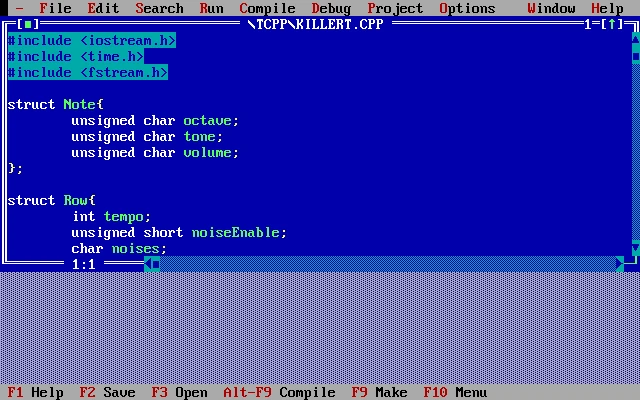
Back in the 1990s, with Turbo C or Borland C++, we were already doing modular development. You’d pick a graphics library here, a math library there, link everything together, and produce a single .exe. One binary, multiple components. Sound familiar?
Then came the 2000s and the era of dynamic loading. DLLs, COM, ActiveX… The idea was to build plugin architectures where our application was still one process, but it could load and unload components at runtime. Flexibility was the buzzword.
Then we went distributed. The application itself was shattered across multiple machines. SOA, then microservices. Each piece running on its own server, communicating over the network. The promise was scalability and independent deployment. The reality was… well, let’s just say distributed debugging at 3 AM is a special kind of fun.
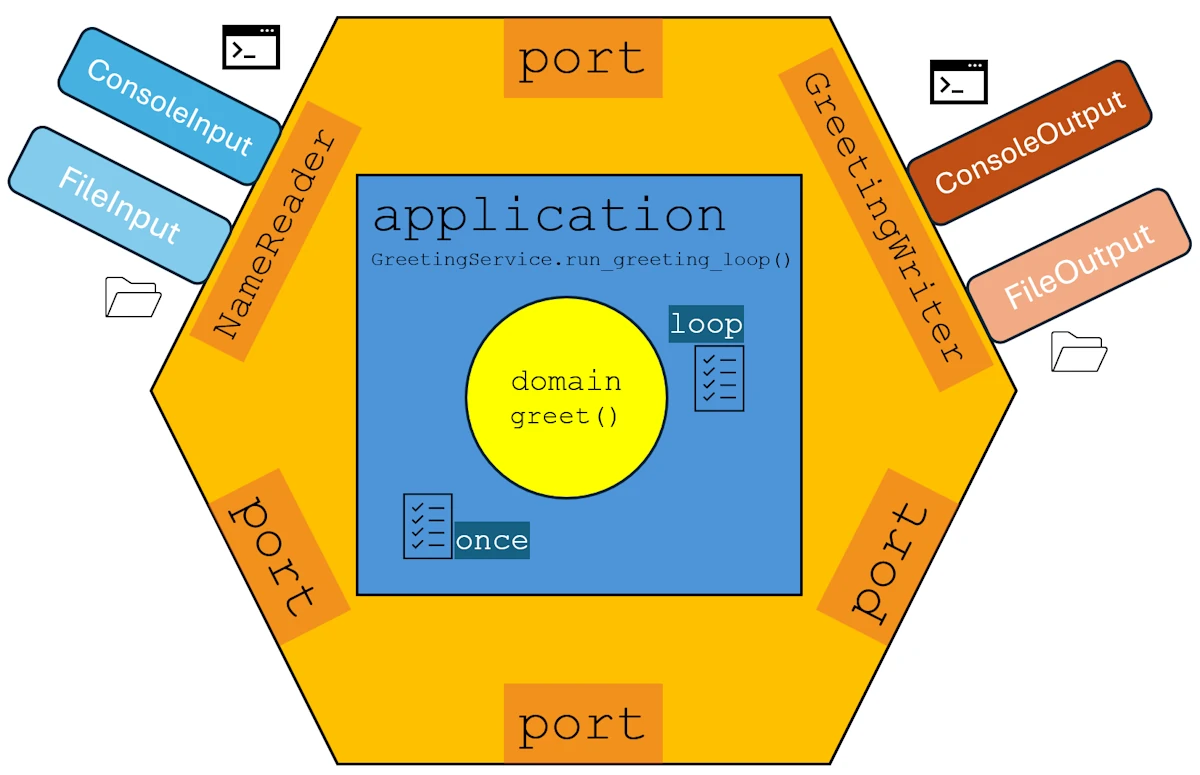
In 2005, Alistair Cockburn formalized Hexagonal Architecture (also known as “Ports and Adapters”). He didn’t invent the underlying ideas. Good developers had been separating concerns for decades. However he gave us a clear vocabulary and well-defined responsibilities. Ports, adapters, domain, application layer… Suddenly we had words to describe what we’d been doing (or should have been doing) all along.
And now, in the 2020s, the pendulum is swinging back. Modular monoliths are trendy again, and for good reason. The insight is simple: if our application is properly modular from day one, we get the best of both worlds. We start as a monolith: fast to develop, easy to deploy, simple to debug. Later, if and when we actually need it, we can extract any module into its own service running on a separate server. The key word being “if”. Because most applications never need microservices because most of us don’t have to solve the problems that Amazon, Netflix and firends have. However, all applications need clean boundaries.
So that’s what this series is about. We’ll take a simple Rust project and, step by step, refactor it into a modular monolith following hexagonal architecture principles. By the end, swapping the console for a file adapter (or anything else) will be a matter of changing a couple of lines in main.rs.
What you need before starting
This series is aimed at beginners. That said, you should have:
- Written some Rust code already (you’ve been through at least half of The Rust Programming Language aka TRPL)
- A working Rust toolchain (
cargo,rustc) - VSCode (or your editor of choice)
- A terminal and some basic comfort with the command line (create a folder, copy a file. In addition I will provide the Powershell commands)
The road ahead
We’ll go through 7 steps, each building on the previous one:
- Step 00: Build a working proof of concept. Everything in one file. It works, it’s ugly, it’s fine.
- Step 01: Split the code into multiple files. Same behavior, better organization.
- Step 02: Move the tests into a proper
tests/folder. - Step 03: Introduce Hexagonal Architecture: ports (traits) and adapters (implementations).
- Step 04: Promote each component to its own crate within a Cargo workspace.
- Step 05: Replace our homemade error types with
anyhowandthiserror. - Step 06: Add a file adapter to prove the architecture works
- Bonus: Fix an error in the API design.
By the end of the series, not only our “Hello World” application will be completely independent from its I/O but, cherry on the cake we will truly and deeply understand what the following kind of diagram means:
Again, don’t worry, at every step, we keep the application running and the tests passing. No big-bang refactor. No “trust me, it’ll work at the end.” Each step compiles, runs, and is tested. That’s the deal.
Alright, let’s get started, let’s print “Hello World!” again.
Objective
We want a working prototype (POC). This prototype is NOT the final application, but it proves that the “concept” is valid. Here the “concept” is rather simple, the idea is to print “Hello XYZ” if you enter “XYZ”. We will go one sample code at a time, validating some “business rule”, adding some tests…
At the end of this prototyping phase the folders will look like this:
step_00/
│   Cargo.toml
├───examples
│       ex00.rs
│       ex01.rs
│       ex02.rs
│       ex03.rs
│       ex04.rs
│       ex05.rs
│       ex06.rs
│       ex07.rs
└───src
        main.rs
Setup
You can download the project from GitHub (at least you know it works) but I strongly suggest to rebuild it yourself.
mkdir modular_monolith
cd modular_monolith
git init
cargo new step_00
cd step_00
code .
Once in VSCode, open an integrated terminal (CTRL+ù on FR keyboard)
cargo run
Expected output:
cargo run
   Compiling step_00 v0.1.0 (C:\Users\phili\OneDrive\Documents\Programmation\rust\01_xp\046_modular_monolith\step_00)
    Finished `dev` profile [unoptimized + debuginfo] target(s) in 0.48s
     Running `C:/Users/phili/rust_builds/Documents/Programmation/rust/01_xp/046_modular_monolith/step_00\debug\step_00.exe`
Hello, world!
At this point we know everything is up and running. Now, we can start to “play”.
Actions
Example 00
In the project folder, create an examples/ folder. In the folder write a ex00.rs code which uses a function greet() to format the message Hello XYZ when “XYZ” is used as an argument.
fn main() {
    let greeting = greet("Bob");
    println!("{}", greeting);
}

fn greet(name: &str) -> String {
    format!("Hello {}.", name)
}
Run the application with cargo run --example ex00. Expected output:
Hello Bob.
Example 01
There is an exception in our “business”. If the argument is “Roberto”, the application writes “Ciao Roberto!”. Copy ex00.rs into ex01.rs and modify the code to take this requirement into account:
fn main() {
    let greeting = greet("Roberto");
    println!("{}", greeting);
}

fn greet(name: &str) -> String {
    // Special case for Roberto
    if name == "Roberto" {
        return "Ciao Roberto!".to_string();
    }
    format!("Hello {}.", name)
}
Run the application:
cargo run -q --example ex01
Ciao Roberto!
Example 02
There are 2 other specific cases in our “business”.
- If the length of the parameter is 0, nothing is displayed and an error is returned
- The output cannot exceed 25 chars. If the parameter is too long, the output is truncated and ends with “…”.
Copy ex01.rs into ex02.rs, implement both cases and the error management
fn main() {
    match greet("Alice") {
        Ok(greeting) => println!("{}\n", greeting),
        Err(e) => eprintln!("Error: {}\n", e),
    }
}

fn greet(name: &str) -> Result<String, String> {
    if name.is_empty() {
        return Err("Name cannot be empty".to_string());
    }

    // Special case for Roberto
    if name == "Roberto" {
        return Ok("Ciao Roberto!".to_string());
    }

    // Calculate greeting length
    let greeting_prefix = "Hello ";
    let greeting_suffix = ".";
    const MAX_LENGTH: usize = 25;
    let available_for_name = MAX_LENGTH - greeting_prefix.len() - greeting_suffix.len();

    // If name fits within limit
    if name.len() <= available_for_name {
        return Ok(format!("Hello {}.", name));
    }

    // Name is too long, truncate with ellipsis
    const TRAILER: &str = "...";
    let truncate_length = MAX_LENGTH - greeting_prefix.len() - TRAILER.len();
    let truncated_name = &name[..truncate_length.min(name.len())];
    Ok(format!("Hello {}{}", truncated_name, TRAILER))
}
Run the application and make some experiments:
cargo run -q --example ex02
Hello Alice.
Example 03
Copy ex02.rs into ex03.rsand add one test just to see how this works:
fn main() {
    match greet("Roberto") {
        Ok(greeting) => println!("{}\n", greeting),
        Err(e) => eprintln!("Error: {}\n", e),
    }
}

// Generates a greeting according to business rules
fn greet(name: &str) -> Result<String, String> {
    if name.is_empty() {
        return Err("Name cannot be empty".to_string());
    }

    // Special case for Roberto
    if name == "Roberto" {
        return Ok("Ciao Roberto!".to_string());
    }

    // Calculate greeting length
    let greeting_prefix = "Hello ";
    let greeting_suffix = ".";
    const MAX_LENGTH: usize = 25;
    let available_for_name = MAX_LENGTH - greeting_prefix.len() - greeting_suffix.len();

    // If name fits within limit
    if name.len() <= available_for_name {
        return Ok(format!("Hello {}.", name));
    }

    // Name is too long, truncate with ellipsis
    const TRAILER: &str = "...";
    let truncate_length = MAX_LENGTH - greeting_prefix.len() - TRAILER.len();
    let truncated_name = &name[..truncate_length.min(name.len())];
    Ok(format!("Hello {}{}", truncated_name, TRAILER))
}

#[cfg(test)]
mod tests {
    use super::*;

    #[test]
    fn empty_name_returns_error() {
        let result = greet("");
        assert!(result.is_err());
        let err = result.unwrap_err();
        assert_eq!(err.to_string(), "Name cannot be empty");
    }
}
Run the test and make some experiments:
cargo test --example ex03
    Finished `test` profile [unoptimized + debuginfo] target(s) in 0.01s
     Running unittests examples\ex03.rs (C:/Users/phili/rust_builds/Documents/Programmation/rust/01_xp/046_modular_monolith/step_00\debug\examples\ex03-259cabc647968b82.exe)

running 1 test
test tests::empty_name_returns_error ... ok

test result: ok. 1 passed; 0 failed; 0 ignored; 0 measured; 0 filtered out; finished in 0.00s
Example 04
Copy ex03.rs into ex04.rs, add a loop in main() and more tests. Make sure the ? operator can be used in the main() function:
use std::io;
fn main() -> Result<(), String> {
    loop {
        // Read user input
        let mut input = String::new();
        io::stdin()
            .read_line(&mut input)
            .map_err(|e| format!("Failed to read input: {}", e))?;

        let name = input.trim();

        // Exit condition
        if name.eq_ignore_ascii_case("quit")
            || name.eq_ignore_ascii_case("exit")
            || name.eq_ignore_ascii_case("q!")
        {
            println!("\nGoodbye!");
            break;
        }

        // Skip empty input
        if name.is_empty() {
            continue;
        }

        match greet(name) {
            Ok(greeting) => println!("{}\n", greeting),
            Err(e) => eprintln!("Error: {}\n", e),
        }
    }

    Ok(())
}

/// Generates a greeting according to business rules
fn greet(name: &str) -> Result<String, String> {
    if name.is_empty() {
        return Err("Name cannot be empty".to_string());
    }

    // Special case for Roberto
    if name == "Roberto" {
        return Ok("Ciao Roberto!".to_string());
    }

    // Calculate greeting length
    let greeting_prefix = "Hello ";
    let greeting_suffix = ".";
    const MAX_LENGTH: usize = 25;
    let available_for_name = MAX_LENGTH - greeting_prefix.len() - greeting_suffix.len();

    // If name fits within limit
    if name.len() <= available_for_name {
        return Ok(format!("Hello {}.", name));
    }

    // Name is too long, truncate with ellipsis
    const TRAILER: &str = "...";
    let truncate_length = MAX_LENGTH - greeting_prefix.len() - TRAILER.len();
    let truncated_name = &name[..truncate_length.min(name.len())];
    Ok(format!("Hello {}{}", truncated_name, TRAILER))
}
Expected output (exit with CTRL+C):
cargo run --example ex04
   Compiling step_00 v0.1.0 (C:\Users\phili\OneDrive\Documents\Programmation\rust\01_xp\046_modular_monolith\step_00)
    Finished `dev` profile [unoptimized + debuginfo] target(s) in 0.28s
     Running `C:/Users/phili/rust_builds/Documents/Programmation/rust/01_xp/046_modular_monolith/step_00\debug\examples\ex04.exe`
sdf
Hello sdf.
Here are the tests:
#[cfg(test)]
mod tests {
    use super::*;
    const MAX_LENGTH: usize = 25;
    const TRAILER: &str = "...";

    #[test]
    fn empty_name_returns_error() {
        let result = greet("");
        assert!(result.is_err());
        // assert_eq!(result.unwrap_err(), "Name cannot be empty");
        let err = result.unwrap_err();
        assert_eq!(err.to_string(), "Name cannot be empty");
    }

    #[test]
    fn normal_greeting() {
        let result = greet("Alice");
        assert!(result.is_ok());
        assert_eq!(result.unwrap(), "Hello Alice.");
    }

    #[test]
    fn roberto_special_case() {
        let result = greet("Roberto");
        assert!(result.is_ok());
        assert_eq!(result.unwrap(), "Ciao Roberto!");
    }

    #[test]
    fn domain_should_not_use_special_greeting_for_similar_names() {
        // Case sensitive - "roberto" should get normal greeting
        let result = greet("roberto");
        assert_eq!(result.unwrap(), "Hello roberto.");

        // Different name
        let result = greet("Robert");
        assert_eq!(result.unwrap(), "Hello Robert.");
    }

    #[test]
    fn greeting_length_limit() {
        // "Hello " (6) + "." (1) = 7, so max name is 18 chars for MAX_LENGTH total
        let result = greet("ExactlyEighteenChr");
        assert!(result.is_ok());

        let greeting = result.unwrap();
        assert_eq!(greeting, "Hello ExactlyEighteenChr.");
        assert_eq!(greeting.len(), MAX_LENGTH);
    }

    #[test]
    fn truncation_for_long_names() {
        let long_name = "ThisIsAVeryLongNameThatExceedsTheLimit";
        let result = greet(long_name);
        assert!(result.is_ok());

        let greeting = result.unwrap();
        assert!(greeting.starts_with("Hello "));
        assert!(greeting.ends_with(TRAILER));
        assert_eq!(greeting.len(), MAX_LENGTH);
    }

    #[test]
    fn boundary_case_nineteen_chars() {
        // 19 chars should trigger truncation (6 + 19 + 1 = 26, exceeds MAX_LENGTH)
        let name = "NineteenCharactersX";
        let result = greet(name);
        assert!(result.is_ok());

        let greeting = result.unwrap();
        assert!(greeting.ends_with(TRAILER));
        assert_eq!(greeting.len(), MAX_LENGTH);
    }

    #[test]
    fn domain_should_handle_unicode_names() {
        let result = greet("José");
        assert_eq!(result.unwrap(), "Hello José.");

        let result = greet("François");
        assert_eq!(result.unwrap(), "Hello François.");
    }

    #[test]
    fn domain_should_truncate_long_unicode_names() {
        // **Points of attention:** Unicode characters may have different byte lengths
        let long_unicode_name = "Müller-Öffentlicher-Straßenbahn-Überführung";
        let result = greet(long_unicode_name);

        assert!(result.is_ok());
        let greeting = result.unwrap();
        assert_eq!(greeting.len(), MAX_LENGTH);
        assert!(greeting.ends_with(TRAILER));
    }
}
Expected output:
 cargo test --example ex04
   Compiling step_00 v0.1.0 (C:\Users\phili\OneDrive\Documents\Programmation\rust\01_xp\046_modular_monolith\step_00)
    Finished `test` profile [unoptimized + debuginfo] target(s) in 0.33s
     Running unittests examples\ex04.rs (C:/Users/phili/rust_builds/Documents/Programmation/rust/01_xp/046_modular_monolith/step_00\debug\examples\ex04-b27bcdfa5005af06.exe)

running 9 tests
test tests::boundary_case_nineteen_chars ... ok
test tests::domain_should_handle_unicode_names ... ok
test tests::domain_should_not_use_special_greeting_for_similar_names ... ok
test tests::empty_name_returns_error ... ok
test tests::roberto_special_case ... ok
test tests::truncation_for_long_names ... ok
test tests::domain_should_truncate_long_unicode_names ... ok
test tests::normal_greeting ... ok
test tests::greeting_length_limit ... ok

test result: ok. 9 passed; 0 failed; 0 ignored; 0 measured; 0 filtered out; finished in 0.00s
Example 05
Copy ex04.rs into ex05.rs then improve the main() function so that CTRL+C can be avoided:
use std::io::{self, Write};
fn main() -> Result<(), String> {
    println!("=== Greeting Service (Step 00) ===");
    println!("Enter a name to greet (or 'quit' to exit):\n");

    loop {
        // Prompt for input
        print!("> ");
        io::stdout().flush().map_err(|e| e.to_string())?;

        // Read user input
        let mut input = String::new();
        io::stdin()
            .read_line(&mut input)
            .map_err(|e| format!("Failed to read input: {}", e))?;

        let name = input.trim();

        // Exit condition
        if name.eq_ignore_ascii_case("quit")
            || name.eq_ignore_ascii_case("exit")
            || name.eq_ignore_ascii_case("q!")
        {
            println!("\nGoodbye!");
            break;
        }

        // Skip empty input
        if name.is_empty() {
            continue;
        }

        match greet(name) {
            Ok(greeting) => println!("{}\n", greeting),
            Err(e) => eprintln!("Error: {}\n", e),
        }
    }

    Ok(())
}
// The rest of the code is unchanged
Expected output:
cargo run --example ex05
=== Greeting Service (Step 00) ===
Enter a name to greet (or 'quit' to exit):

> ert
Hello ert.

> quit

Goodbye!
Example 06
On this excellent Web site, read again this page about errors. When this is done, copy ex05.rs into ex06.rs and modify the code in consequence:
use std::io::{self, Write};

pub type Error = Box<dyn std::error::Error>;
pub type Result<T> = std::result::Result<T, Error>;

fn main() -> Result<()> {
    println!("=== Greeting Service (Step 00) ===");
    println!("Enter a name to greet (or 'quit' to exit):\n");

    loop {
        // Prompt for input
        print!("> ");
        io::stdout().flush().map_err(|e| e.to_string())?;

        // Read user input
        let mut input = String::new();
        io::stdin()
            .read_line(&mut input)
            .map_err(|e| format!("Failed to read input: {}", e))?;

        let name = input.trim();

        // Exit condition
        if name.eq_ignore_ascii_case("quit")
            || name.eq_ignore_ascii_case("exit")
            || name.eq_ignore_ascii_case("q!")
        {
            println!("\nGoodbye!");
            break;
        }

        // Skip empty input
        if name.is_empty() {
            continue;
        }

        // Call domain logic
        match greet(name) {
            Ok(greeting) => println!("{}\n", greeting),
            Err(e) => eprintln!("Error: {}\n", e),
        }
    }

    Ok(())
}

// Generates a greeting according to business rules
fn greet(name: &str) -> Result<String> {
 ...
}
// The rest of the code is unchanged
cargo run --example ex06
   Compiling step_00 v0.1.0 (C:\Users\phili\OneDrive\Documents\Programmation\rust\01_xp\046_modular_monolith\step_00)
    Finished `dev` profile [unoptimized + debuginfo] target(s) in 0.57s
     Running `C:/Users/phili/rust_builds/Documents/Programmation/rust/01_xp/046_modular_monolith/step_00\debug\examples\ex06.exe`
=== Greeting Service (Step 00) ===
Enter a name to greet (or 'quit' to exit):

> Zorro
Hello Zorro.

> exit

Goodbye!
Example 07
The POC is done! Copy ex06.rs into ex07.rs, review the code once again, add comments, run the tests and take a break. See you tomorrow!
//! Greeting service example demonstrating error handling,
//! business rules, and basic I/O interaction.
//!
//! Run with:
//! - cargo run --example ex07
//! - cargo test --example ex07

use std::io::{self, Write};

pub type Error = Box<dyn std::error::Error>;
pub type Result<T> = std::result::Result<T, Error>;

/// Application entry point.
///
/// Runs an interactive loop that asks the user for a name,
/// applies greeting rules, and handles errors gracefully.
fn main() -> Result<()> {
    println!("=== Greeting Service (Step 00) ===");
    println!("Enter a name to greet (or 'quit' to exit):\n");

    loop {
        // Prompt for input
        print!("> ");
        io::stdout().flush().map_err(|e| e.to_string())?;

        // Read user input
        let mut input = String::new();
        io::stdin()
            .read_line(&mut input)
            .map_err(|e| format!("Failed to read input: {}", e))?;

        let name = input.trim();

        // Exit condition
        if name.eq_ignore_ascii_case("quit")
            || name.eq_ignore_ascii_case("exit")
            || name.eq_ignore_ascii_case("q!")
        {
            println!("\nGoodbye!");
            break;
        }

        // Skip empty input
        if name.is_empty() {
            continue;
        }

        // Call domain logic
        match greet(name) {
            Ok(greeting) => println!("{}\n", greeting),
            Err(e) => eprintln!("Error: {}\n", e),
        }
    }

    Ok(())
}

/// Generates a greeting according to business rules.
///
/// Rules:
/// - Default: "Hello {name}." with a maximum of 25 characters total
/// - Special case: "Roberto" returns "Ciao Roberto!"
/// - If the name is too long, it is truncated and suffixed with "..."
///
/// # Errors
/// Returns an error if the name is empty.
fn greet(name: &str) -> Result<String> {
    if name.is_empty() {
        return Err("Name cannot be empty".to_string().into());
    }

    // Special case for Roberto
    if name == "Roberto" {
        return Ok("Ciao Roberto!".to_string());
    }

    const MAX_LENGTH: usize = 25;
    const GREETING_PREFIX: &str = "Hello ";
    const GREETING_SUFFIX: &str = ".";
    const TRAILER: &str = "...";

    let available_for_name = MAX_LENGTH - GREETING_PREFIX.len() - GREETING_SUFFIX.len();

    // Name fits within the allowed length
    if name.len() <= available_for_name {
        return Ok(format!("Hello {}.", name));
    }

    // Name is too long, truncate and add ellipsis
    let truncate_length = MAX_LENGTH - GREETING_PREFIX.len() - TRAILER.len();

    let truncated_name = &name[..truncate_length.min(name.len())];
    Ok(format!("Hello {}{}", truncated_name, TRAILER))
}
// The rest of the code is unchanged
Expected output:
cargo run --example ex07
   Compiling step_00 v0.1.0 (C:\Users\phili\OneDrive\Documents\Programmation\rust\01_xp\046_modular_monolith\step_00)
    Finished `dev` profile [unoptimized + debuginfo] target(s) in 0.40s
     Running `C:/Users/phili/rust_builds/Documents/Programmation/rust/01_xp/046_modular_monolith/step_00\debug\examples\ex07.exe`
=== Greeting Service (Step 00) ===
Enter a name to greet (or 'quit' to exit):

> Obiwan
Hello Obiwan.

> Luke
Hello Luke.

> Exit

Goodbye!
cargo test --example ex07
   Compiling step_00 v0.1.0 (C:\Users\phili\OneDrive\Documents\Programmation\rust\01_xp\046_modular_monolith\step_00)
    Finished `test` profile [unoptimized + debuginfo] target(s) in 0.48s
     Running unittests examples\ex07.rs (C:/Users/phili/rust_builds/Documents/Programmation/rust/01_xp/046_modular_monolith/step_00\debug\examples\ex07-789efb9150878b4d.exe)

running 9 tests
test tests::boundary_case_nineteen_chars ... ok
test tests::domain_should_handle_unicode_names ... ok
test tests::empty_name_returns_error ... ok
test tests::greeting_length_limit ... ok
test tests::domain_should_not_use_special_greeting_for_similar_names ... ok
test tests::roberto_special_case ... ok
test tests::domain_should_truncate_long_unicode_names ... ok
test tests::truncation_for_long_names ... ok
test tests::normal_greeting ... ok

test result: ok. 9 passed; 0 failed; 0 ignored; 0 measured; 0 filtered out; finished in 0.00s
Summary
What have we done so far?
- We have a working proof of concept
- The business rule (say “Hello”) is applied
- Exceptions to the business rule are managed (“Roberto”, empty parameter…)
- Errors are returned
- Tests are written but remember that “testing can be used to show the presence of bugs, but never to show their absence” (Edsger W. Dijkstra).
Next Steps
Tomorrow, read Episode 01.
- Episode 00: Introduction + Step 00 - First prototype working
- Episode 01: Step 01 - Split the source code in multiple files
- Episode 02: Step 02 - Add a test folder
- Episode 03: Step 03 - Implement Hexagonal Architecture
- Episode 04: Step 04 - One crate per component
- Episode 05: Step 05 - Anyhow & ThisError
- Episode 06: Step 06 - Add new adapters + Conclusion
- Episode 07: Bonus