Rust Error Handling, Demystified
A beginner-friendly conversation on Errors, Results, Options, and beyond.
This is Episode 03

Let's have a beginner-friendly conversation on Errors, Results, Options, and beyond.
Posts
Table of Contents
Custom Error Types and Error Handling in Larger Programs
Alice: So far we’ve talked about using the built-in errors (like std::io::Error or parsing errors). What about bigger programs where different parts can error in different ways? How should I think about it and then design my own error data types, if necessary?
Bob: For me, the key point is that we need to ensure that our custom error type behaves as much like std::error::Error as possible. If we can do that, our error can be handled like any standard error, which is pretty cool. As you will see, luckily the std::error::Error trait is here to help.
This said, as our Rust program grows, we might call many operations that can fail, potentially with different error types. We have a few choices:
- Use one catch-all error type everywhere to simplify things. Think to our good old
Box<dyn std::error::Error>or a crate likeanyhowin applications. - Define our own custom error type (usually an
enum) that implementsstd::error::Errorwhere we enumerate all possible errors in our context and which is able to convert other errors into our custom type.
Defining a custom error type is common in libraries because, once this is done, the library returns one consistent error type that the users can handle, instead of many disparate types.
Alice: How would a custom error type looks like?
Bob: As I said, usually it is an enum, you know, the Rust’s jewel of the crown…

For example, imagine a program that needs to load a configuration file which is in JSON format. Things that could go wrong: file I/O could fail, or JSON parsing could fail. These are two different error types from the std lib or the crate (IO errors and parse errors). We might create an enum type definition like this:
// ex17.rs
use serde::Deserialize;
use std::fmt;
use std::fs::{read_to_string, write};
use std::io::ErrorKind;

#[derive(Debug)]
enum ConfigError {
    Io(std::io::Error),
    Parse(serde_json::Error),
}

// Implement Display for our error to satisfy Error trait.
impl fmt::Display for ConfigError {
    fn fmt(&self, f: &mut fmt::Formatter<'_>) -> fmt::Result {
        match self {
            ConfigError::Io(e) => write!(f, "I/O error: {e}"),
            ConfigError::Parse(e) => write!(f, "Parse error: {e}"),
        }
    }
}

// Implement the standard Error trait for integration with other error tooling.
// To implement the std::error::Error trait for ConfigError, ConfigError must implement Debug and Display
impl std::error::Error for ConfigError {}
ConfigErroris our custom error type- It is an enum (a sum type). A value of this type is exactly one of its variants at a time. Here it has two possible variants:
Io(...)— a variant that carries one payload of typestd::io::ErrorParse(...)— a variant that carries one payload of typeserde_json::Error
- Keep in mind that each enum variant is also a constructor of an instance of the enum.
- Think about:
fn Io(e: std::io::Error) -> ConfigError{...}
- Think about:
This is key
Each enum variant is also a constructor of an instance of the enum.
- Then in the code above we implement the
Displaytrait for our data typeConfigError.- This is mandatory. In VSCode, if we hover the word
Errorfromimpl std::error::Errorwe learn that- to implement the
std::error::Errortrait forConfigError,ConfigErrormust implementDebugandDisplay. Debugis easy. It is implemented automatically thanks to the directive#[derive(Debug)].- Now, regarding
Display, for each variant of theenumwe explain how towrite!()it so that they can print nicely.
- to implement the
- This is mandatory. In VSCode, if we hover the word
This is key
To implement the
std::error::Errortrait forConfigError,ConfigErrormust implementDebugandDisplay
- Finally comes the empty implementation of
ErrorforConfigError. It is empty because the trait only have default methods which is the case here. In other words, the line officially registers our data type as a standard error, without any additional customization.
Side Note
If you don’t feel confident with traits you can read this series of posts.
- Next, when we write the function
load_config()we make sure it returnsResult<Config, ConfigError>. See below:
fn load_config(path: &str) -> Result<Config, ConfigError> {
    let data = read_to_string(path).map_err(ConfigError::Io)?;
    let cfg = serde_json::from_str::<Config>(&data).map_err(ConfigError::Parse)?;
    Ok(cfg)
}
Now, fasten your seat belt and stay with me because what follows is a bit rock ‘n’ roll… In any case, it took me a while to really realize what was happening. Indeed, inside load_config(), if something bad happen we convert the current error into ConfigError with the help of .map_err(). Here is how:
- If it fails,
std::fs::read_to_stringreturns aResult<String, std::io::Error>.map_err(ConfigError::Io)is then executed- However, since you remember (you confirm, you remember) that each enum variant of
ConfigErroris also an initializer of the enum, when.map_err(ConfigError::Io)is executed, it calls the functionConfigError::Io(e: std::io::Error) -> ConfigErrorwhich constructs and returns aConfigError - The
ConfigError(which have the traitstd::error::Error) is presented in front of the?operator - The
?operator bubbles up theConfigErrorimmediately since in our explanations we said thatstd::fs::read_to_stringjust failed
-
The same mechanics is at work on the next line
- The caller of
load_config()only have to handleConfigError. Below we show a part of theload_or_init()function. The idea is to focus on how this works from the caller point of view:
fn load_or_init(path: &str) -> Result<Config, ConfigError> {
    match load_config(path) {
        ...
        Err(ConfigError::Parse(e)) => {
            eprintln!("Invalid JSON in {path}: {e}");
            Err(ConfigError::Parse(e))
        }
        ...
    }
}
- This is a
matchon the value returned byload_config() - If the pattern matches
Err(ConfigError::Parse(e)), the.jsonin invalid - The function bubbles up (
Err(...)) the error to the caller (main()here)
Let’s have a look at the main() function.
fn main() -> Result<(), Box<dyn std::error::Error>> {
    write("good_config.json", r#"{ "app_name": "Demo", "port": 8080 }"#)?;
    write("bad_config.json", r#"{ "app_name": "Oops", "port": "not a number" }"#)?;

    let cfg = load_or_init("bad_config.json")?;
    println!("Loaded: {} on port {}", cfg.app_name, cfg.port);
    Ok(())
}
- Note that
main()returnsResult<(), Box<dyn std::error::Error>> - This is cool because now we can use the
?operator in the body of themain()at the end of certain lines - Thanks to
Box<dyn std::error::Error>>, it works even if the error type fromwrite()andload_or_init()are different (they both implement thestd::error::Errortrait)
Expected output of the ex17.rs with bad_config.json:
Invalid JSON in bad_config.json: invalid type: string "not a number", expected u16 at line 1 column 44
Error: Parse(Error("invalid type: string \"not a number\", expected u16", line: 1, column: 44))
error: process didn't exit successfully: `target\debug\examples\ex17.exe` (exit code: 1)
Find below ex17.rs complete source code because I hate partial source code in blog posts that usually never works.
- Feel free to copy/paste in Rust Playground
- In VSCode, set a breakpoint and take the time to go through the code line by line (F10).
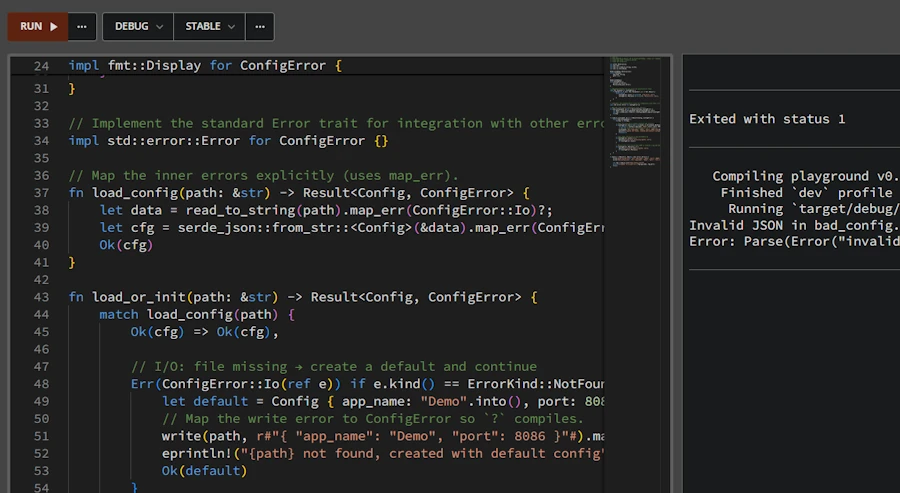
Click the image to zoom in
// ex17.rs
use serde::Deserialize;
use std::fmt;
use std::fs::{read_to_string, write};
use std::io::ErrorKind;

#[derive(Debug, Deserialize)]
struct Config {
    app_name: String,
    port: u16,
}

#[derive(Debug)]
enum ConfigError {
    Io(std::io::Error),
    Parse(serde_json::Error),
}

impl fmt::Display for ConfigError {
    fn fmt(&self, f: &mut fmt::Formatter<'_>) -> fmt::Result {
        match self {
            ConfigError::Io(e) => write!(f, "I/O error: {e}"),
            ConfigError::Parse(e) => write!(f, "Parse error: {e}"),
        }
    }
}

impl std::error::Error for ConfigError {}

fn load_config(path: &str) -> Result<Config, ConfigError> {
    let data = read_to_string(path).map_err(ConfigError::Io)?;
    let cfg = serde_json::from_str::<Config>(&data).map_err(ConfigError::Parse)?;
    Ok(cfg)
}

fn load_or_init(path: &str) -> Result<Config, ConfigError> {
    match load_config(path) {
        Ok(cfg) => Ok(cfg),

        Err(ConfigError::Io(ref e)) if e.kind() == ErrorKind::NotFound => {
            let default = Config { app_name: "Demo".into(), port: 8086 };
            // Map the write error to ConfigError so `?` compiles.
            write(path, r#"{ "app_name": "Demo", "port": 8086 }"#).map_err(ConfigError::Io)?;
            eprintln!("{path} not found, created with default config");
            Ok(default)
        }

        Err(ConfigError::Io(e)) => {
            eprintln!("I/O error accessing {path}: {e}");
            Err(ConfigError::Io(e))
        }

        Err(ConfigError::Parse(e)) => {
            eprintln!("Invalid JSON in {path}: {e}");
            Err(ConfigError::Parse(e))
        }
    }
}

fn main() -> Result<(), Box<dyn std::error::Error>> {
    write("good_config.json", r#"{ "app_name": "Demo", "port": 8080 }"#)?;
    write("bad_config.json", r#"{ "app_name": "Oops", "port": "not a number" }"#)?;

    let cfg = load_or_init("bad_config.json")?;
    println!("Loaded: {} on port {}", cfg.app_name, cfg.port);
    Ok(())
}
Alice: Got it. So if I have a module—or more likely, a library—that performs some operations, I should define a custom error type in that module to represent everything that can go wrong. Then I can use ? to convert sub-errors into my custom error and let them bubble up to main(). That way, main() only deals with my module’s error type.
Bob: Exactly. Let’s do a quick mini-example of propagating an error from a module to main(). Suppose we have a module math_utils with a function that can fail:
// ex19.rs
mod math_utils {
    // This module could be in a file math_utils.rs
    #[derive(Debug)]
    pub enum MathError {
        DivisionByZero { numerator: f64 },
        NegativeLogarithm { value: f64 },
    }

    impl std::fmt::Display for MathError {
        fn fmt(&self, f: &mut std::fmt::Formatter<'_>) -> std::fmt::Result {
            match self {
                MathError::DivisionByZero { numerator } => write!(f, "Cannot divide {} by zero", numerator),
                MathError::NegativeLogarithm { value } => write!(f, "Logarithm of negative number ({})", value),
            }
        }
    }

    impl std::error::Error for MathError {}

    // Functions that return Result<_, MathError>
    pub fn divide(a: f64, b: f64) -> Result<f64, MathError> {
        if b == f64::EPSILON { Err(MathError::DivisionByZero { numerator: a }) } else { Ok(a / b) }
    }

    pub fn log10(x: f64) -> Result<f64, MathError> {
        if x < 0.0 { Err(MathError::NegativeLogarithm { value: x }) } else { Ok(x.log10()) }
    }
}

use math_utils::{divide, log10};
type Result<T> = std::result::Result<T, Box<dyn std::error::Error>>;

fn run() -> Result<()> {
    let my_log = log10(1024.0)?;
    println!("Log10 is {:.3}", my_log);

    let ratio = divide(10.0, 3.0)?;
    println!("Ratio is {:.3}", ratio);

    let bad_ratio = divide(5.0, 0.0)?;
    println!("This won't print because of error above ({})", bad_ratio);

    Ok(())
}

fn main() -> Result<()> {
    if let Err(e) = run() {
        eprintln!("Error: {}", e);
        std::process::exit(42);
    }
    Ok(())
}
Expected output:
Log10 is 3.010
Ratio is 3.333
Error: Cannot divide 5 by zero
error: process didn't exit successfully: `target\debug\examples\ex19.exe` (exit code: 42)
If we run this:
main()calls therun()function- There is no problem with
log10() - There is no problem with the first
divide() - The second
divide()returns anErr(MathError::DivisionByZero)and the?bubbles up the error to the caller - The
println!()withbad_ratiois never executed - Back in
main(), “Ooops, division by zero” is printed, thanks toDisplayimplementation forMathError - Just for the fun, at this point, we return 42 and exit.
We could also catch the error in main with a match instead, and print something custom. But the point was to illustrate bubbling the error from a module up to main(). The key was to define MathError and to use it consistently. Each function in the module returns MathError on failure, and run() and main() can deal with MathError.
Alice: I think I have a much better understanding error handling in Rust now. Thanks.
Bob: It’s a lot to take in at first, but once we get comfortable, we appreciate how Rust’s approach makes us think about errors up front. No more runtime surprises from unhandled exceptions. We decide what to do in each case. And keep in mind, for larger packages, there are crates like thiserror to reduce error boilerplate, and anyhow for quick-and-easy error handling in applications. Those can be handy, but the fundamentals of Result<T, E> and ? we covered are the building blocks of it all.
Summary – Custom Errors
Summary – Custom Errors
- Custom error types: We can define our own error type (often an
enumbecause our error can only have a value at a time) to represent errors in our application or library. This allows us to consolidate different error sources (IO, parsing, etc.) into one type and make our functions return that. It improves API clarity. Callers deal with one error type and can match on its variants.- Implementing Error trait: By implementing
std::error::Error(which means implementingfmt::Displayand having#[derive(Debug)]), our error type becomes interoperable with the standard ecosystem. It lets us use trait objects (Box<dyn Error>) if needed and makes our errors printable and convertible.- Converting errors: We use pattern matching or helper methods like
.map_err()(or theFromtrait implementations) to convert underlying errors into our custom error variants. The?operator automatically convert errors if our custom error type implementsFromfor the error thrown inside the function. This reduces a lot of manual code in propagating errors upward.
- Suppose we have an error
enumConfigError { Io(io::Error), Parse(ParseError) }. If a function reading a config file encounters anio::Error, we can do.map_err(ConfigError::Io)?to turn it into our error type and return it. The same for parse errors. Now the function returnsResult<Config, ConfigError>, and the caller only has to handleConfigError.- Using
Box<dyn Error>: In application code, if we don’t want to define lots of error types, we can useBox<dyn Error>as a catch-all error type (since most errors in std lib implementError). For example,fn main() -> Result<(), Box<dyn std::error::Error>>allows us to use?with any error that implementsErrorand just propagate it. This is convenient, but in library code you’d usually favor a concrete error type so that the API is self-documented.
Exercises – Custom Errors
-
Define and Use a Custom Error: Create an enum
MyErrorwith variants for two different error scenarios (for example,MyError::EmptyInputandMyError::BadFormat(std::num::ParseIntError)). Implementstd::fmt::DisplayforMyErrorto provide human-readable messages. Then write a functionparse_nonempty_int(s: &str) -> Result<i32, MyError>that returns an error if the input string is empty (EmptyInput) or if parsing to int fails (BadFormat). Use?and appropriate conversions (map_err) inside the function. Test it with various inputs (empty string, non-numeric, numeric). -
Combine Two Error Types: Suppose we have two functions
fn get_data() -> Result<String, io::Error>andfn parse_data(data: &str) -> Result<Data, ParseError>. Write a new functionfn load_data() -> Result<Data, LoadError>whereLoadErroris our custom enum that has variants for IO and Parse errors. Inload_data, callget_data()andparse_data()using?, converting their errors intoLoadError(we can implementFrom<io::Error>andFrom<ParseError>forLoadErroror usemap_err). Then try usingload_data()in amainthat prints different messages depending on which error occurred (hint: usematch e { LoadError::Io(e) => ..., LoadError::Parse(e) => ... }). -
Error Propagation in Modules: Organize a small package with two modules:
networkanddatabase. Innetwork, create a functionfetch_data()that might return a network-related error (we can simulate by just returning anErrvariant likeNetworkError::Offline). Indatabase, create a functionsave_data()that might return a DB-related error (e.g.,DbError::ConnectionLost). Then inmain, write a functionrun()that callsfetch_datathensave_data, propagating errors using?. Define a combined error type (enum withNetwork(NetworkError), Database(DbError)) to unify them forrun(). Havemaincallrun()and handle the unified error. This exercise will give we practice in designing error types and propagating across module boundaries.