Rust Error Handling, Demystified
A beginner-friendly conversation on Errors, Results, Options, and beyond.
This is Episode 01

Let's have a beginner-friendly conversation on Errors, Results, Options, and beyond.
Posts
Table of Contents
The Result<T, E> Type: Handling Recoverable Errors
Alice: So, Result<T, E>… What exactly is it?
Bob: Result<T, E> is an enum (like a tagged union) defined roughly like this:
enum Result<T, E> {
    Ok(T),  // success, holding a value of type `T`
    Err(E), // failure, holding an error value of type `E`
}
It’s a generic enum with two variants:
Ok(T)means the operation succeeded and yielded a value of typeTErr(E)means it failed, yielding an error of typeEdescribing what went wrong
For example, when we try to open a file, the success type T is a file handle ( std::fs::File ), and the error type E is std::io::Error.

Alice: How do I use it? Let’s say I call a function that returns a Result. What do I do with that?
Bob: We have to check which variant it is. Typically, we use a match expression or one of many helper methods. Let’s do a simple example. Suppose we try to parse an integer from a string – this can fail if the string isn’t a number. Copy/paste/try this code in Rust Playground:
fn main() {
    let text = "42";
    let number_result = text.parse::<i32>();  // parse() returns Result<i32, ParseIntError>

    match number_result {
        Ok(n) => println!("The number is {n}"),              // If parsing succeeds, use the number.
        Err(e) => println!("Could not parse number: {e}"),   // If it fails, handle the error.
    }
}
In this code, text.parse::<i32>() will return an Ok(42) if the string is a valid integer, or an Err(e) if it isn’t (for example, if text = "hello" ). We then match (destructure) on the number_result:
- in the
Okarm, we get the parsedi32numbernand print it - in the
Errarm, we get an errore(of typestd::num::ParseIntErrorin this case) and print an error message.
This way we’ve handled both outcomes explicitly. Using match is the standard way to handle a Result<T, E> because it forces us to consider both success and error cases.
Alice: Cool, but matching on every Result<T, E> is verbose. No?
Bob: True and this is why Rust provides utility methods on Result<T, E> to make life easier. For example, if we just want to crash on error (perhaps in an experimentation), we can use .unwrap() or .expect(...). These will check the Result<T, E> for us:
.unwrap()returns the success value if it’sOk, but if it’s anErr, it willpanic!()right there..expect(msg)does the same but lets us provide a custom panic error message.
Alice: So .unwrap() is basically a shortcut for “give me the value or panic”?
Bob: Exactly. For example copy/paste/try this code in Rust Playground:
fn main() {
    let text = "not a number";
    // This will panic because the string can't be parsed as i32
    let number = text.parse::<i32>().unwrap();
}
If we run this, it will panic with a message like: thread 'main' panicked at src/main.rs:4:38: called 'Result::unwrap()' on an 'Err' value: ParseIntError { kind: InvalidDigit }
Because “not a number” can’t be parsed, parse returns an Err, and .unwrap() triggers a panic!().
By contrast, if text = "42", .unwrap() would succeed and give us the i32 value 42 without any panic.
Alice: Got it. And .expect() is similar but with my own message?
Bob: Right. We might do:
let number = text.parse::<i32>().expect("Expected a number in the string");
If it fails, we would get a panic!() with our message: 'Expected a number in the string: ParseIntError { ... }'. Using .expect() with a clear message is considered better style code compared to .unwrap(), because if a panic happens, the message helps us track down the source and reason.
In fact, developers should prefer .expect() over .unwrap() so that there’s more context in case of a crash.
Alice: So I should avoid .unwrap() and use expect() with a good message if I must panic on an error?
Bob: Yes, that’s a good rule of thumb. Even better, where possible, handle the error gracefully instead of panicking. .unwrap()/.expect() should be used sparingly – basically in scenarios where we are very sure Err won’t happen or in code snippet, sample code for brevity.
One more thing: Result<T, E> has other handy methods:
.unwrap_or_default()will.unwrap()the value or give a default if it’s an error (no panic)..unwrap_or_else(f)where we can run a closure to generate a fallback value or do some other handling for the error.
To show how to use .unwrap_or_default(), here below is a code you can copy/paste in Rust Playground. Note that the default is the default of the current data type (0 for i32, “” for a String…)
fn main() {
    // Option<i32>
    let some_number: Option<i32> = Some(42);
    let none_number: Option<i32> = None;

    // unwrap_or_default() gives the value if Some, or the default (0 for i32) if None
    println!("Some(42).unwrap_or_default() = {}", some_number.unwrap_or_default());
    println!("None::<i32>.unwrap_or_default() = {}", none_number.unwrap_or_default());

    // Option<String>
    let some_text: Option<String> = Some("Hello".to_string());
    let none_text: Option<String> = None;

    // Default for String is empty string ""
    println!("Some(\"Hello\").unwrap_or_default() = '{}'", some_text.unwrap_or_default());
    println!("None::<String>.unwrap_or_default() = '{}'", none_text.unwrap_or_default());
}
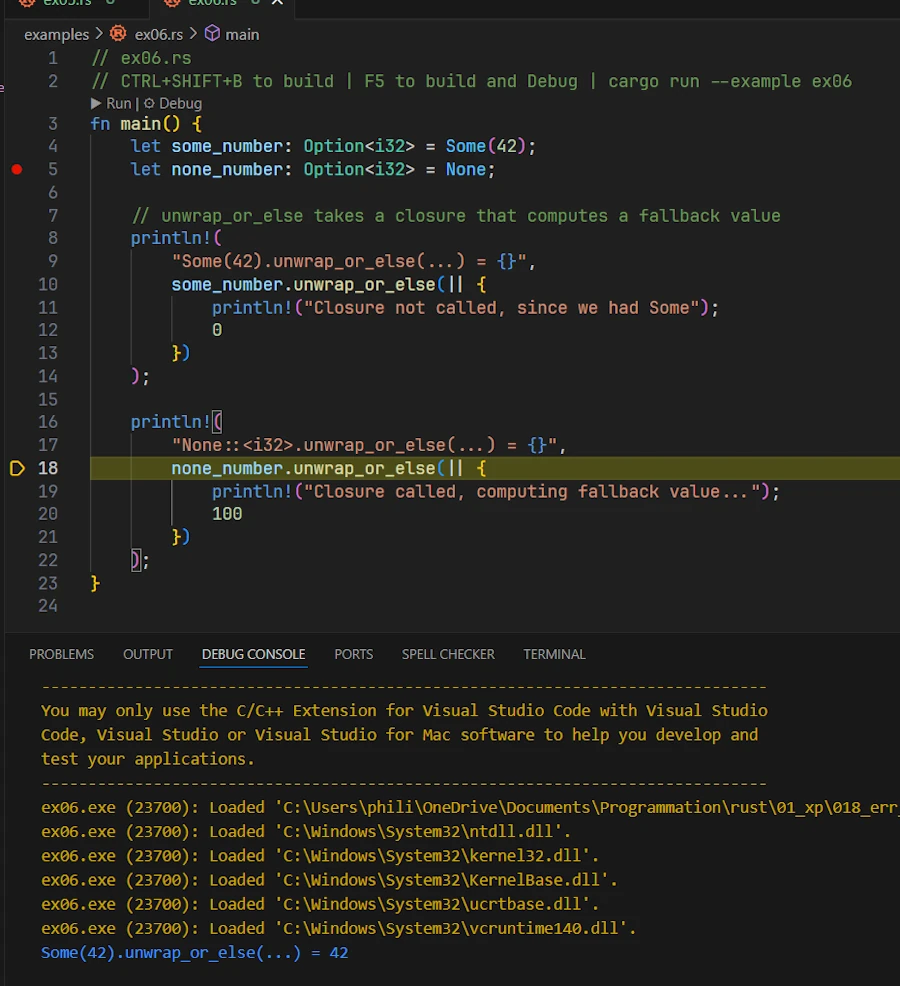
The code below shows how to use .unwrap_or_else(f). The tricky part might be the source code layout
// ex06.rs
fn main() {
    let some_number: Option<i32> = Some(42);
    let none_number: Option<i32> = None;

    // unwrap_or_else takes a closure that computes a fallback value
    println!(
        "Some(42).unwrap_or_else(...) = {}",
        some_number.unwrap_or_else(|| {
            println!("Closure not called, since we had Some");
            0
        })
    );

    println!(
        "None::<i32>.unwrap_or_else(...) = {}",
        none_number.unwrap_or_else(|| {
            println!("Closure called, computing fallback value...");
            100
        })
    );
}
With this code it might be a good idea to open ex06.rs in the editor, set a breakpoint on line 5, press F5, click on the DEBUG CONSOLE tab when the execution is paused and then to press F10 to step over line by line.
Alice: Earlier, we mentioned opening files… Is that similar with Result<T, E> ?
Bob: Yes. Opening a file is a classic example of a function returning Result. Let’s look the code below in Rust Playground:
use std::fs::File;
use std::io::ErrorKind;

fn main() {
    let file_path = "hello.txt";
    let result = File::open(file_path);  // Result<File, std::io::Error>

    let file = match result{
        Ok(file_handle) => file_handle,
        Err(error) => {
            if error.kind() == ErrorKind::NotFound {
                // If file not found, try to create it
                File::create(file_path).expect("Failed to create file")
            } else {
                // For other errors (e.g., permission denied), panic
                panic!("Problem opening the file: {:?}", error);
            }
        }
    };
    println!("File opened: {:?}", file);
}
Here, File::open returns a Result<File, Error> – it could be Ok(file_handle) if the file exists and was opened, or Err(error) if something went wrong (file missing, no permission, etc.).
We then match on it:
- If the error kind is
NotFound, we attempt to create the file (which itself could error, so we use.expect()to crash if even creation fails). - For any other kind of error, we just panic immediately.
This way, we handle the “file not found” case by recovering (creating a new file) and let other errors bubble up as a panic!(). This example shows how we might handle different error scenarios differently by inspecting the error (here using error.kind()).
Alice: I see. We could also handle it differently, like notify the user or retry, depending on the context.
Bob: Exactly. The point is that with Result<T, E>, we decide how to handle it. We could propagate it up, log it, ignore it (not recommended without justification), or crash. But we have to choose. That’s the strength of the design: we won’t accidentally ignore an error.
Summary – The Result<T, E> Type Basics
Summary – The
Result<T, E>Type Basics
Result<T, E>is an enum: with variantsOk(T)(success) andErr(E)(error).- Handle with
matchor methods:
match
- Using
matchon aResult<T, E>forces explicit handling of success and error.matchdestructures theResult<T, E>- Inside an
Ok(file)match arm, the namefileis a pattern variable that temporarily binds theFileobject contained in theOk()variant of the enumResult<T, E>.- Methods
- Use
.unwrap()/.expect()to get the value orpanic!()on error.- Use
.unwrap_or_default()/.unwrap_or_else(func)to provide fallbacks instead of panicking.- Prefer
.expect(): If we choose topanic!()on an error, prefer.expect("custom message")over plain.unwrap(). It gives a clearer error message for debugging when the unexpected happens.
Exercises – Result<T, E> Basics
-
Can you find
Result<T, E>in std documentation? -
Match Practice: Write a function
parse_number(text: &str) -> i32that tries to convert a string to an integer. Usematchontext.parse::<i32>()(which gives aResult<i32,std::num::ParseIntError>) and return the number if successful, or print an error and return0if not. Test it with both a numeric string and a non-numeric string. -
.unwrap() vs .expect(): Using the same
parse_numberlogic, create another functionparse_number_expect(text: &str) -> i32that does the parsing but uses.expect()instead ofmatchto crash on error (with a custom message likeFailed to parse number). Call this function with a bad input to see the panic message. Then replace.expect()with.unwrap()to see the default panic message. Note the difference in the panic outputs. -
File Open Challenge: Write a small program that attempts to open a file (e.g.,
config.txt). If it fails because the file is missing, have the program create the file and write a default configuration to it (we can just write a simple string). If it fails for any other reason, have it print a graceful error message (instead of panicking). Use pattern matching on theErr(e)ande.kind()as shown above to distinguish the cases.
Propagating Errors with ? Operator
Alice: This match stuff is okay, but if I have to bubble up errors from multiple functions, writing a match expression in each function sounds painful.
Bob: You’re in luck – Rust has a convenience for that: the ? operator. It’s a little piece of syntax that makes propagating errors much nicer.
Alice: I think I already saw ? here and there in some Rust code. How does it work?
Bob: The ? operator is essentially a shortcut for the kind of match-and-return-on-Err logic we’ve been writing. When we append ? to a Result<T, E> (or an Option<T>), it will check the result:
- If it’s Ok , it unwraps the value inside and lets our code continue
- If it’s an Err, it returns that error from the current function immediately, bubbling it up to the caller. This means we don’t have to write the
matchourself,?does it for us.
Alice: So it returns early on error? Nice, that’s like exceptions but checked at compile time.
Bob: Right, it’s analogous to exception propagation but explicitly done via return values. Let’s refactor a source code that use match expressions into one using ? operator. First copy/paste and execute (CTRL+ENTER) the code below in Rust Playground. It works but… Too much match everywhere…
use std::fs::File;
use std::io::{self, Read};

fn read_username_from_file() -> Result<String, io::Error> {
    let mut file = match File::open("username.txt") {
        Ok(file) => file,           // success, variable shadowing on file, continue
        Err(e) => return Err(e),    // early return
    };

    let mut username = String::new();

    match file.read_to_string(&mut username) {
        Ok(_) => Ok(username),      // success, returns
        Err(e) => Err(e),           // returns the error e
    }                               // no ; here
}

fn main() {
    match read_username_from_file() {
        Ok(name) => println!("Username: {name}"),
        Err(e) => eprintln!("Error reading username: {e}"),
    }
}
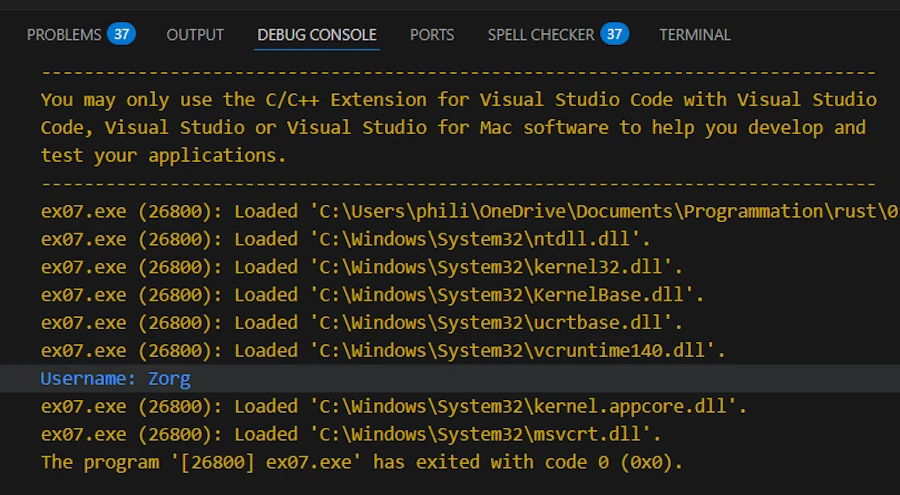
Now, modify the code above in Rust Playground and when it is working paste it, locally in ex07.rs.
// ex07.rs
use std::fs::File;
use std::io::{self, Read};

fn read_username_from_file() -> Result<String, io::Error> {
    let mut file = File::open("username.txt")?; // if Err, returns Err up
    let mut username = String::new();
    file.read_to_string(&mut username)?; // if Err, returns Err up
    Ok(username) // if we got here, all good
}

fn main() {
    // Use the function and handle any error here
    match read_username_from_file() {
        Ok(name) => println!("Username: {name}"),
        Err(e) => eprintln!("Error reading username: {e}"),
    }
}
While ex07.rs is open in VSCode:
- Set breakpoints on lines 7 and 15
- Run the code (F5)
- When the application is done, there is a file named
username.txt.bakat the root of the directory (00_u_are_errors/), rename itusername.txt. - Restart the code (F5)
- When the application is done, open and delete the content of
username.txt - Run the code (F5)
Bob: First thing first. Do you see the return type in the signature of read_username_from_file(). This confirms, and this is a very good thing, that we can return Result<T, E> from our functions:
- At the end of the function, if everything went well we return
OK(username) - Otherwise we bubble up the errors with the help of the
?operator. Do you see those?afterFile::openandread_to_string? If either operation fails, the function returns aErr(io::Error)back to the caller.
This pattern is so common that using ? is idiomatic. It makes the code much cleaner by avoiding all the boilerplate of matching and returning errors manually.
Alice: That’s much shorter! And in main() we decided to handle the error with a match . Could I propagate the error from main() as well?
Bob: This is a very good point. In fact, yes we can! In “modern” Rust, the main() function itself can return a Result<T, E> (or any type that implements the Termination trait, like Result<T, E> does).
This is a feature that let us use ? even in main() . For example:
// ex08.rs
use std::error::Error;
use std::fs::File;

fn main() -> Result<(), Box<dyn Error>> {
    let file = File::open("username.txt")?; // if this errors, `main()` will return Err
    println!("File opened successfully: {:?}", file);
    Ok(())
}
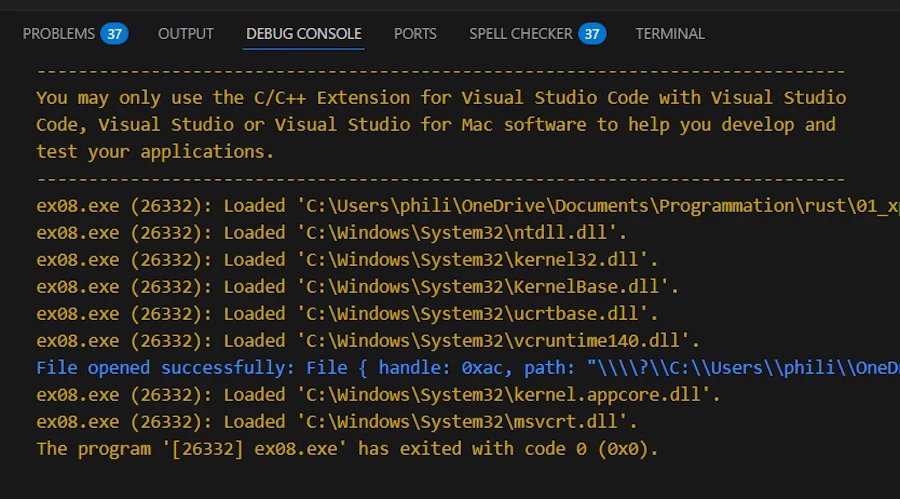
By writing fn main() -> Result<(), Box<dyn Error>>, we indicate that main() might return an error. The Box<dyn Error> is a convenient way to say that the returned error could be of any type that implements the std::error::Error trait.
Now, using ? in main() is allowed because the error can be returned from main(). If an error occurs, the runtime will print the error and exit with a non-zero status code. If main() returns Ok(()) , the program exits normally with code 0.
This is really nice for quick scripts – we can just propagate errors out of main() and let the program crash gracefully with an error message, rather than writing a lot of error handling in main().
We can go one step further with the code below:
// ex09.rs
use std::fs::File;

type Result<T> = std::result::Result<T, Box<dyn std::error::Error>>; // Type Alias

fn main() -> Result<()> {
    let file = File::open("username.txt")?;
    println!("File opened successfully: {:?}", file);
    Ok(())
}
It does exactly the same thing but thanks to type aliases, we lighten the signature of main(). Note that the line use std::error::Error; is no longer necessary.
Alice: So ? can be used in any function that returns a Result<T, E> or Option<T> right?
Bob: Correct. The rule is: we can use ? in a function if the return type of that function can absorb the error. Typically, that means if our function returns a Result<T, E>. We can use ? on another Result<T, E2> as long as E2 can convert into E. Usually they’re the same E or there’s an implementation of the From trait to convert one error into the other. Rust does this conversion automatically in many cases.
For example, below, the main() returns a Result<T, Box<dyn Error>>, but calls parse::<i32>(), which returns a ParseIntError. Rust performs the conversion automatically using From<ParseIntError> for Box<dyn Error>.
// ex10.rs
type Result<T> = std::result::Result<T, Box<dyn std::error::Error>>;

fn parse_number(s: &str) -> Result<i32> {
    // `parse::<i32>()` returns Result<i32, ParseIntError>
    // The `?` operator works here because ParseIntError implements
    // the `Error` trait, and Rust knows how to convert it into Box<dyn Error>.
    let n: i32 = s.parse()?;
    Ok(n)
}

fn main() -> Result<()> {
    let value = parse_number("123sdfsdf")?;
    println!("Parsed value: {value}");
    Ok(())
}
If our function returns Option<T> , we can use ? on another Option<T>. If it’s None, our function returns None early. Play with the code below:
// ex11.rs

fn first_char_upper(s: &str) -> Option<char> {
    // `first_char_upper()` returns Option<char>
    // `chars().next()` returns Option<char>
    // => we can use `?` at the end of s.chars().next()
    // If it's None, the function returns None early
    let c = s.chars().next()?;
    Some(c.to_ascii_uppercase())
}

fn main() {
    println!("{:?}", first_char_upper("hello")); // Some('H')
    println!("{:?}", first_char_upper("")); // None
}
Please note that the code below would work as well.
fn first_char_upper(s: &str) -> Option<f64> {
    let c = s.chars().next()?; // c: char
    Some(42.0)
}
It compiles without any problems because the ? always outputs a char but the compiler doesn’t care that our function returns an Option<f64>. It just checks that the ? “absorbs” the Option<char> by returning None when necessary. Then it’s up to us to transform the char into whatever we want (in this case, an f64).
One thing to remember: we can’t mix return types with ?. For example, if our function returns a Result, we can’t directly use ? on an Option<T> without converting it (and vice versa). For example the code below does not compile:
// ex12.rs
// ! DOES NOT COMPILE

use std::fs::File;

fn bad_example() -> Option<File> {
    // `File::open` returns Result<File, io::Error>
    // But our function returns Option<File>.
    // The compiler rejects this because it cannot convert Result into Option automatically.
    let file = File::open("username.txt")?;
    Some(file)
}

fn main() {
    let f = bad_example();
    println!("{:?}", f);
}
See part of the message from the compiler on build:
error[E0277]: the `?` operator can only be used on `Option`s, not `Result`s, in a function that returns `Option`
   |
 8 | fn bad_example() -> Option<File> {
   | -------------------------------- this function returns an `Option`
...
12 |     let file = File::open("username.txt")?;
   |                                          ^ use `.ok()?` if you want to discard the `Result<Infallible, std::io::Error>` error information
There are helper methods like .ok_or() to turn an Option<T> into a Result<T, E> if needed. See below:
// ex13.rs
type Result<T> = std::result::Result<T, Box<dyn std::error::Error>>;

fn get_first_char(s: &str) -> Result<char> {
    // Convert Option<char> into Result<char, String>
    s.chars().next().ok_or("String was empty".into())
}

fn main() -> Result<()> {
    let c1 = get_first_char("hello")?;
    println!("First char: {c1}");

    let c2 = get_first_char("")?; // This will return Err
    println!("First char: {c2}");

    Ok(())
}
Alice: Understood. I really like how ? reduces the clutter. It reads almost like normal linear code, but errors just get propagated automatically.
Bob: Exactly. It’s one of the features that make Rust’s error handling ergonomic. Just be sure that when we use ?, we know what error type our function is returning and that it’s appropriate to let it bubble up to the caller.
Summary – Propagating Errors with ?
Summary – Propagating Errors with
?
?operator: A shorthand for propagating errors. It unwraps theOk()value or returns the error to the caller if it’s anErr(), effectively doing thematch+return Err(...)for us. This simplifies error handling in functions that just want to pass errors up the chain.- Usage requirements: We can only use
?in a function that returns a compatible type (e.g., if the function returnsResult<T, E>orOption<T>). Using?on aResult<T, E>in a function returningResult<T, E>will propagate the error; using it inmain()requiresmain()to return aResult<T, E>as well. If we try to use?in a function that returns()(unit type) or another type that can’t represent an error, the code won’t compile – the compiler will remind we to change the return type or handle the error another way.- Converting error types: When using
?, if the error type of theResult<T, E>you’re handling doesn’t exactlymatchour function’s error type, it will attempt to convert it via theFromtrait. This allows different error types to be mapped into one error type for our function (for example, converting astd::io::Errorinto our custom error type). If no conversion is possible, you’ll get a type mismatch compile error, which we can resolve by using methods like.map_err()or implementingFromfor our error.main()can returnResult<T, E>: To use?at the top level, we can havemain()returnResult<(), E>. This way, anyErrthat propagates tomain()will cause the program to exit with a non-zero status and print the error. For example,main() -> Result<(), Box<dyn std::error::Error>>is a common choice to allow using?inmain()- Let’s keep this snippet in mind
  type Result<T> = std::result::Result<T, Box<dyn std::error::Error>>;
  fn main() -> Result<()> {
      // ...
      Ok(())
  }
Exercises – Propagating Errors
- Refactor with
?:- Take one of our functions from the previous exercises (for instance, a file-reading function or the number-parsing function) that handled errors with
match. - Change it to return a
Result<T, E>instead of, say, defaulting to a value, and use the?operator to propagate errors to the caller. For example, change aparse_numberthat returned 0 on error to instead returnResult<i32, std::num::ParseIntError>and use?inside. - Then handle the error at the top level (maybe in
main()) by printing an error.
- Take one of our functions from the previous exercises (for instance, a file-reading function or the number-parsing function) that handled errors with
- Chain calls with
?:- Write two short functions:
fn get_file_contents(path: &str) -> Result<String, std::io::Error>that opens and reads a file (using?), andfn count_lines(path: &str) -> Result<usize, std::io::Error>that callsget_file_contents(using?) and then returns the number of lines in the file. - In
main(), callcount_lines(somefile.txt)and handle the error with amatchor by returning aResult<T, E>frommain()using?. - This will give us practice in propagating errors through multiple levels.
- Write two short functions:
- Using ? with Option:
- Write a function
last_char_of_first_line(text: &str) -> Option<char>that returns the last character of the first line of a string, orNoneif the string is empty or has no lines. - Hint: We can use
text.lines().next()?to get the first line, and thenchars().last()on that line. - The
?will return early withNoneif there is no first line - Test it with an empty string, a single-line string, and a multi-line string.
- Write a function