Learning Modular Monolith Architecture with Rust
Learn Rust modular monolith: 7-step tutorial from Hello World to I/O-agnostic application with hexagonal architecture, traits and crates. For beginners, tinkerers, hobbyists, amateurs, and early-career developers…
This is the Bonus Episode
All the examples are on GitHub
The Posts Of The Saga
- Episode 00: 🟢 Introduction + Step 00 - First prototype working
- Episode 01: 🟢 Step 01 - Split the source code in multiple files
- Episode 02: 🟢 Step 02 - Add a test folder
- Episode 03: 🟢 Step 03 - Implement Hexagonal Architecture
- Episode 04: 🔵 Step 04 - One crate per component
- Episode 05: 🔴 Step 05 - Anyhow & ThisError
- Episode 06: 🟢 Step 06 - Add new adapters + Conclusion
- Episode 07: 🟢 Bonus

Table of Contents
Objective
We want to improve the adapter_file so that, in main(), it is used exactly like the adapter_console. In addition we want to be able to read multiple names from the input file and write multiple greetings in the output file.
At the end of this episode, the folder hierarchy should look like this:
step_07/
│   Cargo.toml
│   input.txt
│   output.txt
├───.cargo
│       config.toml
└───crates
    ├───adapter_console
    │   │   Cargo.toml
    │   ├───src
    │   │       errors.rs
    │   │       input.rs
    │   │       lib.rs
    │   │       output.rs
    │   └───tests
    │           adapter_console_test.rs
    ├───adapter_file
    │   │   Cargo.toml
    │   ├───src
    │   │       errors.rs
    │   │       input.rs
    │   │       lib.rs
    │   │       output.rs
    │   └───tests
    │           adapter_file_test.rs
    ├───app
    │   │   Cargo.toml
    │   └───src
    │           main.rs
    ├───application
    │   │   Cargo.toml
    │   ├───src
    │   │       errors.rs
    │   │       greeting_service.rs
    │   │       lib.rs
    │   └───tests
    │           application_test.rs
    ├───domain
    │   │   Cargo.toml
    │   ├───src
    │   │       errors.rs
    │   │       greeting.rs
    │   │       lib.rs
    │   │       ports.rs
    │   └───tests
    │           domain_test.rs
    └───integration_tests
        │   Cargo.toml
        ├───src
        │       lib.rs
        └───tests
                integration_test.rs
Points of attention:
- No change. This is the same directory tree as in
step_06
Setup
- Save your work
- Quit VSCode
- You should have a terminal open and you should be in the
step_06/folder
cd ..
# make a copy the folder step_06 and name it step_07
Copy-Item ./step_06 ./step_07 -Recurse
cd step_07
code .
Actions
Cargo.toml
No change
The domain crate
The ports.rs file:
use std::any::Any;

pub trait InfraError: std::error::Error + Send + Sync + 'static {
    fn as_any(&self) -> &dyn Any;
}

pub trait NameReader {
    fn read_name(&mut self) -> Result<String, Box<dyn InfraError>>;
}

pub trait GreetingWriter {
    fn write_greeting(&self, greeting: &str) -> Result<(), Box<dyn InfraError>>;
}
Points of attention:
- Now the parameter in
read_name()is&mut self(it used to be&self)
The adapter_console crate
The others files of the crate do no change but since the contract has changed in ports.rs, we must update the signature of read_name(). See below:
// Rest of the code does not change

impl NameReader for ConsoleInput {
    fn read_name(&mut self) -> Result<String, Box<dyn InfraError>> {
        print!("> ");
        io::stdout().flush().map_err(into_infra)?;

        let mut input = String::new();
        io::stdin().read_line(&mut input).map_err(into_infra)?;

        Ok(input.trim().to_string())
    }
}
Points of attention:
- Do you see the
&mut self? - Here we do not use the fact that
selfis&mut - Apart the signature, the code is the same as in
step_06
The adapter_file crate
errors.rs and lib.rs do not change. However, since we want to read and write multiples names, input.rs and output.rs change.
In output.rs here is the new version of write_greeting()
// The rest of the code do not change

impl GreetingWriter for FileOutput {
    fn write_greeting(&self, greeting: &str) -> Result<(), Box<dyn InfraError>> {
        let mut file = std::fs::OpenOptions::new()
            .create(true)
            .append(true)
            .open(&self.path)
            .map_err(into_infra)?;
        file.write_all(format!("{greeting}\n").as_bytes()).map_err(into_infra)?;
        Ok(())
    }
}
Points of attention:
- Now the file is opened in append mode
.write_all()replace the::write()we used instep_06
The input.rs is much more impacted but it becomes much smarter:
use crate::errors::into_infra;
use domain::{InfraError, NameReader};
use std::path::PathBuf;

#[derive(Debug)]
pub struct FileInput {
    path: PathBuf,
    names: Option<Vec<String>>,
    index: usize,
}

impl FileInput {
    pub fn new(path: impl Into<PathBuf>) -> Self {
        Self {
            path: path.into(),
            names: None,
            index: 0,
        }
    }

    fn load_names(&mut self) -> Result<(), Box<dyn InfraError>> {
        let content = std::fs::read_to_string(&self.path).map_err(into_infra)?;
        self.names = Some(
            content
                .lines()
                .map(|line| line.trim().to_string())
                .collect(),
        );
        self.index = 0;
        Ok(())
    }
}

impl NameReader for FileInput {
    fn read_name(&mut self) -> Result<String, Box<dyn InfraError>> {
        if self.names.is_none() {
            self.load_names()?;
        }

        let names = self.names.as_ref().expect("names must be loaded");

        if self.index < names.len() {
            let name = names[self.index].clone();
            self.index += 1;
            Ok(name)
        } else {
            Ok("quit".to_string())
        }
    }
}
Points of attention:
- In
.new()thepathto the input file is stored andSelfis returned. This is what ensures, that now, creating aConsoleInputor aFileInputlooks the same:let mut input = ConsoleInput::new(); let mut input = FileInput::new("input.txt"); - When
.read_name()is called, only during the the very first call (seeself.names.is_none()) we load the names (seeload_names()). Think to it as a kind of lazy implementation. - Then, no matter if it is the first call or not, if the
indexis not at the end of the list of names, a name build and returned. - If the index is at the end of the vector we return “quit” as we used to do on the console.
- In
load_names()we do not filter the empty lines. This is not our job. An input adapter get the names from the outside world and if the WOPR did not kill everybody (noInfraError), it returns them, as they are.
The application crate
Is not modified.
The app crate
Let’s see the impact of the new signature in main():
use adapter_console::{ConsoleInput, ConsoleOutput};
use adapter_file::{FileInput, FileOutput};

use application::GreetingService;

use anyhow::{Context, Result};

fn main() -> Result<()> {
    println!("=== Greeting Service (Step 07 - File Adapter Demo) ===");

    // Dependency injection: Create file-based adapters
    // let output = ConsoleOutput::new();
    // let mut input = ConsoleInput::new();

    let output = FileOutput::new("output.txt");
    let mut input = FileInput::new("input.txt");

    let service = GreetingService::new();
    service
        // .run_greeting_once(&mut input, &output)
        .run_greeting_loop(&mut input, &output)
        .context("Failed to run greeting service")?;

    Ok(())
}
Points of attention:
- Creating a
FileInputis now similar to creating aConsoleInput. - The error handling has disappear.
- The
adapter_filecan be used in a.run_greeting_loop()use case to read more than one name and to generate more than one greeting.
Build, run & test
Create an input.txt file at the root of the project. Here is an example with one empty line in the middle:
Buck
Roberto

Lisa
Alice
Build, run and test the application. Find below the expected output:
cargo run
warning: unused imports: `ConsoleInput` and `ConsoleOutput`
 --> crates\app\src\main.rs:3:23
  |
3 | use adapter_console::{ConsoleInput, ConsoleOutput};
  |                       ^^^^^^^^^^^^  ^^^^^^^^^^^^^
  |
  = note: `#[warn(unused_imports)]` (part of `#[warn(unused)]`) on by default

warning: `app` (bin "step_07") generated 1 warning (run `cargo fix --bin "step_07" -p app` to apply 1 suggestion)
    Finished `dev` profile [unoptimized + debuginfo] target(s) in 0.03s
     Running `C:/Users/phili/rust_builds/Documents/Programmation/rust/01_xp/046_modular_monolith/step_07\debug\step_07.exe`
=== Greeting Service (Step 07 - File Adapter Demo) ===
Error: Name cannot be empty


Goodbye!
A new output.txt file is created. Here is its content:
Hello Buck.
Ciao Roberto!
Hello Lisa.
Hello Alice.
Points of attention:
- Do not worry about the warnings. This is because we don’t use
ConsoleInputnorConsoleOutputin this version ofmain(). - The error due to the empty line in
input.txtis reported on error console (the screen here). - The other greetings are stored in the
output.txtfile. - As in
step 06we can mix adapters (file, console) and use case (once, loop).
Summary
What have we done so far?
- With the correct signature for
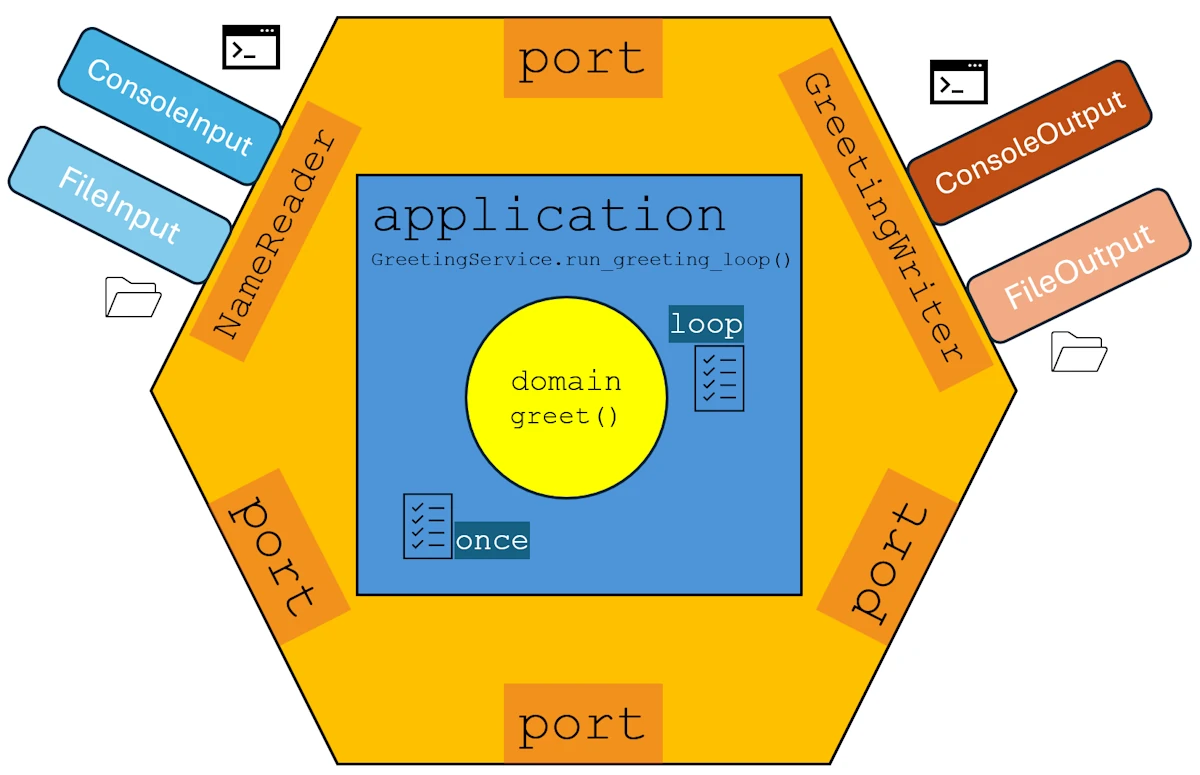
read_name()the adapters are created consistently and used in all use cases (loop or once).- If you behave like an
std::XYZthen copy thestd::XYZAPI.- At this point our application can be draw as below:
The organization of the application looks like:
Next Steps
- Episode 00: Introduction + Step 00 - First prototype working
- Episode 01: Step 01 - Split the source code in multiple files
- Episode 02: Step 02 - Add a test folder
- Episode 03: Step 03 - Implement Hexagonal Architecture
- Episode 04: Step 04 - One crate per component
- Episode 05: Step 05 - Anyhow & ThisError
- Episode 06: Step 06 - Add new adapters + Conclusion
- Episode 07: Bonus