From Folders to Crates: A Practical Guide to Modern Rust Module Trees (No mod.rs, No Tears)
TL;DR
- For beginners, tinkerers, hobbyists, amateurs, and early-career developers…
- Starting with a hierarchy of directories and files already in place
- A process to make sure the compiler and the linker can build the lib and the app
- Explain the
use ...statements that help to write easy to read code - As proposed since 2018+,
mod.rsfiles are not used here - Process
- You have a sub-directory named
my_dir/ - Next to
my_dir/, create a filemy_dir.rs - Inside
my_dir.rsdeclare the modules to add to the module tree (pub mod zoubida;)zoubidarefers to the module defined inmy_dir/zoubida.rsmy_dir/zoubida.rscan be either :- a regular module file containing code, or
- a hub file that declares further submodules
- The process starts at the crate root (
lib.rs)
- You have a sub-directory named
Introduction
- August 2025
- p 139 of the Rust Prog Language book they say that using
mod.rseverywhere is old style, confusing, blah blah blah… - What?!!! Old style… No way, not for me. I’m a fashion victim and I want to visit Milan, Paris etc.
- Surprisingly I just
git cloneMicrosoft Edit and it seems they usemod.rseverywhere…
- Surprisingly I just

- More seriously, this side project is the first step of a larger one. Here, once and for all, I want to figure out how to properly build my module tree (at least in a way that works and that I can clearly understand).
- So, below, don’t start complaining. The project hierarchy is over complicated for good reasons.
- The project is on GitHub
The context
Imagine…
- Imagine you’re building an application that uses sensors to collect measurements. That’s why there’s a
sensors/directory. - All sensors are input sensors (not actuators), so you add an
input/directory. - Some of the sensors measure temperature. Later, you may add others (pressure, weight, etc.). That explains the
temp/directory. - So far, you have two temperature sensors:
TempSensor01defined inmy_sensor1.rsinside atemp_sensor1/directoryTempSensor02defined inyour_sensor2.rsinside atemp_sensor2/directory
-
To separate usage from implementation, you define a trait
TempSensorand implement it for both sensors. Thanks to this, from the application’s perspective, using one sensor or the other looks the same:let my_temp = my_sensor.get_temp();where
my_sensorcould be either sensor. - Notice that the sensor file name (for example
my_sensor1.rs) does not match the directory name (temp_sensor1/). This is intentional: I want to keep the file hierarchy independent from the module tree and truly understand the differences between both. - The project also includes both
lib.rsandmain.rs, making it a library crate with a binary crate.
Here’s the initial structure:
.
│   .gitignore
│   Cargo.lock
│   Cargo.toml
│   README.md
│
├───examples
│       ex_01.rs
│
└───src
    │   lib.rs
    │   main.rs
    │
    └───sensors
        └───input
            └───temp
                │   temp_sensor.rs
                │
                ├───temp_sensor1
                │       my_sensor1.rs
                │
                └───temp_sensor2
                        your_sensor2.rs
The objective
I want to:
- Use the modern style of Rust module organization (no more
mod.rsfiles). - Build a module tree so that we can make temperature sensors measurement from both
src/main.rsandexamples/ex_01.rs.
What to keep in mind
- Because the project has both
lib.rsandmain.rs, Cargo treats it as a library crate plus a binary. - The compiler first builds the library, then the binary (using the library’s content).
- The build system doesn’t care about files or directories — it only cares about the module tree.
1. Building the library (src/lib.rs)
My approach is:
- Organize the directories however I like.
- Name the files however I like.
- Then, use hub files to connect everything into a clean module tree.
This way, the build process doesn’t force me into rigid naming conventions — I have flexibility.
The key point: Here I suppose the sensors/, input/, and temp/ directories already exist before I start working on the build and add the hub files.
Using hub files
The compiler needs a module tree to know how to find and link everything. One simple and scalable way is to use hub files — small files that declare which modules exist at a given level.
Note: For what I know, the term hub files is absolutely not official. I call these files, hub files because they act as connectors in the module tree. As David Wheeler once said:
“All problems in computer science can be solved by another level of indirection.”
Don’t worry — this isn’t rocket science. Let’s go step by step.
Step 1: Starting from lib.rs
Right now, lib.rs contains one line:
pub mod sensors;
The line pub mod sensors; declares the existence and loads a module named sensors in the module tree of the current crate (the library crate). The pub access specifier make sure that shared symbols of the sensors module can be accessed from the current crate using the namespace notation (sensors::...)
A module is a namespace and the line brings its content to the local scope (crate root).
By convention, the compiler will first look for src/sensors.rs. Since we want a directory instead (src/sensors/), we create a hub file named sensors.rs next to lib.rs. sensors.rs contains:
pub mod input;
The line declares and loads a module input in the module tree under construction. Since the line take place in the module sensors, the module input is a child of sensors and a grand child of crate under construction (library crate).
Step 2: Going deeper
Inside the sensors/ directory, we add another hub file, input.rs, because there is an input/ subdirectory. input.rs contains:
pub mod temp;
I guess you know the song… The line declares and loads a module temp in the module tree under construction. Since the line take place in the module input, the module temp is a child of input. Check the module tree below.
Inside the input/ directory, we create a hub file named temp.rs next to the temp/ directory. temp.rs contains three lines:
pub mod temp_sensor;  // The trait lives here
pub mod temp_sensor1; // Concrete sensor #1 (folder-backed)
pub mod temp_sensor2; // Concrete sensor #2 (folder-backed)
The 3 lines above declares and loads 3 different modules (temp_sensor, temp_sensor1 and temp_sensor2). They are children of the temp module.
In the temp/ directory we find:
temp_sensor.rsdefines theTempSensortrait.- We also create hub files
temp_sensor1.rsandtemp_sensor2.rsbecause there are subdirectoriestemp_sensor1/andtemp_sensor2/.
Content of temp_sensor1.rs:
pub mod my_sensor1;
The line declares and loads a module my_sensor1 in the module tree under construction. Since the line take place in the module temp_sensor1, the module my_sensor1 is a child of temp_sensor1.
Content of temp_sensor2.rs:
pub mod your_sensor2;
Same reasoning apply here, the module your_sensor2 is a child of temp_sensor2.
When the compiler reads temp_sensor1.rs, it looks inside the temp_sensor1/ directory and finds my_sensor1.rs, which defines TempSensor01 and implements the trait TempSensor for it (same logic for TempSensor02).
At the end of the tree, the directories contain the actual sensor implementations:
temp_sensor1/
    my_sensor1.rs
temp_sensor2/
    your_sensor2.rs
Step 3: Using the trait
Inside my_sensor1.rs
use crate::sensors::input::temp::temp_sensor::TempSensor;
pub struct TempSensor01;

impl TempSensor for TempSensor01 {
    fn get_temp(self) -> f64 {
        142.0
    }
}
We can bring the trait TempSensor into scope like this:
use crate::sensors::input::temp::temp_sensor::TempSensor;
Notice: we don’t write use CRATE_NAME::... where CRATE_NAME would come from Cargo.toml. Instead, we use crate::... to refer to the current crate under construction (the library crate).
Wrapping up
At this point:
- The module tree is fully built.
- The compiler and linker can happily do their work.
- The library is compiled and stored on disk (
target/debug/libtraits_for_plugins.rlib)
At the end, once hub files are added, the directory looks like this:
.
│   .gitignore
│   Cargo.lock
│   Cargo.toml
│   README.md
│
├───examples
│       ex_01.rs
│
├───src
│   │   lib.rs
│   │   main.rs
│   │   sensors.rs
│   │
│   └───sensors
│       │   input.rs
│       │
│       └───input
│           │   temp.rs
│           │
│           └───temp
│               │   temp_sensor.rs
│               │   temp_sensor1.rs
│               │   temp_sensor2.rs
│               │
│               ├───temp_sensor1
│               │       my_sensor1.rs
│               │
│               └───temp_sensor2
│                       your_sensor2.rs
│
└───target
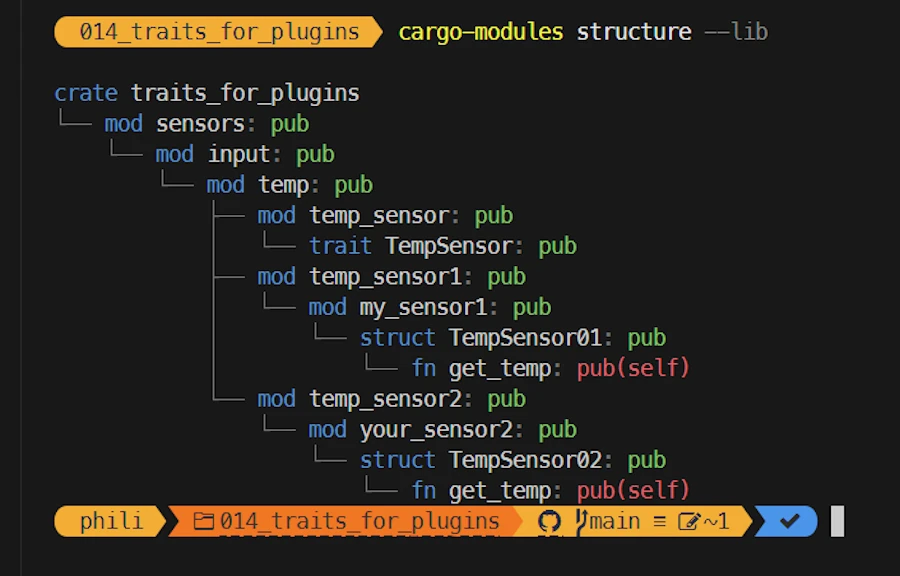
The module tree looks like this :
crate (lib.rs)
└── sensors (sensors.rs)
    └── input (input.rs)
        └── temp (temp.rs)
            ├── temp_sensor       (temp_sensor.rs, trait definition)
            ├── temp_sensor1      (temp_sensor1.rs → loads folder temp_sensor1/)
            │   └── my_sensor1    (my_sensor1.rs, implements TempSensor01)
            └── temp_sensor2      (temp_sensor2.rs → loads folder temp_sensor2/)
                └── your_sensor2  (your_sensor2.rs, implements TempSensor02)
Tips’n Tools
CTRL+ù(FR keyboard) to open a terminal in VSCodecargo install cargo-modules- Read the documentation
cargo-modules structure --lib
What does it show?
- This is the complete module tree of the lib (see the
--libin the command) in Technicolor! - Should be enough most of the time
You can also try this:
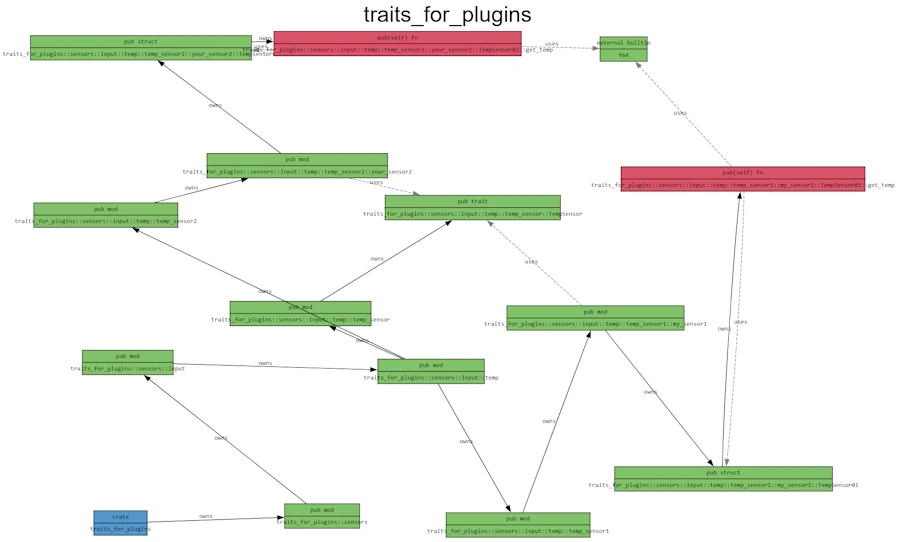
cargo-modules dependencies --lib- Copy the output text from the console
- Paste it in this page
What does it show?
- Each box (node) is a module, trait, struct, or function.
- Each edge (arrow) describes a relationship:
- owns → parent contains the child (module owns a submodule, struct owns a method, etc.).
- uses (dashed line) → one element depends on another (e.g. my_sensor1 uses TempSensor).
The output file basically says:
- crate traits_for_plugins → owns sensors → owns input → owns temp → etc.
- TempSensor01 implements TempSensor.
- get_temp() returns an f64.
The graph is a full semantic map of the crate.
2. Building the binary (src/main.rs)
- It should be clear by now that the binary and the library are 2 different beasts
- This is why, in
main.rs, we cannot writeuse crate::.... Instead we writeuse CRATE_NAME::...whereCRATE_NAMEis defined by the line[package] name = "..."inCargo.toml(in our casetraits_for_plugins).
// main.rs
use traits_for_plugins::sensors::input::temp::temp_sensor::TempSensor;
use traits_for_plugins::sensors::input::temp::temp_sensor1::my_sensor1;

fn main() {
    let my_sensor = my_sensor1::TempSensor01;
    let my_temp = my_sensor.get_temp();
    println!("{my_temp}");
}
Indeed, main.rs is a client of lib.rs and it does not see the internal modules via crate::... directly. In main.rs, crate::... refers to the binary crate itself, not to the library defined in lib.rs.
To make a long story short:
- Since there a
main.rsnext tolib.rs - In
main.rswe write theusestatements consideringmainas an external module/namespace - We use the crate name (the one defined in
[package] name = "..."inCargo.toml). - And yes, by default, if both
lib.rsandmain.rsexist, the library and the binary crates share the same name (libtraits_for_plugins.rlibandtraits_for_plugins.exe). This can be overridden inCargo.toml.
[[bin]]
name = "MyApp"  # name of the executable (MyApp.exe under Windows)
path = "src/main.rs"

[lib]
name = "MySuperLib"  # name of the lib (MySuperLib.lib under Windows)
path = "src/lib.rs"
3. Building the example (examples/ex_01.rs)
- The example is clearly a client of the lib
- All that we already know about
src/main.rsapply toexamples/ex_01.rs - This includes the line
use crate_name::...
What’s next?
git clonethe project- Forget about the code it should work
- Rename everything (files, directories), add sub-directories etc.
- Break everything
- Then make it work and make it great again
Checklist
You start with:
src/
├── lib.rs
└── parent_dir/
    └── child_dir/
        └── grandchild/
            ├── foo.rs
            └── bar.rs
Expose parent_dir/
- Add to
src/lib.rsthe linepub mod parent_dir; - Create a hub file
src/parent_dir.rs. - Content of
parent_dir.rs=pub mod child_dir;
Expose child_dir/
- Create a hub file
src/parent_dir/child_dir.rs. - Content of
child_dir.rs=pub mod grandchild;
Expose leaf level grandchild/
- Create a hub file
src/parent_dir/child_dir/grandchild.rs. - Content of
grandchild.rs=pub mod foo; pub mod bar;
Final module tree:
src/
├── lib.rs                (crate root, declares `pub mod parent_dir;`)
├── parent_dir.rs         (hub for directory parent_dir/)
└── parent_dir/
    ├── child_dir.rs      (hub for directory child_dir/)
    └── child_dir/
        ├── grandchild.rs (hub for directory grandchild/)
        └── grandchild/
            ├── foo.rs    (leaf module)
            └── bar.rs    (leaf module)
Using modules
From anywhere you can now do: use crate::parent_dir::child_dir::grandchild::foo;
General Rules
- One directory → one hub file in its parent
- Hub file name = directory name +
.rs - Hub file content =
pub mod ...;for every child module (files + subdirectories) - Leaf files don’t need hubs (just
foo.rs) - Don’t mirror blindly — only expose what you want public
Exercice
You are given the hierarchy below:
src/
├── lib.rs
└── animals/
    ├── animals.rs
    ├── cat/
    │   ├── cat.rs
    │   └── persian.rs
    └── dog.rs
Questions:
- For each directory/file, explain what it is , what it contains and why…
- Draw the module tree
-
lib.rs→pub mod animals; -
animals.rs→pub mod cat; pub mod dog; -
cat.rs→pub mod persian;
Module tree:
crate
└── animals
    ├── cat
    │   └── persian
    └── dog