Option<T> in Rust: 15 Examples from Beginner to Advanced
A Code-First Guide with Runnable Examples
TL;DR
-
If this
Option<T>isNone, immediately returnNonefrom the function. Otherwise, unwrap theSome(v)value and continue.// Example 05: Early Return Propagation let text = s?; chars.next()?; Option<T>.unwrap_or(v)= “Give me the value inside theOption<T>OR if the option isNone, give me the valuev(wherevcan be the result of a function).”-
Option<T>.unwrap_or_else(||my_closure())= “Give me the value inside theOption<T>OR if theOption<T>isNone, call the closure and give me its returned value.”// Example 06: Providing Defaults Option<T>.unwrap_or(v) or Option<T>.unwrap_or(my_function()) Option<T>.unwrap_or_else(||my_closure()) -
If the
Option<T>isSome(v), apply the transformation to the inner value and wrap the result inSome(w). IfNone, skip the transformation and returnNone.// Example 07: Transforming Values Inside `Option<T>` let result = name.map(|n| n.trim().to_string()) -
If the
Option<T>isSome(v), apply the transformation that returns anOption<U>and flatten the result. IfNone, skip and returnNone.// Example 08: Chaining `Option<T>` let chain_result = Some("49") .and_then(|s| parse_positive(s)) // Some(49) .and_then(|n| if n < 50 { Some(n * 2) } else { None }); -
If the
Option<T>isSome(v)AND if the extracted value (v) satisfies this predicate then execute the code after the=>.// Example 09: Pattern Matching with Guards match age { Some(a) if a < 18 => "Minor", ...
This is Episode 01
The Posts Of The Saga
- 🟢 Episode 00: Intro + Beginner Examples
- 🔵 Episode 01: Intermediate Examples
- 🔴 Episode 02: Advanced Examples + Advises + Cheat Sheet…

Table of Contents
- 🔵 - Example 05 - Early Return Propagation - The
?Operator - 🔵 - Example 06 - Providing Defaults Values -
.unwrap_or(v)vs.unwrap_or_else(||C()) - 🔵 - Example 07 - Transforming Values Inside
Option<T>-Option<T>.map(|v| transform(v)) - 🔵 - Example 08 - Chaining
Option<T>-Option<T>.and_then(|v| C(v) - 🔵 - Example 09 - Pattern Matching with Guards
🔵 - Example 05 - Early Return Propagation - The ? Operator
Real-world context
Chaining optional operations, parsing pipelines, database query chains.
Runnable Example
Copy and paste in Rust Playground
// Without ? - verbose equivalent
fn get_first_char_verbose(s: Option<&str>) -> Option<char> {
    match s {
        Some(text) => text.chars().next(),
        None => None,
    }
}

fn get_first_char(s: Option<&str>) -> Option<char> {
    let text = s?; // If None, return None immediately
    text.chars().next()
}

// Chaining multiple ?
fn get_second_char(s: Option<&str>) -> Option<char> {
    let text = s?;
    let mut chars = text.chars();
    chars.next()?; // Skip first
    chars.next() // Return second
}

fn main() {
    println!("{:?}", get_first_char_verbose(Some("hello"))); // Some('h')
    println!("{:?}\n", get_first_char_verbose(None)); // None

    println!("{:?}", get_first_char(Some("hello"))); // Some('h')
    println!("{:?}\n", get_first_char(None)); // None

    println!("{:?}", get_second_char(Some("hi"))); // Some('i')
    println!("{:?}", get_second_char(Some("x"))); // None (only 1 char)
    println!("{:?}", get_second_char(None)); // None
}
Read it Aloud
The ? operator says: “If this Option<T> is None, immediately return None from the function. Otherwise, unwrap the Some(v) value and continue.”
Comments
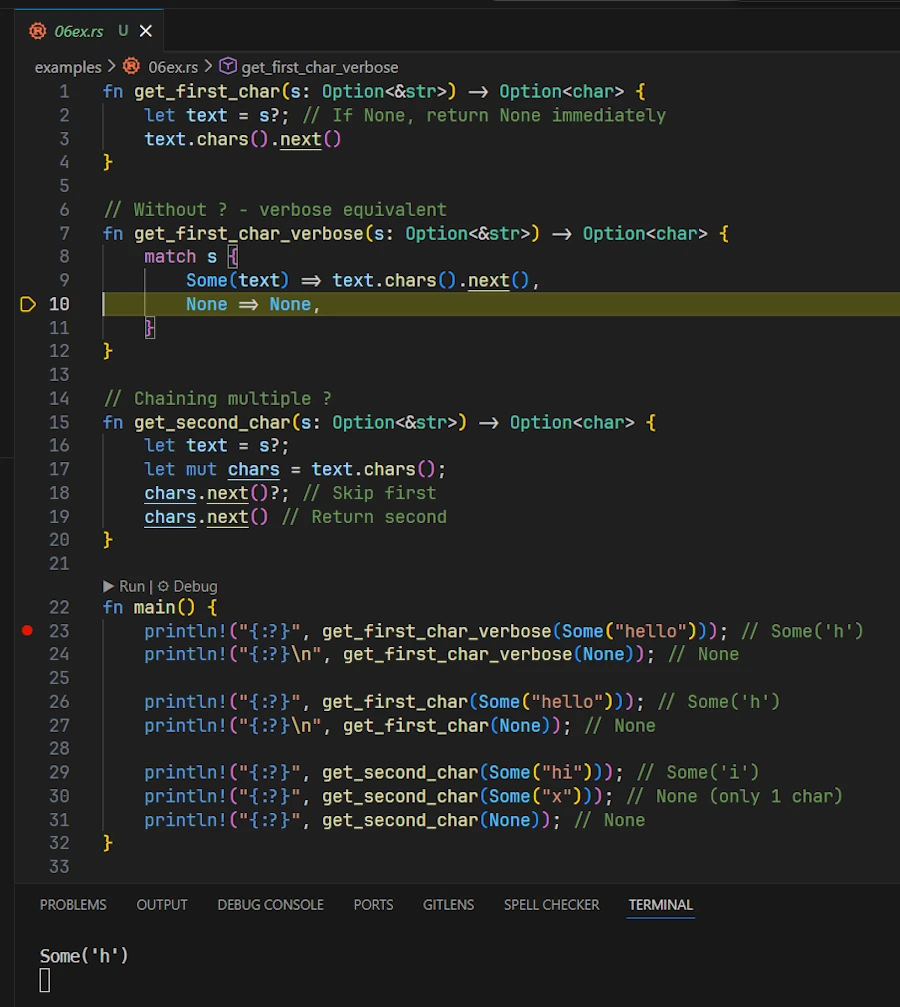
In addition to the Playground it is useful to debug the code in VSCode. This really helps to visualize what happens.
Key Points
- Return type requirement: Function must return
Option<T>to use? - Chaining: Enables clean sequential operations without nested matches
- Not just
Option<T>: Also works withResult<T, E> - Pattern:
Some(value?)combines - try to get value, wrap inSome(v)if successful
Find More Examples
Regular expression to use either in VSCode ou Powershell: \w+\?; or return .+\?
🔵 - Example 06 - Providing Defaults Values - .unwrap_or(v) vs .unwrap_or_else(||C())
Real-world context: Setup configurations with fallback values, set user preferences with default values if not specified, set optional parameters… It is smart to check if getting the default values is fast (a constant) or slow (read a database). If so 2 options are available.
Runnable Example
Copy and paste in Rust Playground
fn expensive_computation() -> String {
    println!("\tComputing a default value for 10 seconds...");
    "DEFAULT_NAME".to_string()
}

fn main() {
    println!("\n--- PART 1: Where default is NOT needed");
    let some_name: Option<String> = Some("Zoubida".into());

    // 1.1: .unwrap_or_else() (LAZY Evaluation)
    // The closure '|| expensive_computation()' is called ONLY IF 'some_name' is None (not the case here)
    // This avoids the expensive operation.
    // NO "Computing..." message is printed.
    // This is the correct, efficient approach when dealing with Some.
    println!("About to call .unwrap_or_else():");
    let _name4 = some_name.clone().unwrap_or_else(|| expensive_computation());
    println!("\tResult after .unwrap_or_else() on Some: {_name4}");

    // 1.2: .unwrap_or() (EAGER Evaluation)
    // The argument 'expensive_computation()' is calculated first, regardless of whether 'some_name' is None or Some.
    // The "Computing..." message is printed, the returned value is thrown away
    // This is a wasted computation
    println!("About to call .unwrap_or():");
    let _name3 = some_name.unwrap_or(expensive_computation());
    println!("\tResult after .unwrap_or() on Some(v)  : {_name3}");

    println!("\n\n--- PART 2: Where default is NEEDED");
    let none_name: Option<String> = None;

    // 2.1: .unwrap_or_else() (LAZY Evaluation)
    // The closure '|| expensive_computation()' is called ONLY IF 'none_name' is None (the case here)
    // The "Computing..." message is printed and the DEFAULT_NAME is used
    println!("About to call .unwrap_or_else():");
    let _name2 = none_name.clone().unwrap_or_else(|| expensive_computation());
    println!("\tResult after .unwrap_or_else() on None: {_name2}");

    // 2.2: .unwrap_or() (EAGER Evaluation)
    // The argument 'expensive_computation()' is calculated first, regardless of whether 'none_name' is None or Some.
    // The "Computing..." message is printed.
    println!("About to call .unwrap_or():");
    let _name1 = none_name.unwrap_or(expensive_computation());
    println!("\tResult after .unwrap_or() on None     : {_name1}");
}
Read it Aloud
In the code above, .unwrap_or(v) and .unwrap_or_else(||my_closure()) should be read as follow:
.unwrap_or(v)= “Give me the value inside theOption<T>OR if theOption<T>is empty (None), give me the valuev(wherevcan be the result of a function).”.unwrap_or_else(||my_closure())= “Give me the value inside theOption<T>OR if theOption<T>is empty (None), call the closure and give me its returned value.”
Comments
- “
Option<T>.unwrap_or(v)always evaluatesv, even if theOption<T>isSome(v)” - “
Option<T>.unwrap_or_else(F)the closureFis called if if theOption<T>isSome(v)” - What makes the laziness possible?
- In one case (
.unwrap_or()) the argument is a value or the result of a function which have been already evaluated while on the other (.unwrap_or_else()) we pass a function pointer, a callable, a closure, a recipe which can be invoked. - With
Option<T>.unwrap_or(my_function()):my_function()is called first. It produces a return valuevof typeTwhich becomes the argument of.unwrap_or(v). IfOption<T>isSome(v)this is a waste of time. - With
Option<T>.unwrap_or_else(||my_closure()):.unwrap_or_else()first checks ifOption<T>isSome(v). If so it returnsvimmediately. IfOption<T>isNone, then.unwrap_or_else()executes the “recipe” by calling the closure. The closure in charge of setting the default value is called only when needed.
- In one case (
- Clippy will generate some warnings. It wants us to write:
let name2 = expensive_computation(); let name4 = "Alice".to_string();- Indeed the compiler knows
none_nameisNoneand so.unwrap_or_else()will always be called, so let’s call it directly. - The same way, the compiler knows that
some_nameisSome(v), so the closure will never be called, so let’s simplify code.
- Indeed the compiler knows
Key Points
- Performance:
.unwrap_or_else()is lazy. Important for expensive defaults - Related:
unwrap_or_default()usesDefault::default()(e.g.,""for String,0for i32) - When to use:
- If the default value is a simple constant or literal, use
.unwrap_or(), which is straightforward. - If the default value is the result of an expensive function call (I/O, network, heavy computation, etc.), use
.unwrap_or_else()to avoid wasting computation.
- If the default value is a simple constant or literal, use
- Read the signatures of both method:
Option<T>.unwrap_or(v),Option<T>.unwrap_or_else(F)
Find More Examples
Regular expression to use either in VSCode ou Powershell: unwrap_or_else\( unwrap_or\(. ripgrep project is again a good candidate.
🔵 - Example 07 - Transforming Values Inside Option<T> - Option<T>.map(|v| transform(v))
Real-world context
Processing data that might not exist, transforming configurations, sanitizing user input.
Runnable Example
Copy and paste in Rust Playground
fn main() {
    let name: Option<String> = Some("  Zoubida  ".to_string());

    // Chain transformations - only applied if Some
    let result = name
        .map(|n| n.trim().to_string())           // Some("Zoubida")
        .map(|n| n.to_uppercase())               // Some("ZOUBIDA")
        .unwrap_or_else(|| "ANONYMOUS".to_string());
    println!("{}", result); // "ZOUBIDA"

    // With None - transformations skipped, default used
    let no_name: Option<String> = None;
    let result2 = no_name
        .map(|n| n.trim().to_string())
        .map(|n| n.to_uppercase())
        .unwrap_or_else(|| "ANONYMOUS".to_string());
    println!("{}", result2); // "ANONYMOUS"
}
Read it Aloud
Option<T>.map(|v| transform(v)) says: “If the Option<T> is Some(v), apply this transformation to the inner value and wrap the result in Some(w). If None, skip the transformation and return None.”
Comments
- If applicable
Option<T>.map(|v| transform(v))returnsSome(w) .to_string()or.to_uppercase()returnStringwhich is wrapped into anOption<T>container.- The purpose of the
.map()method is to wrap the result of its closure inside a newOption<T>container, regardless of what the closure itself returns. - At the end of the pipeline
.unwrap_or_else(|| C())returns aStringto print
Key Points
- Chainable: Multiple
.map()calls compose cleanly - Lazy: Thanks to the closures, if the original
Option<T>isNone, transformations don’t execute - Type change:
Option<T>→Option<U>(TandUcan differ) - Functional programming: Avoids explicit if/match - more declarative
- When: Use
.map(|v| transform(v))for always-succeeds transformations.
Find More Examples
Regular expression to use either in VSCode ou Powershell: \.map\(\s*\|[^|]+\|[^)]*\)
🔵 - Example 08 - Chaining Option<T> - Option<T>.and_then(|v| C(v)
Real-world context
Validation chains, nested optional lookups (config sections), parsing pipelines.
Runnable Example
Copy and paste in Rust Playground
fn parse_positive(s: &str) -> Option<i32> {
    s.parse::<i32>().ok().filter(|&n| n > 0)
}

fn main() {
    let input = Some("42");

    // map creates nested Option<Option<i32>>
    let bad = input.map(|s| parse_positive(s));
    println!("{:?}", bad); // Some(Some(42)) - awkward

    // and_then flattens automatically
    let good = input.and_then(|s| parse_positive(s));
    println!("{:?}", good); // Some(42) - clean

    let input = Some("-56");
    let neg = input.and_then(|s| parse_positive(s));
    println!("{:?}", neg); // None

    // Chaining multiple and_then
    let chain_result = Some("49")
        .and_then(|s| parse_positive(s)) // Some(49)
        .and_then(|n| if n < 50 { Some(n * 2) } else { None });
    println!("{:?}", chain_result); // Some(98)
}
Read it Aloud
Option<T>.and_then(|v| C(v)) says: “If the Option<T> is Some(v), apply the transformation that returns an Option<U> and flatten the result. If None, skip and return None.”
Comments
- With
input.map(),parse_positive()returns anOption<i32>which is wrapped into anOption<T>container =>Option<Option<i32>> - Let’s read, piece by piece the line
let good = input.and_then(|s| parse_positive(s));:- Takes
input(anOption<&str>) - If
inputisSome(s), it callsparse_positive(s)and returns that result directly - If
inputisNone, it short-circuits and returnsNoneimmediately
- Takes
- Double check and read the
let chain_result = ...- The first closure has a string as parameter (
|s|) - While the second closure receive an
i32(|n|)
- The first closure has a string as parameter (
- Aka
flatmap
Key Points
- Flattening: Prevents
Option<Option<T>>. Chaining is impossible otherwise - When to use: When the transformation itself might fail (returns
Option<T>) - vs .map(): Use
.map()for always-succeeds transforms,and_thenfor fallible ones
Find More Examples
Regular expression to use either in VSCode ou Powershell: \.and_then\(
🔵 - Example 09 - Pattern Matching with Guards
Real-world context
Conditional logic based on value properties, filtering with conditions, validation.
Runnable Example
Copy and paste in Rust Playground
fn categorize_age(age: Option<i32>) -> &'static str {
    match age {
        Some(a) if a < 18 => "Minor",
        Some(a) if a < 65 => "Adult",
        Some(_a) => "Senior",  // a >= 65 but a not used => _a
        None => "Unknown",
    }
}

fn main() {
    println!("{}", categorize_age(Some(10)));  // "Minor"
    println!("{}", categorize_age(Some(30)));  // "Adult"
    println!("{}", categorize_age(Some(70)));  // "Senior"
    println!("{}\n\n", categorize_age(None));      // "Unknown"

    // Alternative with if let and guards
    let score = Some(85);

    if let Some(s) = score && s >= 90 {
        println!("A grade");
    } else if let Some(s) = score && s >= 80 {
        println!("B grade");  // This prints
    } else {
        println!("Lower grade");
    }
}
Read it Aloud
In each match arm, Some(v) if predicate says: “If the Option<T> (age) is Some(a) AND if the extracted value (a) satisfies this predicate then execute the code after the =>.”
Comments
- Pay attention to the lifetime of the value returned by
categorize_age(). Remove'staticand build the code. What the compiler says? Why?
Key Points
- Guard syntax:
ifafter pattern - tested only if pattern matches - Order matters: Earlier guards are checked first - be specific before general
- Readability: Sometimes clearer than nested if statements
- Alternative with let-chains:
if let Some(x) = opt && x > 10combines pattern + condition. Read this.
Find More Examples
Regular expression to use either in VSCode ou Powershell: Some\(.+\) if