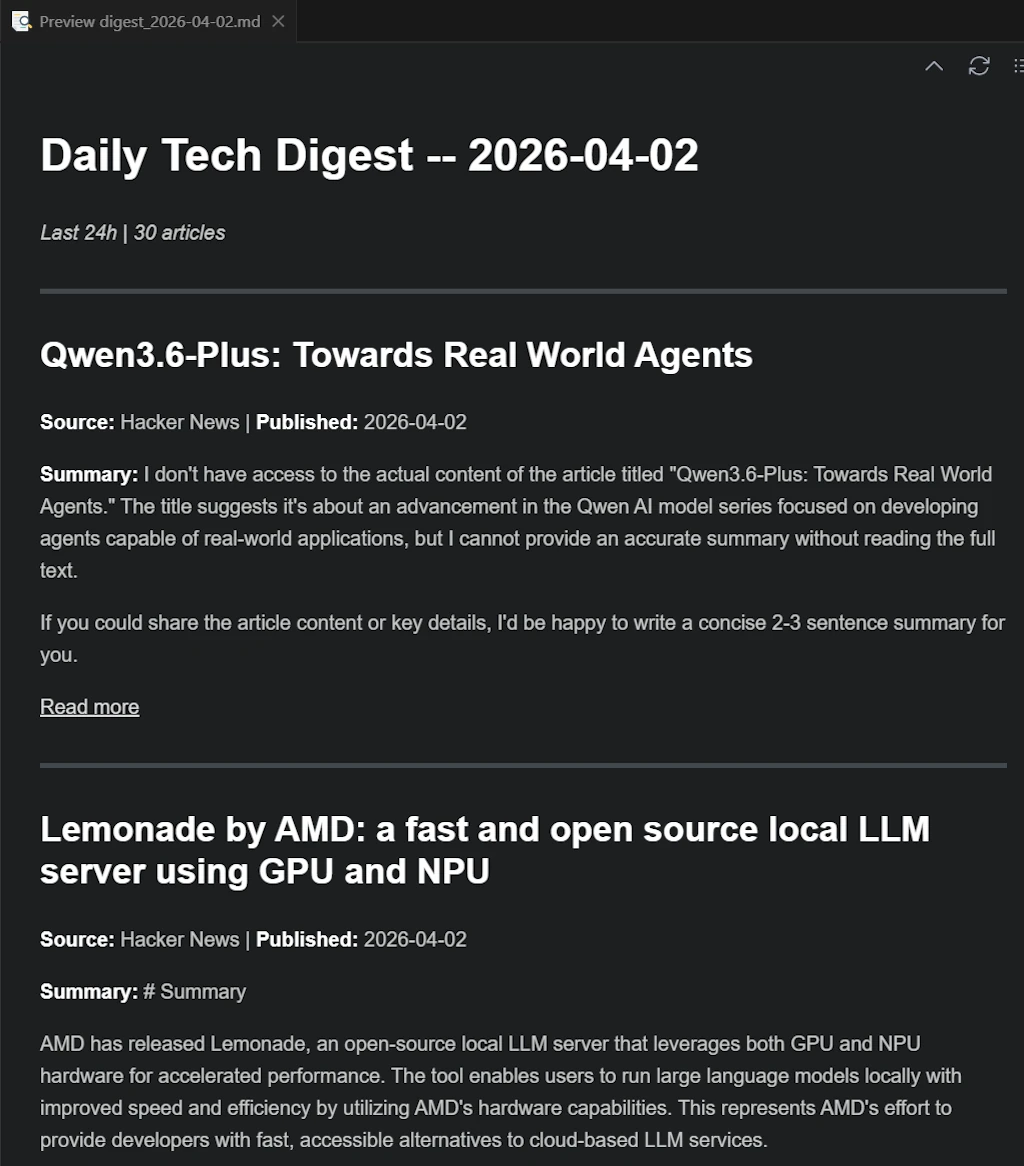
Claude and the WAT Task Pipeline
…
🚧 This post is under construction 🚧
TL;DR
- Use SDD when you’re building something that lasts.
- Use a WAT Task Pipeline when you’re processing something one-off.

Table of Contents
- Introduction
- SDD vs WAT Task Pipeline
- Prerequisites
- Step 00: Create project folder
- Step 01: Create
CLAUDE.md - Step 02: First prompt
- Step 03: Create
docs/project_goal.md - Step 04: Second prompt
- Step 05: Implementing
- Conclusion
- Webliography
Introduction
SDD vs WAT Task Pipeline
What’s the Difference and When to Use Which?
The Core Distinction
Both SDD and task pipelines use the WAT framework (Workflows, Agents, Tools) a three-layer architecture that separates AI reasoning from deterministic code execution. The difference is in what we are building and what we deliver.
SDD (Spec-Driven Development) is a methodology for building software guided by specifications. The final artifact is code that runs in production: a Rust binary, an API, a web application. The specs describe an architecture, contracts, and business behaviors. The agent (Claude Code) builds something durable.
WAT Task Pipelines are workflows for executing one-shot tasks. The final artifact is processed data or an action: a summary, a report, a spreadsheet, a sent email, a Jira ticket. The Python scripts are disposable tools or reusable-as-is utilities, not an evolving codebase.
In short:
- SDD: we deliver a system (that produces results on demand).
- WAT Task Pipeline: we deliver a result (a file, processed data, or a triggered action).
Why Multiple Scripts Instead of One?
We could put everything in a single file. But splitting into separate steps gives us:
- Fault recovery: if scraping fails, we rerun just that step.
- Observability: we can inspect intermediate data between steps.
- Composability: we reuse “summarize articles” in another pipeline.
- Parallelism: independent steps can run concurrently.
Same logic as Powershell pipes: fetch | parse | summarize | synthesize. A single script works, but a pipeline composes and maintains itself.
The “Who Complains About What” Test
This is perhaps the sharpest way to tell them apart:
- WAT Task Pipeline: the client complains that the data isn’t formatted the way they want. The issue is presentation or one-shot processing.
- SDD: the client complains that the application can’t handle their data the way they want. The issue is behavior or the data model.
In a task pipeline, once the deliverable is consumed, it’s done. In SDD, the deliverable persists and interacts. The user comes back to it, feeds it, and depends on it over time.
Decision Grid
| Criterion | SDD (Spec-Driven Development) | WAT Task Pipeline |
|---|---|---|
| The output is… | Production code | Processed data or a triggered action |
| Does it evolve? | Yes — features, refactors | No (or rarely) |
| The agent’s role | Builds | Executes |
| Spec lifespan | Long (PRs, version history) | Short (task description) |
| Typical deliverables | Binary, API, web app | Slides, PDF, spreadsheet, email |
| Bug profile | Behavior / data model issues | Formatting / processing issues |
| Pilot profile | Dev guiding an architecture | Analyst orchestrating tools |
Prerequisites
- Windows 11 (but should work similarly on other platforms)
- VSCode
- Claude
- Python
- uv
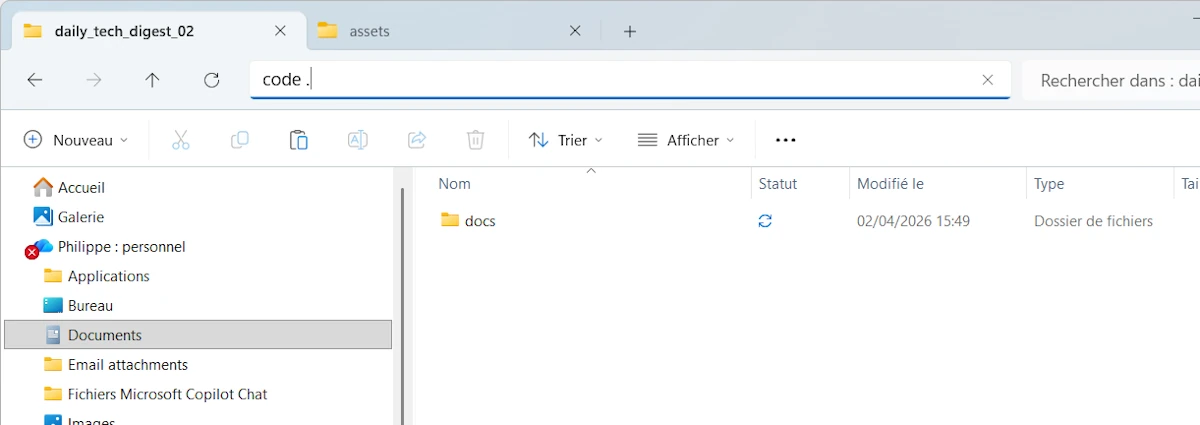
Step 00: Create project folder
# Create a folder for the new project
new-item -ItemType Directory daily_tech_digest_02
cd daily_tech_digest_02

# Create a folder for the docs
new-item -ItemType Directory docs

# Open VSCode
code .
Step 01: Create CLAUDE.md
- In the
docs/folder, make some tests, keep different versions ofCLAUDE.mdetc. - Talk to ChatGPT, Claude and friends…
You can start with the version below.
Notes
- In the File Structure section, adjust where the final outputs should go:
out/folder or a cloud service. - If you expect deliverables in cloud services, look for the word
out/inCLAUDE.mdand remove the unnecessary mentions;. - Read the Dependency Management section and adjust the line “Core principle:” to your need
- Make sure the Execution Environment description matches your host
When you are satisfied, paste CLAUDE.md at the root of the project folder
An exemple of CLAUDE.md
# Agent Instructions

You're working inside the **WAT framework** (Workflows, Agents, Tools). This architecture separates concerns so that probabilistic AI handles reasoning while deterministic code handles execution. That separation is what makes this system reliable.

## Context Boundaries (STRICT)

ALLOWED directories (you may read, write, and list):
* tools/
* workflows/
* config/ (if present)
* .tmp/ (for generated data only)
* out/ (for final outputs)
* Root-level files only: .env, pyproject.toml, .gitignore, CLAUDE.md

FORBIDDEN directories (you MUST NOT read, list, open, or access in any way):
* docs/
* Any other directory not listed above

This applies to you AND to any sub-agent you spawn.
If you launch an Explore agent, constrain its scope to the allowed directories only.
If you believe you need access to a forbidden directory, ask the user FIRST.

## The WAT Architecture

**Layer 1: Workflows (The Instructions)**
- Markdown SOPs (Standard Operating Procedure) stored in `workflows/`
- Each workflow defines the objective, required inputs, which tools to use, expected outputs, and how to handle edge cases
- Written in plain language, the same way you'd brief someone on your team

**Layer 2: Agents (The Decision-Maker)**
- This is your role. You're responsible for intelligent coordination.
- Read the relevant workflow, run tools in the correct sequence, handle failures gracefully, and ask clarifying questions when needed
- You connect intent to execution without trying to do everything yourself
- Example: If you need to pull data from a website, don't attempt it directly. Read `workflows/scrape_website.md`, figure out the required inputs, then execute `tools/scrape_single_site.py`

**Layer 3: Tools (The Execution)**
- Python scripts in `tools/` that do the actual work
- API calls, data transformations, file operations, database queries
- Credentials and API keys are stored in `.env`

## Bootstrapping a New Project

When `tools/` and `workflows/` are empty (fresh project), follow this sequence:

1. Read this file in full
2. Create the directory structure defined in the File Structure section
3. Initialize the Python environment with `uv init` (creates `pyproject.toml` if missing)
4. Create a `.gitignore` with sensible defaults (`.tmp/`, `.env`, `credentials.json`, `token.json`, `__pycache__/`, `.venv/`)
5. Pause and confirm what has already been created, and make sure you clearly recognize that you are operating within the WAT framework.
6. Do not create any workflows or tools at this stage. Wait for the user to define the first workflow

Do NOT assume what the project will do. The user will tell you.

## How to Operate

**1. Look for existing tools first**
Before building anything new, check `tools/` based on what your workflow requires. Only create new scripts when nothing exists for that task.

**2. Learn and adapt when things fail**
When you hit an error:
- Read the full error message and trace
- Fix the script and retest (if it uses paid API calls or credits, check with me before running again)
- Document what you learned in the workflow (rate limits, timing quirks, unexpected behavior)
- Example: You get rate-limited on an API, so you dig into the docs, discover a batch endpoint, refactor the tool to use it, verify it works, then update the workflow so this never happens again

**3. Keep workflows current**
Workflows should evolve as you learn. When you find better methods, discover constraints, or encounter recurring issues, update the workflow.

That said, don't create or overwrite workflows without asking unless I explicitly tell you to. These are your instructions and need to be preserved and refined, not tossed after one use.

## The Self-Improvement Loop

Every failure is a chance to make the system stronger:
1. Identify what broke
2. Fix the tool
3. Verify the fix works
4. Update the workflow with the new approach
5. Move on with a more robust system

This loop is how the framework improves over time.

## File Structure

**What goes where:**
- **Deliverables**: Final outputs go to `out/`
<!-- - **Deliverables**: Final outputs go to cloud services (Google Sheets, Slides, etc.) where I can access them directly -->
- **Intermediates**: Temporary processing files that can be regenerated go to `.tmp/`

**Directory layout:**

out/                            # Generated files (markdown, PDFs...) are stored as final output.
.tmp/                           # Temporary files.
tools/                          # Python scripts for deterministic execution
workflows/                      # Markdown SOPs defining what to do and how
.env                            # API keys and environment variables (NEVER store secrets anywhere else)
.gitignore                      # Excludes .tmp/, .env, __pycache__/, .venv/

## Execution Environment (STRICT)

You are running on:
- Windows 11
- PowerShell 7.x

Python execution MUST follow these rules:
- Python is managed via uv
- NEVER install Python
- NEVER use pip
- NEVER call python directly

ALWAYS run Python scripts using:

`uv run python <script.py>`

Example:

`uv run python tools/fetch_rss.py`

PowerShell scripts must be executed using:

`pwsh ./tools/script.ps1`

### Dependency Management

- NEVER install dependencies yourself — `no uv add`, `no pip install`, no manual edits to `pyproject.toml`
- If a script needs a package that is not installed, report the missing dependency and wait
- The user will run `uv add <package>` manually, then tell you to continue

<!-- **Core principle:** Local files are just for processing. Anything I need to see or use lives in cloud services. Everything in `.tmp/` is disposable. -->
**Core principle:** Local files are just for processing. Anything I need to see or use lives in the `out/` folder. Everything in `.tmp/` is disposable.

## Bottom Line

You sit between what I want (workflows) and what actually gets done (tools). Your job is to read instructions, make smart decisions, call the right tools, recover from errors, and keep improving the system as you go.

Stay pragmatic. Stay reliable. Keep learning.
Step 02: First prompt
- In VSCode, open a terminal (
CTRL+ù) - Open
claude - ⚠️
Alt+P, Sonnet, High Effort - Use this prompt:
Read CLAUDE.md in full, then follow the instructions in the "Bootstrapping a New Project" section
At the end Claude has created the directories and it confirms its role.
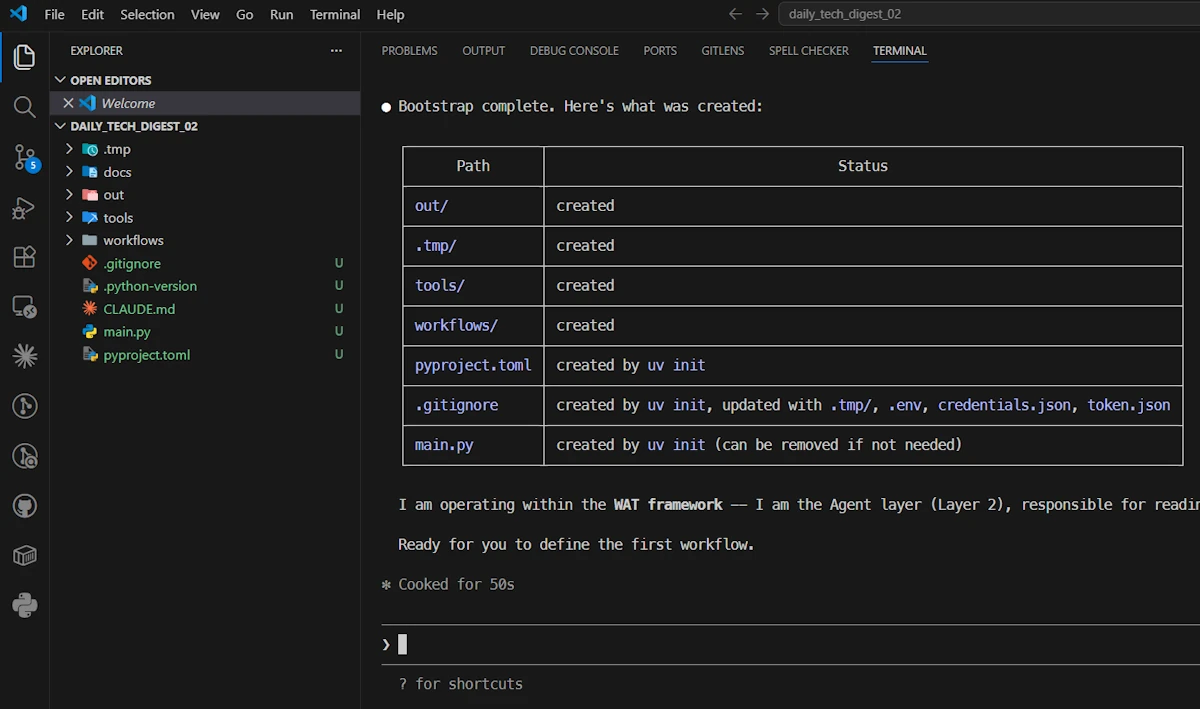
- ⚠️ Delete the
main.pyat the root of the project - Create a
.envfile at the root of the project (we never know)
Step 03: Create docs/project_goal.md
- In the
docs/folder, make some tests, keep different versions ofproject_goal.mdetc. - Talk to ChatGPT, Claude and friends…
- Iterate
For example, here is a first version:
# Project: Daily Tech Digest Generator

## Goal
Build a system that generates a Daily Tech Digest. The system should:
- Collect information from online sources (e.g., RSS feeds, tech blogs, GitHub, newsletters...)
- Extract relevant articles based on user-defined topics of interest
- Summarize key insights from each article
- Produce a clear, structured daily report (format TBD: markdown, email, Google Doc...)

## Constraint
All planning must align with the WAT framework defined in CLAUDE.md.
Workflows go in workflows/, tools go in tools/, the agent coordinates.

## Context
- Target platform: Windows 11 / PowerShell 7.x
- This is a greenfield project — no code exists yet
- The exact tech stack, workflows, architecture, and tools are not yet decided
- The workflows and tools must be created as needed.

## What I expect from you right now
We are in **planning mode**. Before writing any code or proposing a specific architecture:

1. **Ask me clarifying questions**: Don't assume anything. Challenge my assumptions if needed. I'd rather answer 10 good questions now than rewrite things later.
2. **Explore the problem space**: What are the key decisions we need to make? What are the trade-offs?
3. **Propose options, not solutions**: When there are multiple valid approaches (tech stack, storage, scheduling, output format…), lay them out with pros/cons so we can decide together.
4. **Think in vertical slices**: Help me identify a minimal first slice we can build end-to-end before adding complexity.

Take your time. There is no rush to produce code.
And the one I will use:
# Project: Daily Tech Digest Generator

## Goal

Build a system that generates a Daily Tech Digest. The system should:
- Collect information from online sources (e.g., RSS feeds, tech blogs, GitHub trending, newsletters...)
- Extract relevant articles based on user-defined topics of interest
- Summarize key insights from each article
- Produce a clear, structured daily report (format TBD: markdown, email, Google Doc...)

## Constraints

All planning must align with the WAT framework defined in CLAUDE.md.
- **Workflows** go in `workflows/` — a workflow is a multi-step orchestration
- **Tools** go in `tools/` — a tool is a single, deterministic operation
- **The Agent** coordinates execution across workflows and tools

When referencing system components, always use WAT terminology (workflow, tool, agent).
Do NOT invent other abstractions or naming conventions.

## Context

- Target platform: Windows 11 / PowerShell 7.x
- Greenfield project (no existing code)
- Tech stack, architecture, workflows, and tools are not yet decided
- Everything should be designed incrementally


## Current Mode: PLANNING ONLY

### Do

- Ask questions before making any decision
- Challenge my assumptions
- Present trade-offs explicitly

### Do NOT

- Write code
- Jump to a final architecture
- Propose specific tools or workflows yet — we define those AFTER key decisions are locked
- Name files, modules, or classes prematurely


## What I Expect From You

### 1. Ask structured clarifying questions

Organize your questions into numbered categories so I can reply concisely (e.g., "Q2: RSS only for now").

- **Q1 — User needs & expectations**: Who reads the digest? What does "useful" look like? How personalized should it be?
- **Q2 — Data sources & ingestion**: Which sources? How many? Rate limits? Authentication?
- **Q3 — Filtering & relevance logic**: Keyword match? Semantic similarity? LLM-based classification? How strict?
- **Q4 — Summarization approach**: LLM provider? Local vs. API? Length and style of summaries?
- **Q5 — Output format & delivery**: Markdown file? Email? HTML? Where does the digest land?
- **Q6 — Operational constraints**: How often does it run? Acceptable latency? Cost budget? Error handling expectations?

### 2. Map the problem space

Identify:
- The key architectural decisions we need to make
- The main unknowns or risks
- Dependencies between decisions (which decisions gate others)

### 3. Propose options (not a single solution)

For each major decision (storage, scheduling, summarization, output format...):
- Present 2–3 viable options
- Explain pros / cons
- Indicate when each option is most appropriate

### 4. Help prioritize decisions

Clearly distinguish:
- **Early decisions**: things that gate the first vertical slice
- **Deferrable decisions**: things we can lock later without rework

### 5. Define a minimal vertical slice

Propose a small, end-to-end version of the system that:
- Runs locally on Windows 11 (PowerShell-friendly, no Docker required)
- Avoids unnecessary infrastructure (no database, no message queue, no cloud service)
- Covers the full pipeline: ingest → filter → summarize → output
- Is simple enough to build in one session but meaningful enough to validate the concept
- Maps cleanly onto the WAT structure (at least one workflow, a few tools, agent coordination)

### 6. Keep things pragmatic

- Avoid over-engineering
- Avoid premature optimization
- Prefer simple, testable approaches first
- If something can be a flat file instead of a database, prefer the flat file
- If something can be a CLI script instead of a service, prefer the CLI script
Step 04: Second prompt
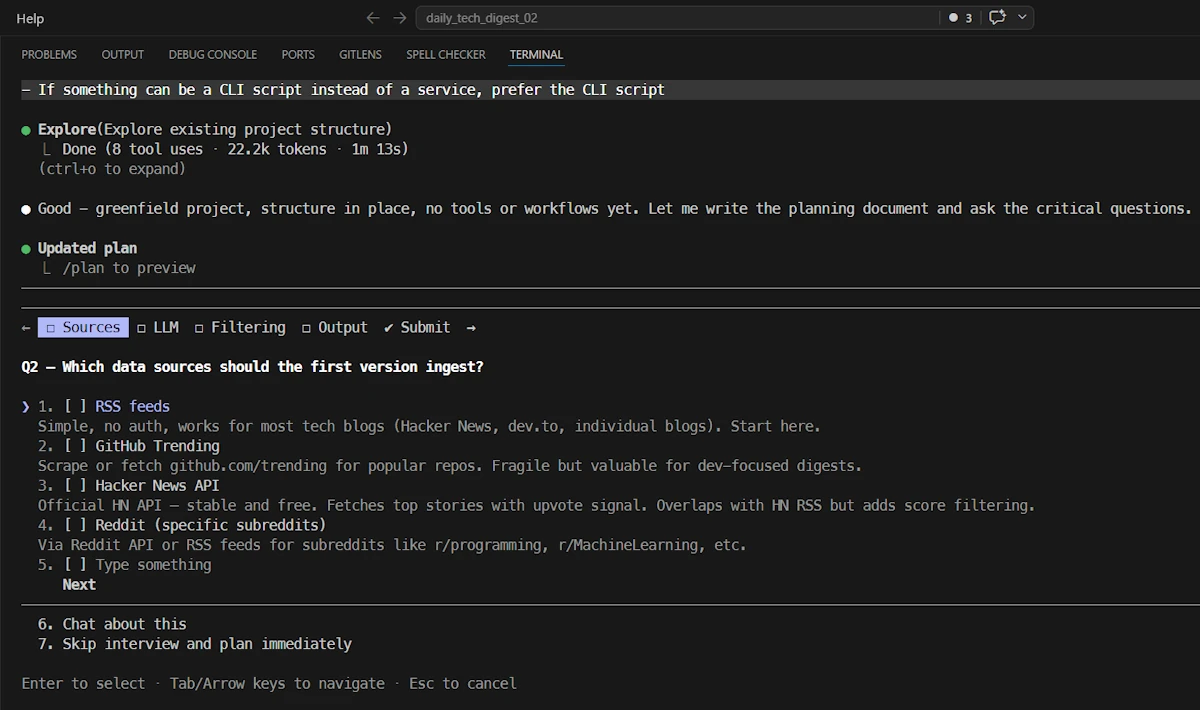
/clearconversation- ⚠️ TURN ON PLAN MODE:
SHIFT+TAB - Paste the content of
docs/project_goal.mdand use it as a prompt. - Answer Claude questions
When the plan is ready:
- Read the plan
- Ask question. For example : “Make sure we can specify a time window (ex 24H, 48H)”
- When you are satisfied, ask Claude to make a copy of the plan in
out/plan_00.mdfolder- It cannot copy the plan in
docs/but you can.
- It cannot copy the plan in
Step 05: Implementing
- TURN ON ACCEPT EDIT:
SHIFT+TAB- ⚠️
Alt+P, Sonnet, Medium (or even Low)
- ⚠️
- Tell claude to code
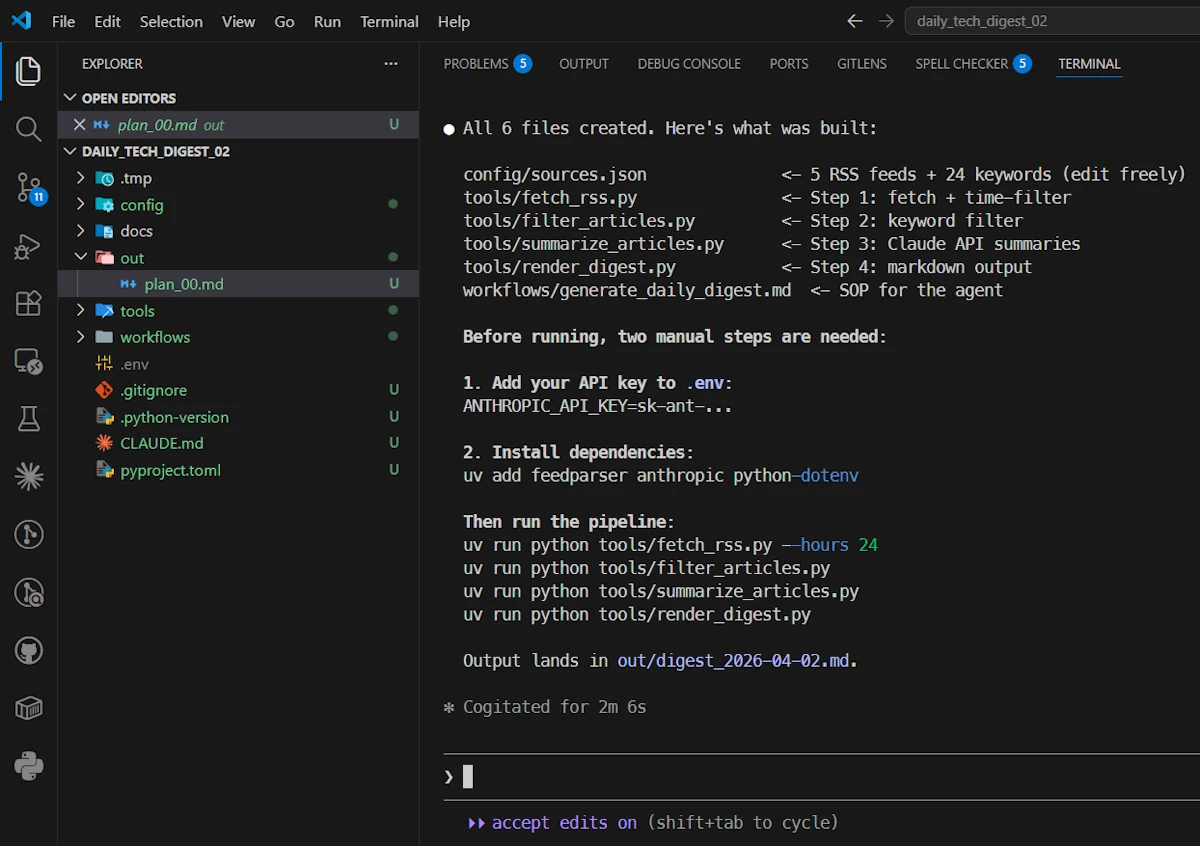
Read the summary and execute the 2 manual steps
- ⚠️
ANTHROPIC_API_KEY. Go to the Claude Console, generate a key and paste it in the.envfile- Make sure some credits are available.
- Run
uv add feedparser anthropic python-dotenvin a second terminal (CTRL+SHIFT+ù)
Test the tools in order
uv run python tools/fetch_rss.py --hours 24uv run python tools/filter_articles.pyuv run python tools/summarize_articles.pyuv run python tools/render_digest.py
TADAA!